Chapter 5. OpenLDAP Samples
5.3 Expanded Hierarchy
Contents
5.1 Simple Directory
5.1.1 Designing the DIT
5.1.2 Select the STRUCTURAL objectClass
5.1.3 slapd.conf File
5.1.4 LDIF File
5.1.5 Loading the LDIF
5.1.6 Adding New Entries using LDIF
5.1.7 Modifying Entries using LDIF
5.1.8 Just Fooling Around
5.2 Securing the Directory
5.2.1 Security Policy
5.2.2 Adding Groups
5.2.3 ACL slapd.conf Access Definitions
5.2.4 Testing the ACL
5.3 Expanded Hierarchy
5.3.1 Requirement
5.3.2 Implementation
5.3.3 LDIF
5.3.4 ACL slapd.conf Access Definitions
5.3.5 Testing the ACL
5.4 Creating & Adding Objects
5.4.1 Requirement
5.4.2 Implementation
5.4.3 Attribute Definitions
5.4.4 objectClass & Schema Definition
5.4.5 ACL slapd.conf Access Definitions
5.4.6 LDIF
5.4.7 Testing the Changes
5.5 Single Sign On
5.6 Referral and Replication
5.3 Expanded Hierarchy
5.3.1 Expansion Requirement
Our current implementation has been so wildly successful that our corporate masters have decided they want to make four enhancements:
A common Customer/Contact address book - this may be read by any authenticated user but can only be added to by sales.
All company IT assets (PCs, printers etc) will be kept in the directory and may be updated by the itpeople group only but may be read by anyone.
Personal address books will now be added to the directory. Entries may be read, created and written by the individual only. BUT the user will not be able to delete the addressbook entry branch (only itpeople - who will not be able to see the addressbook entries).
The hrpeople group will be responsible for adding and deleting entries into all groups.
The revised DIT looks like the diagram below.
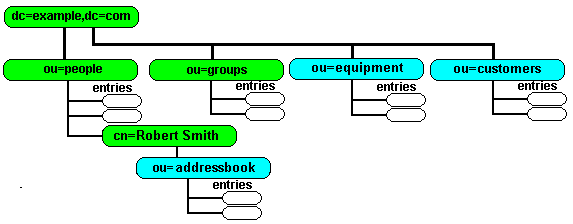

5.3.2 Expansion Implementation
When we breakdown the requirements we need to implement the following:
Add a new salespeople group to our existing group branch
Add a new equipment branch to our DIT. This will use a device objectclass.
Add a new customers branch to our DIT. This will use a standard inetorgperson objectclass.
Add a new addressbook branch under every people entry. This will use a standard inetorgperson objectclass.
5.3.3 Expansion LDIF
The following LDIF shows how we modify the DIT as identified above.
version: 1

# create FIRST level customers branch

dn: ou=customers,dc=example,dc=com
objectclass: organizationalunit
ou: customers
description: customer address book branch

# create FIRST level equipment branch

dn: ou=equipment,dc=example,dc=com
objectclass: organizationalunit
ou: equipment
description: IT assets branch

# create an entry under equipment entry under groups

dn: cn=LP1,ou=equipment,dc=example,dc=com
objectclass: device
cn: LP1
description: Some brand of printer
serialnumber: 1-77-23-15
l: Room 17
owner: cn=John Smith,ou=people,dc=example,dc=com
ou: printers

# create the salespeople entry under groups

dn: cn=salespeople,ou=groups,dc=example,dc=com
objectclass: groupofnames
cn: salespeople
description: Sales group
member: cn=John Smith,ou=people,dc=example,dc=com

# create the addressbook entry for each person

dn: ou=addressbook,cn=John Smith,ou=people,dc=example,dc=com
objectclass: organizationalunit
ou: addressbook
description: Personal Address Book

dn: ou=addressbook,cn=Sheri Smith,ou=people,dc=example,dc=com
objectclass: organizationalunit
ou: addressbook
description: Personal Address Book

dn: ou=addressbook,cn=Robert Smith,ou=people,dc=example,dc=com
objectclass: organizationalunit
ou: addressbook
description: Personal Address Book
Get sample file as text (use save as in your browser).
Notes:
We create a single entry under equipment.
Assuming we save the above LDIF as enhance.ldif in our /tmp directory we load the LDIF file using ldapadd with a command like this (line below is split for HTML formatting reasons only and should be on a single line):
ldapadd -H ldap://ldaphost.example.com -x -D "cn=jimbob,dc=example,dc=com"
 -f /tmp/enhance.ldif -w dirtysecret
The ldaphost.example.com should be replaced with whatever hostname your LDAP directory is located on.
5.3.4 ACL - slapd.conf Access
We now need to translate our update policy into an Access Control List (ACL) using OpenLDAP's slapd.conf access to directives.
Controlling access to the personal addressbook is a very complex update and is described in mind-numbing detail. The ACLs used in the example are the same as those described in the preceding link with the exception that we have added ACL8A to control access to the equipment group which should provide light relief after reading about the previous ACLs.
Note: Significant changes have been made to this file since re-running tests under 2.4.16+. Sigh.
The sample below shows our original slapd.conf sample modified to include our Access Control Policy.
#
###### SAMPLE 3 - DIRECTORY with enhanced ACL ############
#
# NOTES: inetorgperson picks up attributes and objectclasses
#        from all three schemas
#        devices objectclass is in core.schema
#
# NB: RH Linux schemas in /etc/openldap
#
include		/usr/local/etc/openldap/schema/core.schema
include		/usr/local/etc/openldap/schema/cosine.schema
include		/usr/local/etc/openldap/schema/inetorgperson.schema

# NO REFERRALS

# DON'T bother with ARGS file
# pidfle allows scripts for stopping slapd to work
pidfile /var/run/slapd.pid

# enable a lot of logging - we might need it
loglevel 	-1

# NO dynamic backend modules

# NO TLS-enabled connections

#######################################################################
# bdb database definitions
#
# replace example and com below with a suitable domain
#
# If you don't have a domain you can leave it since example.com
# is reserved for experimentation or change them to My and inc
#######################################################################

database bdb
suffix "dc=example, dc=com"
# ACL Notes
# The following additional notes apply for 2.4:
# 1. attrs is now used instead of attr (to reduce warning messages)
# 2. Removed the ,expand modifier with all regex expressions since
#    2.4 rejected some (but not all) ACL's which contained this modifier
# 3. 2.4 checking is much more rigorous and rejected ACL 8 since it contained
#    attributes to be added later
# 4. If exact or base contains a regular expression substitution then
#    the expand keyword must be used
# ACL1
access to attrs=userpassword
  by self       write
  by anonymous  auth
  by group.exact="cn=itpeople,ou=groups,dc=example,dc=com" write
  by *          none

# ACL2
# allow read of addressbook by owner and itpeople; no-one else see it
access to dn.regex="^ou=addressbook,cn=([^,]+),ou=people,dc=example,dc=com$"
    attrs=entry
  by dn.exact,expand="cn=$1,ou=people,dc=example,dc=com" read
  by group.exact="cn=itpeople,ou=groups,dc=example,dc=com" write
  by users none

# ACL3
# allows itgroup to create addressbook but not see entries
access to dn.regex="cn=[^,]+,ou=people,dc=example,dc=com$"
   attrs=children
  by group.exact="cn=itpeople,ou=groups,dc=example,dc=com" write
  by users none break

# ACL4
# allows creation of entries in own addressbook; no-one else can
# access it, needs write access to the ENTRY attribute (ACL5 or ACL6A)
# and the entries CHILDREN (ACL4)
access to dn.regex="ou=addressbook,cn=([^,]+),ou=people,dc=example,dc=com$"
   attrs=children
  by dn.exact,expand="cn=$1,ou=people,dc=example,dc=com" write
  by users none

# ACL5 - only required prior to 2.2
# allow creation of entries in own addressbook; no-one else can
# access it, needs write access to the ENTRY attribute (ACL5 or ACL6A)
# and the entries CHILDREN (ACL4)
#access to dn.regex="ou=addressbook,cn=([^,]+),ou=people,dc=example,dc=com$"
#   attrs=entry
#  by dn.exact,expand="cn=$1,ou=people,dc=example,dc=com" write
#  by users none

# ACL6 - only required prior to 2.2
# allow creation of entries in own addressbook; no-one else can
# access it
#access to dn.regex="ou=addressbook,cn=([^,]+),ou=people,dc=example,dc=com$"
#   filter=(objectclass=inetorgperson)
#  by dn.exact,expand="cn=$1,ou=people,dc=example,dc=com" write
#  by users none

# ACL6A - 2.2+ replace both ACL5 and ACL6 with this ACL
access to dn.regex="ou=addressbook,cn=([^,]+),ou=people,dc=example,dc=com$"
   attrs=entry,@inetorgperson
  by dn.exact,expand="cn=$1,ou=people,dc=example,dc=com" write
  by users none

# ACL7
# allows sales to create entries in customers
# authenticated user can only read
access to dn.one="ou=customers,dc=example,dc=com"
   attrs=children
  by group.exact="cn=salespeople,ou=groups,dc=example,dc=com" write
  by users read

# ACL8
access to attrs=carlicense,homepostaladdress,homephone
  by self       write
  by group.exact="cn=hrpeople,ou=groups,dc=example,dc=com" write
  by *          none

# ACL8A - control access to equipment
access to dn.one="ou=equipment,dc=example,dc=com"
  by group.exact="cn=itpeople,ou=groups,dc=example,dc=com" write
  by users      read
	by *          none
# ACL9
access to *
  by self       write
  by group.exact="cn=hrpeople,ou=groups,dc=example,dc=com" write
  by users      read
  by *          none
# root or superuser
rootdn "cn=jimbob, dc=example, dc=com"
rootpw dirtysecret
# The database directory MUST exist prior to running slapd AND
# change path as ncessary
directory	/var/db/openldap/example-com

# Indices to maintain for this directory
# unique id so equality match only
index	uid	eq
# allows general searching on commonname, givenname and email
index	cn,gn,mail eq,sub
# allows multiple variants on surname searching
index sn eq,sub
# sub above includes subintial,subany,subfinal
# optimise department searches
index ou eq
# if searches will include objectClass uncomment following
# index objectClass eq
# shows use of default index parameter
index default eq,sub
# indices missing - uses default eq,sub
index telephonenumber

# other database parameters
# read more in slapd.conf reference section
cachesize 10000
checkpoint 128 15
Get sample file as text (use save as in your browser).
We now need to stop OpenLDAP and restart to pick up this new slapd.conf file. Use something like the following commands:
# stop and start OpenLDAP (slapd)
# on Linux/Redhat
/etc/rc.d/init.d/ldap restart

# on BSD
[bsd] /usr/local/etc/openldap/slapd.sh stop
# then
[bsd] /usr/local/etc/openldap/slapd.sh start

# confirm slapd is running
ps ax | grep slapd
5.3.5 Testing the ACL
We now need to test our newly established policy. To test the ACL use your LDAP Browser and:
Configure your LDAP browser to bind or authenticate using dn: cn=Robert Smith, ou=people, dc=example, dc=com with a userpassword of rJsmitH (case sensitive) and because this entry has hrpeople privileges it will see and be able to modify all entries including carlicense, homepostaladdress and homephone but not userpassword (except for his own entry) and can read the customers and equipment entries but cannot write to them. Robert Smith can also see and add to his own addressbook entries but can only guess if anyone else has an addressbook (cannot see addressbook for anyone else).
Configure your LDAP browser to bind or authenticate using dn: cn=Sheri Smith, ou=people, dc=example, dc=com with a userpassword of sSmitH (case sensitive) and because this entry has itpeople privileges it will see and be able to modify the userpassword attribute of all entries but cannot see carlicense, homepostaladdress and homephone for any entry except her own. This entry can read the customers entries but cannot write to them but can read and write equipment entries . Sheri Smith can also see and add to her own addressbook entries and can see addressbook (but not the entries) for everyone. She can also delete addresbook for each entry (and if you have just tried it can also add it back again!).
Configure your LDAP browser to bind or authenticate using dn: cn=John Smith, ou=people, dc=example, dc=com with a userpassword of jSmitH (case sensitive) and because this entry has no privileges it cannot see carlicense, homepostaladdress, homephone and userpassword for any entry except his own (which he can also modify). This entry because it is a member of the salespeople group can read and write the customers entries but can only read equipment entries . John Smith can also see and add to his own addressbook entries but can only guess if anyone else has an addressbook (cannot see addressbook for anyone else).
Experiment with adding a few entries under each address book - public and private either using LDIF or your LDAP browser.
Configure your LDAP browser for anonymous access and confirm that access is denied.
Authenticate as our rootdn or superuser (defined in the slapd.conf as cn=jimbob,dc=example,dc=com, password dirtysecret) and confirm this overrides all our privileges and can see and modify everything.
It may be useful at this time to export the current state of the directory to an LDIF using either your LDAP browser's export feature or slapcat.
Note:: In all of the above tests you should be able to see with your LDAP Browser the customers, equipment and groups branch and their entries. If you cannot then you may have set your Base DN (or Root DN depending on your browser) fields in the LDAP browser to ou=people,dc=example,dc=com, set this to dc=example,dc=com and you should now be able to see all the entries.
Step 4 - Creating & Adding Objects

Problems, comments, suggestions, corrections (including broken links) or something to add? Please take the time from a busy life to 'mail us' (at top of screen), the webmaster (below) or info-support at zytrax. You will have a warm inner glow for the rest of the day.



