Survival guides - TLS/SSL and SSL (X.509) Certificates
This is a survival guide to the eye-glazing topic of TLS/SSL and X.509 (SSL) certificates - including self-signed certificates. These are elements in what is loosely called a Public Key Infrastructure (PKI).
What are colloquially known as SSL certificates are technically X.509 certificates. The term SSL certificate became common due to the adoption of the X.509 (one of the ITU X.500 Directory standards) certificate format by Netscape when it designed the original versions of the SSL (Secure Socket Layer) protocol, eons ago, when the world was still young, dinosuars still roamed, and the Internet was a friendly place. The term 'SSL certificate' has persisted, and will likely persist for the foreseable future, because given the choice of saying 'SSL' or 'X.509' the former tends to roll off the tongue more comfortably. Doubtless a linguistic expert would wax lyrical over the S sound versus the X sound. For we, mere mortals, its chief merit may be that it's shorter (3 versus 4 syllables).
The current guide includes SSL, TLS, some detail about X.509 and its usage as well as some explanation about certificate types, including EV certificates, and the trust process. Creating self-signed certificates is presented as a worked example of the use of the OpenSSL package. We've also added some info on the contents of various file types (.pem, .p12, .pfx, .der, .cer), PEM keywords and a PKCS to RFC mapping list.
You can either buy an SSL (X.509) certificate or generate your own (a self-signed certificate) for testing or, depending on the application, even in a production environment. Good news: If you self-sign your certificates you may save a ton of money. Bad news: If you self-sign your certificates nobody but you and your close family (perhaps) may trust them. But before you shell out all that filthy lucre for a bright, shiny new X.509 (SSL) certificate or the even more expensive EV SSL (X.509) certificate you might want to know what they do and how they do it. And if your eyes glaze over when people start talking about SSL, security and certificates - start glazing now. This stuff ain't fun.
On Ubiquitous SSL and ACME: It has become a de-facto standard today to use TLS (rather, the presence of a certicate used in TLS) to authenticate web sites (let us not speak unkindly of DNSSEC - an infinitely better solution - but, rather, mourn its determined efforts at seppuku). Indeed, the dominant search engines now use the absence of HTTPS (HTTP over TLS) to penalise search results (meaning that you get policy based results not just content based results). However, this policy has a number of collateral effects, namely: You need to have (buy) an SSL certificate; 'the law of big numbers' states that even a tiny proportion of misconfigurations will generate enough security alerts (red status lines etc.) that the whole enterprise will collapse under its own weight. Enter stage left, Let's Encrypt and Automatic Certificate Management Environment (ACME). Let's Encrypt provide free 90 day certificates and automate the initial install and subsequent certificate rollovers for a number of popular platforms using ACME as a base but with a manual overide if all else fails. The first standard based on their work is RFC 8555 which documents the process of automating the verification of domain ownership and cerificate issue (and revokation).
Note: The main repository for RFCs is maintained by the IETF, text versions (the normative reference, but PDF and HTML versions are also available) may be viewed at www.ietf.org/rfc/rfcXXXX.txt or www.rfc-editor.org/rfc/rfcXXXX.txt (where XXXX is the 4 digit RFC number - left padded with zeros as necessary). Currently published RFCs are pointed to https://www.rfc-editor.org/info/rfcXXXX which contains various information and links to the text (normative) reference and PDF and HTML (non-normative) version. The RFC may also be viewed at http://datatracker.ietf.org/doc/rfcXXXX/ which also contains various RFC status information including errata together with a list of alternative formats, such as, text, PDF and HTML (this is the working area version of the document). Finally, there is now a searchable RFC list.
<ingrained habit> The RFC links below yield a plain text (normative) version which was copied to our site when the RFC was issued. We started this service a long time ago when the world was young, RFCs were maintained in some strange places, occasionally moved location, and performance and reliability of the repositories was very variable (being generous). None of these conditions apply today, far from it. The RFC repository is a robust, fast service. Nevertheless, we persist in our ingrained habits for no particularly good reason (old dog...new tricks..). If you want/prefer/need more choice you are advised to use one of the links identified above, if, however, you just want to read the darned RFC, feel free to click the links below.</ingrained habit>
We update the page from time-to-time when we can think of nothing better to do with our lives and now keep a change log in case you ever happen to read it twice. By mistake of course. You understood it perfectly the first time, right?
Contents:
TLS/SSL Protocol
The major use of SSL (X.509) certificates is in conjunction with the TLS/SSL protocol. Secure Sockets Layer (SSL) is a Netscape protocol originally created in 1992 to exchange information securely between a web server and a browser where the underlying network was insecure. It went through various iterations and is now at version 3 (dating from 1995) and used in a variety of client<->server applications. Since the demise of Netscape the SSL specifications will not be updated further. It is thus a dead standard, (dead as in a dead parrot) and indeed RFC 7568 has finally deprecated SSL v3. It is now officially a dead parrot and must not be used henceforth by order of the great and good (and, in this case, the eminently sensible). The IETF standardized Transport Layer Security (TLS) Version 1, a minor variation of SSL, in RFC 2246, Version 1.1 in RFC 4346, Version 1.2 in RFC 5246 and version 1.3 (representing a substantial change to the handshake protocol) in RFC 8446. In addition, a number of extensions are defined in RFC 3546 when TLS is used in bandwidth constrained systems such as wireless networks, RFC6066 defines a number of TLS extensions carried in an extended client hello format (introduced with TLS 1.2), RFC6961 defines a method for reducing traffic when a client requests the server to supply certificate status information. And RFC 7935 now defines what happens to TLS (and DTLS) when used in the IoT (Internet of Things or Thingies as we, in our iconoclastic way, prefer).
When a secure connection is initially established it will, depending on the implementation, negotiate support of the particular protocol from the set TLSv1, TLSv1.1, TLSv1.2 or TLSv1.3. Such is the pervasive power of the name SSL that in most cases what is called SSL is most likely using TLS.
Note: SSLv2 was banned (officially, moved to historic status) by RFC 6176 which contains a dire list of its shortcomings. SSLv3 has now joined its older brother in being banished by RFC 7568 from all decent company. All references to SSL below are retained for reasons of common usage (the term is still in frequent use) but should be simultaneously translated by the reader into TLS.
TLS/SSL Scope
The following definitions are taken from RFC 8446, Section 1 (but apply to all previous versions):
Authentication: The server side of the channel is always authenticated; the client side is optionally authenticated.
Confidentiality: Data sent over the channel after establishment is only visible to the endpoints.
Integrity: Data sent over the channel after establishment cannot be modified by attackers without detection.
(the data has been re-formatted and some text removed for the sake of brevity.)
Note About Integrity: TLS/SSL is a communications protocol. TLS/SSL guarantees the integrity of data presented to TLS/SSL protocol software using an Application Program Interface (API) (not defined in the TLS/SSL standards) by some application. The application may obtain this data in a variety of ways, for example, by a creation algorithm, from a RAM location, a filesystem, a remote location, and so on. The integrity of this data is not covered by the TLS/SSL protocol. The TLS/SSL protocol may thus be said to provide communication integrity, not content integrity. Thus, for example, if a web site has become corrupted by some filesystem activity then that corruption will not, and cannot, be detected by TLS/SSL. There is a single, important, exception. During the hanshake protocol a TLS/SSL server will typically provide a certificate (the client may optionally also provide a certificate). The content integrity of the certificate is guaranteed, not by TLS/SSL, but by a separately defined certificate validation process.
TLS/SSL Operations
TLS/SSL runs on top of TCP but below the end user protocol that it secures such as HTTP or IMAP as shown in Figure 1.
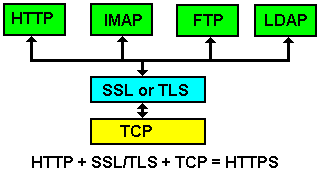
Figure 1 - TLS/SSL Layering.
TLS/SSL does not have a well-known port number - instead when used with a higher layer protocol, such as HTTP, that protocol designates a secure variant, HTTPS in the case of HTTP, which does have a well-known (or default) port number. The designation HTTPS simply indicates that normal HTTP is being run on top of an TLS/SSL connection, which runs over TCP. In the case of HTTPS the well-known port number is 443, in the case of IMAPS - port 993, POP3S - port 995 etc..
The next level of description requires some familiarity with the terms MAC (Message Authentication Code), Secure hashes, symmetric and asymmetric cryptographic algorithms (and, post TLS 1.2, Empheral Diffie-Hellman Exchange). For those not comfortable with these terms they are covered in this Encryption survival guide. You may want to lie down for a while in a darkened room after reading that page.
Notes:
A related protocol, Datagram Transport Layer Security (DTLS), defines a secure service when used with UDP (RFC 6347 updated by RFC7507). While the principles are similar to TLS some details do differ and this guide does not discuss DTLS further.
The term TLS 1.2 Suite B (defined by RFC 6460) defines a cipher suite (see below) compatible with NSA Suite B Cryptography and is only relevant when TLS is used for US national security applications.
The world turns - slowly. RFC 8423 has moved the term Suite B to historic status since the US NSA has retired Suite B and replaced it with the Commercial National Security Algorithm Suite (CNSA Suite). As before the algorithms defined by the CNSA Suite are only relevant when TLS is used for US national security applications up to TOP SECRET designation.
The world turns again - slowly. RFC 8446, after a delay of some years, introduces TLS 1.3. TLS 1.3 contains substantial changes to the TLS handshake protocol including a new method of negotiating established sessions, increases the number of encrypted messages and decreases the number of messsages used in the handshake. TLS 1.3 breaks backward compatibility with TLS 1.2 under certain conditions. Thus, if either the server or client support TLS 1.3 then a TLS 1.2 (or TLS 1.1 peer) peer may not be able to negotiate a session connection without an upgrade.
Overview - Establishing a Secure Connection
When a secure connection is established using TLS/SSL, for example using HTTPS (default port 443), an exchange of messages occur between the client - which always initiates the connection - and a server. The first set of messages are called the Handshake Protocol after which both client and server enter the Record (or Data) Protocol. The exchange of messages during the Handshake Protocol achieves the following objectives:
Establishes the protocol variant to be used from the supported set (depending on the implementation) of TLSv1, TLSv1.1, TLSv1.2 - the latest possible variant will always be used, thus TLSv1.1 would always be used in preference to TLSv1 assuming both client and server support both. The client offers a list - the server makes the choice from the offered list.
Sends authentication data. The server sends authentication information most normally in the form of (wrapped in) an X.509 (SSL) certificate but other methods are supported by the protocol.
Note: RFC 8492 (which only has INFOMATIONAL status) described a password authenticaion system that removes the need for a certificate.Establishes a session ID so that the session can be restarted if required.
Negotiates a Cipher Suite consisting of a key-exchange algorithm together with a bulk-data encryption algorithm type and a MAC type used in the subsequent data session (Record Protocol). The key-exchange algorithm typically uses an asymmetric (public-private key) algorithm such as RSA, DSA or ECC (Elliptic Curve Cipher - see RFC5289). Asymmetric algorithms are very expensive in resources (CPU) and therefore symmetric ciphers are used for subsequent bulk-data encryption (using the Record Protocol). The key-exchange algorithm is used to transfer information from which session key(s) can be independently computed for the symmetric (bulk-data) cipher. The MAC protects the integrity of the transmitted/received data during the Record Protocol.
This a simplified overview and additional data may be exchanged, for instance, the client can be requested to send an authenticating X.509 (SSL) certificate in a process called mutual authentication, but the above describes the most common case when using any SSL version (all now deprecated) and TLS.
Reader's Choice (or Dilemma): TLS just got a whole lot more complicated with the advent of TLS 1.3. You can read the grimy details of TLS prior to TLS 1.3 (TLS 1.1 ad TLS 1.2) or TLS 1.3 (and, one hopes fervently, successor versions). If you have a high pain threshold you could read both. Or, if you want to gracefully retire at this point (with or without a headache), you can skip this whole sorry mess.
TLS 1.3 Detailed Description
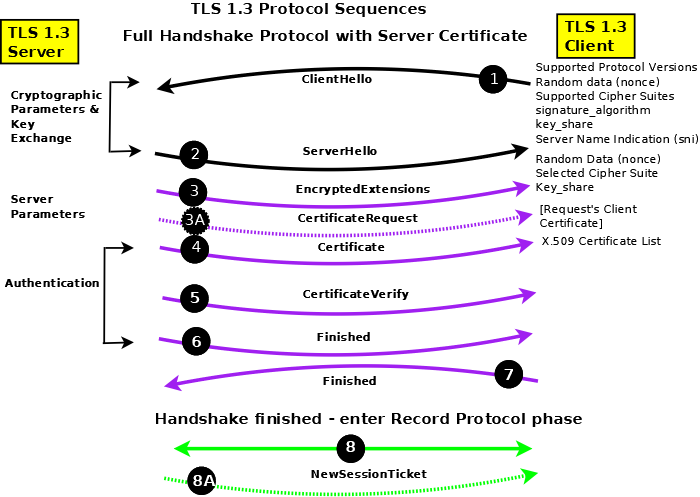
Figure 2 - TLS 1.3 Full Handshake Protocol Sequences
Notes:
The Handshake Protocol negotiates and establishes the connection and the Record Protocol transfers (encapsulates) the encrypted data stream such as HTTP, SMTP or IMAP.
In Figure 2 messages in black are sent in clear text (unencrypted); messages in purple are sent using the negotiated bulk-data cipher (using the computed handshake traffic shared secret) and are protected by the negotiated MAC; messages in green are sent using the negotiated bulk-data cipher (using the computed application traffic shared secret) and are protected by the negotiated MAC; messages (irrespective of color) with dotted lines indicate they are optional and may not be present.
In Figure 2 messages are shown as separate entities for clarity, in practice,they are typically concantenated into blocks.
Versions of TLS/SSL prior to TLS 1.3 allow for a data compression algorithm to be negotiated as part of the cipher suite. Given the speed of modern networks data compression was rarely, if ever, used and was typically set to the value NULL (not used) in the negotiated cipher suite. Indeed it was so rare that TLS 1.3 removed the option with a sigh of relief all round.
TLS 1.3 Full Handshake - Detailed Description (Figure 2A)
In general TLS 1.3 reduces the number of round trips (RTTs) required to establish a connection, encrypts as much traffic as possible and has significantly reduced the number of options to tighten up basic security. The key item to note in the full handshake is that the first two messages (ClientHello(1)/ServerHello(2)) establish only the version being used and the crypto context. Having established a connection using the full handshake, subsequent sessions between the same client and server can be restarted (resumed in the jargon).
ClientHello (1): The TLS 1.3 ClientHello contains certain fixed fields many of which are present for legacy reasons. The protocol versions/variants supported is always set to TLS 1.2 (but the message must include a supported_versions extension with the value set to TLS 1.3), the supported cipher suites in preferred order (RFC 8446 Appendix B.4), a 32 octet random value (a nonce) (which is used later as keying material), session id (always 0 for legacy reasons), a compression method (always 0= NULL for legacy reasons). In addition the following extensions must (depending on context) be present:
supported_versions: When negotiating TLS 1.3 the basic ClientHello version field always contains the value TLS 1.2 (x'0303) but the manadatory supported_versions extension must indicate TLS 1.3 (x'0304).
signature_algorithms: Strictly, this defines the signature algorithm(s) that the client can support in the CertificateVerify (5) message and the signature_algorithms_cert extension applies to acceptable signature algorithms in the Certificate (4) message, however, if no signature_algorithms_cert is present this extension applies to both roles.
supported_groups: The supported methods to be used for Diffie-Hellman Exchange in priority order - selected from Elliptic Curves ((EC)DHE) or Finite Field (DHE).
key_share: One (or more) structures identifying the supported_group and the shared (or public) value for the identified group. The client thus reduces the number of messages reqired for agreement by offering one (or more) key shares (which the peer uses to compute the operational session keys). If the client does not send a key share for a supported_groups that will be subsequently be chosen by the server then the server will send a HelloRetryRequest message which, in essence, tells the client to try again (ClientHello) with the required group for which is required a key_share identified in the key_share extension of the HelloRetryRequest message.
server_name: Server Name Indication (sni) was optional in previous versions of TLS but is mandatory with TLS 1.3, it contains a list of the fully qualified DNS hostnames of the resource being accessed, for instance, example.com and/or www.example.com
ServerHello (2): The TLS 1.3 ServerHello contains certain fixed fields many of which are present for legacy reasons. The protocol versions/variants supported is always set to TLS 1.2 (but the message must include a supported_versions extension with the value set to TLS 1.3), the selected cipher suite, a 32 octet random value (a nonce) (which is used later as keying material), session id (always 0 for legacy reasons), a compression method (always 0= NULL for legacy reasons). In addition the following extensions must (depending on context) be present:
supported_versions: When negotiating TLS 1.3 the basic ServerHello version field always contains the value TLS 1.2 (x'0303) but the manadatory supported_versions extension must indicate TLS 1.3 (x'0304).
supported_groups: The Server can send this extension with a single value which simply indicates its preferred DH algorithm which the client may use in subsequent connections to this server.
key_share: The shared (or public) element for the supported_groups algorithm selected. If the ClientHello (1) did not contain a key_share for a group the server selectes the server sends a HelloRetryRequest with a key_share extension containing a single selected group from the clients original supported_groups list.
EncryptedExtensions (3): Mandatory message that allows the server to send additional extensions (not crypto related) to the client. This message is protected using the bulk-data cipher and MAC negotiated in the cryptographic exchange (ClientHello/ServerHello) using the handshake (peer_handshake_traffic_secret) key.
CertificateRequest (3A): If the server is configured to support Client (or Mutual Authentication) this message requests the client to send an appropriate certificate which will be validated by the server (which must have the relevant CA and/or intermediate certificates). This message is protected using the bulk-data cipher and MAC negotiated in the cryptographic exchange (ClientHello/ServerHello) using the handshake (peer_handshake_traffic_secret) key.
Certificate (4): In the typical case the server sends its certificate to authenticate itself. This message is protected using the bulk-data cipher and MAC negotiated in the cryptographic exchange (ClientHello/ServerHello) using the handshake (peer_handshake_traffic_secret) key.
CertificateVerify (5): Probably the most interesting of the messages since it forces the server to prove that it has the private key associated with the certificate and allows the client the verify that the server has this key. The message (containing the session transcript a some fixed context data) is digitally signed using the algorithm identified in the ClientHello (1) signature_algorithm extension. The entire message is further protected using the bulk-data cipher and MAC negotiated in the cryptographic exchange (ClientHello/ServerHello) using the handshake (peer_handshake_traffic_secret) key.
Finished (6): Server initiated. A transcript of the session. The message is protected using the bulk-data cipher and MAC negotiated in the cryptographic exchange (ClientHello/ServerHello) using the handshake (peer_handshake_traffic_secret) key.
Finished (7): Client initiated. A transcript of the session to this point. The message is protected using the bulk-data cipher and MAC negotiated in the cryptographic exchange (ClientHello/ServerHello) using the handshake (peer_handshake_traffic_secret) key.
Bulk Data exchange (8): Transmission and reception of bulk data starts. Each message is protected using the bulk-data cipher and MAC negotiated in the cryptographic exchange (ClientHello/ServerHello) using the record protocol (peer_application_traffic_secret_0) key.
NewSessionTicket (8A): At anytime after the Client sends Finished (7) the server may send this message which contains a value which may be used by the client as a pre_shared_key (PSK) when it resumes (or restarts) the session. This meesage is optional - Servers do not need to send it. More than one such message may be sent by the server.
Notes:
Individual messages are typically concatenated into blocks wherever sensible, so, for example, messages 3, 3A (if present), 4, 5 and 6 will typically be sent as a single block.
TLS 1.3 mandates an Ephemeral Diffie-Hellman Exchange (using either EC or Finite Fields). This is achieved by recomputing the key_share every time a session is started (or restarted).
The record protocol key can be updated periodically by either the Client or the Server by sending a KeyUpdate message anytime after the Finished (7) message. Both peers recompute the peer_application_traffic_secret_N key (where N is the Nth recomputed key) and immediately start to use the new key.
Either peer can terminate the connection with a (typically) descriptive alert message. Alert messages are encrypted using a key which depends on the phase in which the alert occured (peer_handshake_traffic_secret or peer_application_traffic_secret_N).
TLS 1.3 Resumption (Restart) (Figure 2B)
Once a session has been established using the TLS 1.3 Full Handshake it may be subsequently restarted (or resumed in the jargon) using the method shown on figure 2B, if, and only if, the server has sent one or more optional NewSessionTicket (Figure 2A, item 8A) messages. The RFC does not offer any guidance as to when resumption versus full handshake should be used. While certain messages can be omitted (notably Certificate and CertificateVerify) the number of round trips remains the same and the number of mandatory extensions in the ClientHello (1) increases. However, the fact that the Server may commence sending Record data (5) immediately following its Finished (4) message may offer an advantage in certain circumstances - notably, perhaps, after a communications failure where the server retains state information. Note: An additional procedure is available (termed 0-RTT in the RFC) which provides faster restarting (resumption) but at the expense of not being forward secure (if any key is compromised all communication started using 0-RTT procedures can be decrypted) and is not discussed further on this page.
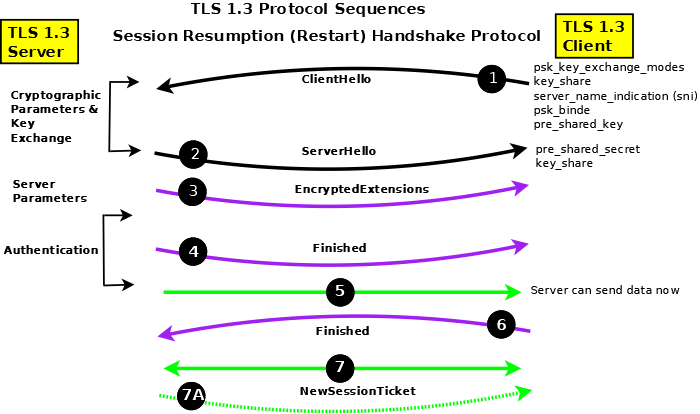
Figure 2B - TLS 1.3 Session Resumption Protocol Sequences
Notes:
Resumption depends upon the client and server agreeing to use a Pre-Shared Secret (derived from the NewSessionTicket message and sent by both sides in the pre_shared_key (PSK) extension of their respective Hello messages (1) and (2). The key_share extensions from both peers ensure forward secrecy since they are essential for Ephemeral Diffie-Hellman Exchange (DHE) whether using EC or Finite Fields.
The ClientHello (1) must include the Server Name Indication (sni) extension during resumption. Further, the pre_shared_secret extension must be the last extension.
The Server may start sending data (5) immediately following its Finished (4) since it assumes that the client, since it provided the PSK, has all the necesary information. However, if the client's Finished (6) fails then the session will be aborted by the server.
If the client wishes to resume again it must use the new data supplied by the newSessionTicket (7A) message sent during the resumed session.
TLS 1.2, TLS 1.1/SSL - Detailed Description (Figure 2A)
This section provides more detail about the TLS/SSL protocol message exchanges when using TLS version 1.1 or TLS 1.2 (Figure 2A) for those who revel in the grisly details (TLS 1.3 is significantly different and is described here). If you prefer the 'stuff happens' level skip this section to retain your sanity.
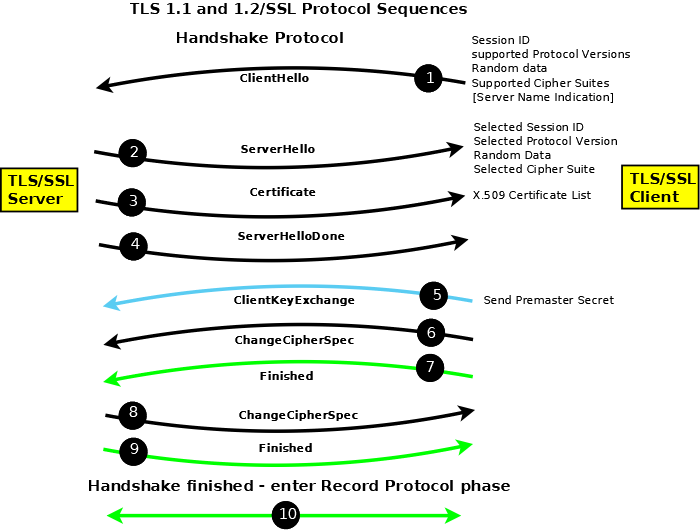
Figure 2A - TLS 1.2/SSL Full Handshake Protocol Sequences
Notes:
The Handshake Protocol negotiates and establishes the connection and the Record Protocol transfers (encapsulates) the encrypted data stream such as HTTP, SMTP or IMAP.
In Figure 2A messages in black are sent in clear text (unencrypted); messages in blue are sent using the public key supplied by the server (using the key-exchange cipher) and require the server to have access to the corresponding private key; messages in green are sent using the negotiated bulk-data cipher (using the computed shared secret) and are protected by the negotiated MAC.
In Figure 2A messages are shown as separate entities for clarity, in practice,they are typically concantenated into blocks.
Versions of TLS/SSL prior to TLS 1.3 allow for a data compression algorithm to be negotiated as part of the cipher suite. Given the speed of modern networks data compression is rarely, if ever, used and is typically set to the value NULL (not used) in the negotiated cipher suite. Indeed it was so rare that TLS 1.3 removed the option with a sigh of relief all round.
ClientHello (1): The ClientHello offers a list of protocol versions/variants supported, the supported cipher suites in preferred order and a list of compression algorithms (typically NULL). The client also sends a 32 octet random value (a nonce), which is used later to provide keying material, and a session ID which will be 0 if no previous session exists or non-zero if the client thinks a previous session exists.
Each cipher suite is comprised of a key-exchange algorithm, a bulk cipher algorithm and a MAC (Hash) algorithm.
The cipher suite used by both client and server on initial connection is:
TLS_NULL_WITH_NULL_NULL (0x00, 0x00)
# the first NULL is the key exchange algorithm
# the following WITH_NULL defines the bulk cipher
# the final NULL defines the MAC
This value indicates no encryption will occur and thus all messages are sent in clear until the Client Key Exchange (ClientKeyMessage).
A typical cipher suite is:
TLS_RSA_WITH_3DES_EDE_CBC_SHA (0x00, 0x0A)
# RSA is the key exchange algorithm
# the WITH_3DES_EDE_CBC defines the bulk cipher
# (Triple DES with Cyclic Block Chaining)
# SHA is the MAC (Hash)
Notes:
To add to your jargon list each cipher suite is encoded and this encoded value (two octets) is known as a Signaling Cipher Suite Value (SCSV). Now that info has probably made your day.
Valid cipher suite values may be found in Appendix C of the relevant TLS RFC (RFC 2246 for TLS 1, RFC 4346 for TLS 1.1 and RFC 5246 for TLS 1.2). These are updated for ECC (Elliptic Curve Ciphers) by RFC 4492 and RFC 7027. An up-to-the-millisecond list is maintained in the IANA TLS Registry.
If you crave nauseating detail about cipher suites and their manipulation then this page, written for OpenLDAP, might provide it. You have been warned.
The word EXPORT appears in some valid cipher suite descriptions and refers to export strength ciphers, that is, some ciphers are only permitted in certain countries (see US Dept. of Commerce, Bureau of Industry and Security(BIS) and the Wassenaar Arrangement) and should be borne in mind when configuring systems that may be used internationally.
Extensions, defined in RFC 3546 and primarily used in wireless networks, may be invoked in a backward compatible manner at ClientHello. RFC6066 significantly increases the number of TLS extensions including many which may be used on conventional (non-wireless) networks. The server is free to silently ignore any extensions it does not understand.
RFC6066 introduced a TLS Certificate Status extension (status_request) type which essentially says 'I (the client) absolutely do not trust your (the server) certificate but I will absolutely trust your (the server) response to my (Certificate Status) request for certificate validity(!)'. The response to the Certificate Status request (obtained typically by using OCSP is sent in a CertificateStatus message immediately after the Certificate message (see below). Apparently, Certificate Status (status-request) has proved wildly popular (for wireless devices?) and is in danger of destroying OCSP servers. RFC6961 introduces a 'certificate_request_v2' extension which reduces the traffic volumes from the TLS server to the OCSP server by allowing it to cache OCSP responses, and from the TLS server to the TLS client by allowing it to send all pertinent information including that for intermediate certificates within a single CertificateStatus message.
RFC 6066 defines an optional extension (Server Name Indication - SNI) that allows the client to send the server name, such as www.example.com, when making the initial TLS/SSL connection. This feature (supported by most modern browsers) allows a web server supporting multiple web sites, for example, Apache's VirtualHost capability, to send a site specific certificate in its Certificate (3) message. (Configuration of Apache 2 to support SNI.)
RFC 7250 defines the extension client_certificate_format which can be used to indicate the format of certificate being used and may be either the normal X.509 format or a RawPublicKey format in which the certificate is reduced to only the subjectPublicKeyInfo attribute in the subsequent certificate transfer messages(s) of the Handshake protocol.
Many TLS/SSL clients will attempt to fallback to a lower protocol version in the event of a network error perhaps unnecessarily weakening the connection. RFC 7507 defines a new cipher suite:
TLS_FALLBACK_SCSV {0x56, 0x00}
A TLS/SSL client can include this message in any attempt to negotiate a lowered protocol version. Older servers will ignore such messages and the connection will be made as normal with a reduced protocol version. Newer servers that recognize the message will terminate the client connection with the failure alert inappropriate_fallback (86) if the offered protocol version is lower than that supported by the server thus limiting cases where unnecessary version reduction is negotiated.
RFC 7685 defines an extension which can be used to pad (with zeros) the size of the ClientHello to ameliorate the effect of buggy TLS implementations (we are not making this stuff up).
RFC 7633 defines a new X.509 certificate extension which includes a list of TLS extensions that the certificate supports. If the server does not provide the referenced TLS extensions the client can assume a potential security violation and abandon the session. Clearly the client decision must be postponed until after the Certificate phase of the TLS handshake.
ServerHello (2): The ServerHello returns the selected protocol variant/version number, cipher suite and compression algorithm. The server sends a 32 octet random value (a nonce) which is used later to compute the symmetric keys. If the session ID in the ClientHello was 0 the server will create and return a session ID. If the ClientHello offered a previous session ID known to the server then a reduced Handshake is negotiated. If the client offered a session ID that was not recognized by the server, the server returns a new session ID and a full Handshake results.
RFC 7250 defines the extension server_certificate_format which can be used to indicate the format of certificate being used and may be either the normal X.509 format or a RawPublicKey format in which the certificate is reduced to only the subjectPublicKeyInfo attribute in the subsequent certificate transfer messages(s) of the Handshake protocol.
Certificate (3): The server sends its X.509 certificate which contains the public key of the server and whose algorithm must be the same as the key exchange algorithm of the selected cipher suite suite. There are other methods offered by the protocol to transfer the public key - it could for example simply point to a DNS KEY/TLSA RR - but an X.509 certificate is the normal method and universally supported. The objective of this message is that the client will obtain from a trusted source the public key of the server which it can use to send an encrypted message.
Notes:
While it is normal to only send a single certificate in this message what is called a certificate bundle (more than one certificate in a single PEM file) can be sent. For example, certificate bundles can be defined using the Apache directive SSLCertificateChainFile whereas a single certificate would be defined using the SSLCertificateFile directive. Bundles are typically used when cross-certificates are present during some form of certificate re-structuring, for example, a corporate takeover of one CA company by another or a change of key/keysize from the CA.
The DNSSEC DANE protocol (RFC6698) allows a client to obtain a copy of the server X.509 certificate from the DNS. However, a certificate obtained from the DNS using DANE is in addition to that obtained in the normal certificate exchange of TLS/SSL and allows extra verification for the perennially paranoid while doing little, if anything, to increase security.
RFC 7250 defines a vestigal certificate format that encapsulates the raw public key in a wrapper consisting of the SubjectPublicKeyInfo (necessary to describe the public key properties). This is a modest move toward a saner solution of obtaining the public key directly from an authenticated source such as a DNSSEC secured DNS RR.
ServerDone (4): Indicates the end of the server part of this dialogue sequence and invites the Client to continue the protocol sequence. Note: The server may request a client certificate at this point to complete mutual authentication. This client certificate exchange sequence has been omitted from the protocol sequence description since it is not commonly used and unnecessarily complicates the description.
Note: If, during the initial TLS/SSL negotiation, the server requested a client certificate then the client must send this (in the same format as defined for the server with the exception that RFC 6066 allows any client to send a certificate URL rather than a full certificate) immediately following the ServerDone and prior to the ClientKeyExchange.
ClientKeyExchange (5): The client computes what is called a pre-master key using the server and client random numbers (or nonces). It encrypts this key using the public key of the server obtained from the supplied X.509 certificate. Only the server can decrypt this message using its private key. Both sides independently compute a master key from the pre-master key using an algorithm defined in the standard. Any required session key is derived from this master key.
Notes:
It has been shown that TLS (and DTLS) can be vulnerable to Man-in-The-Middle (MTM) attacks. To eliminate this possibility RFC 7627 redefines the method of computing the master secret (originally defined in RFC 5246) by replacing the server and client random numbers with a hash of the complete session from ClientHello to ClientKeyExchange. The client indicates it can use the new (redefined) master secret algorithm by sending, in its ClientHello, an empty extended_master_secret extension. If the server can support the new algorithm it will also mirror the empty extended_master_secret extension in its ServerHello. If either the client or server cannot support the new (RFC 7627) algorithm then clearly either may abort the session or continue with the legacy (RFC 5246) algorithm.
This use of the public/private key is not forward secure. That is, if the private key was to be compromised (stolen, obtained or, using British vernacular, nicked) then all previously recorded TLS sessions could be decrypted. TLS 1.3's modified handshake procedures address this issue.
ChangeCipherSpec - Client (6): This message indicates that all subsequent traffic from the client will be encrypted using the selected (negotiated) bulk encryption protocol and will contain the negotiated MAC. Nominally this message is always encrypted with the current cipher which, in the connection's initial state, is NULL and hence the message is shown in the diagram as being sent in clear. While this message is shown in the protocol diagram as a being sent separately it is frequently concatenated with the Client Key Exchange message.
Finished - Client (7): This message contains all the messages sent and received during the Handshake protocol, but excluding the Finished message, and is encrypted using the negotiated bulk encryption protocol and hashed using the negotiated MAC. If the server can decrypt and verify this message (containing all previous messages), using its independently computed session key, the dialog was successful. If not the session is terminated at this point by the server sending an Alert message with some (perhaps vague) error message.
Note: RFC 7918 specifies that under certain conditions the client may start to send data immediately following sending of this message in order to reduce connection latency. A subsequent failure in processing the following server messages will result in an aborted connection but without data compromise.
ChangeCipherSpec - Server (8): This message indicates that all subsequent traffic from the server will be encrypted using the negotiated bulk encryption protocol and contain the negotiated MAC. Nominally this message is encrypted with the current cipher, which in the connection's initial state is NULL and hence the message is shown in the diagram as being sent in clear. Implicity receipt of this message also tells the client that the server received and was able to process the client's Finished message.
Finished - Server (9): This message contains all the messages sent and received during the Handshake protocol, but excluding the Finished message, and is encrypted using the negotiated bulk encryption protocol and includes the negotiated MAC. If the client can decrypt this message using its independently computed key the dialog was successful. If not he client would terminate the connection with and Alert message and a suitable (perhaps vague) error code.
Record Protocol: Subsequent messages between the server and client are encrypted using the negotiated bulk encryption protocol and include the negotiated MAC.
Notes:
The random values sent by the client and server and the subsequent pre-master secret all include a two octet time value (to avoid replay attacks) and consequentially, as in all cryptographic systems, both client and server should be using a synchronized time source such as NTP.
When either the client or the server terminates a connection with an Alert message the error code supplied may not be precise (and rarely helpful) to avoid providing information to the other party which could be used to refine an attack.

X.509 (SSL) Certificate Overview
The original ITU-T standard, from which the certificate gets its infamous name, is X.509 - one of the X.500 directory specification suite of standards. The use of X.509 certificates on the Internet is standardized by the IETF with RFC 5280 defining the X.509 certificate format and RFC 4210 which defines the Certificate Management Protocol (CMP) protocol used to access and process X.509 certificate requests (though a number of additional protocols - discussed below - are used to handle and validate certificates). Finally, RFC 3739 defines what it calls a Qualified Certificate which is related to the European Directive on Electronic Signature (Directive 1999/93/EC).
For the Curious The ITU-T X.500 Directory standards defined, among other things, DAP (Directory Access Protocol) which was intended to support the X.400 Mail service (an ill-fated OSI based service). The IETF wanted the Directory service without all the OSI overheads and created LDAP (Lighweight Directory Access Protocol). All the technical architecture related to X.509 certificates thus has its roots in DAP/LDAP.
X.509 uses a whole new and wonderful world of terminology. Specifically it uses the term Distinguished Name (DN) to refer to attributes within a certificate. DNs are defined by the IETF within the LDAP series of RFCs - particularly RFC 4514. The terms Abstract Syntax Notation 1 (ASN.1) (we now have a survival guide for this gruesome stuff) and Object Identifiers (OIDs) are also used which are both described in ITU X.680 series and finally, encoding uses Distinguished Encoding Rules (DER) described in ITU X.690.
There are also a significant number of standards relating to certificate handling marked PKCS#X (where X is a number), for instance PKCS#10 defines the format of a Certificate Signing Request (CSR). These refer to standards defined by RSA Laboratories. A number of these standards have been reproduced, essentially unchanged, as RFCs, for example, PKCS#10 referred to above has been published as RFC 2986 (updated by RFC 5967). In addition to the IETF, RSA and ITU-T, X.509 has been standardized by a number of countries as well as industry organizations. Observers and implementors have noted that the multiplicity of standards can lead to serious problems in implementation and interpretation. This set of implementation notes from Peter Gutmann is pretty detailed, big and really quite scary.
An X.509 certificate provides two distinct capabilities:
An X.509 certificate (currently X.509v3) acts as a container for the public key that may be used to verify or validate an end entity (EE) such as a web site or an LDAP server. The entity is defined in the subject attribute of the certificate or, increasingly, in the subjectAltName (SAN). The subject is described in the form of a Distinguished Name (DN) - backgrounder about DN/RDNs in LDAP - which is comprised of a number of Relative Distinguished Names (RDNs) each of which is a data-containing element called an Attribute. Specifically, the CN (commonName) attribute (RDN) of the Distinguished Name typically contains the end-entity covered by the certificate. An example of a CN may be a web site address such as CN=www.example.com. A full subject or subjectaltName DN may contain one or more of the following RDNs CN= (commonName, the end-entity being covered, example, a website or www.example.com), C= (country), ST= (state or province within country), L= (location , nominally an address but ambiguously used except in EV certificates where it is rigorously defined), OU= (organizationalUnitName, a company division name or similar sub-structure), O= (organizationName, typically a company name).
The X.509 certificate is digitally signed by a trusted Authority (typically called a Certificate Authority or simply a CA) - identified by a Distinguished Name (DN) in the issuer attribute of the certificate - both to ensure that the certificate has not been tampered with and to attest (or certify) that the public key for this subject (or subjectAltName (SAN)) attribute really, really is the public key for this subject (or subjectAltName). This trust process is described further. The signing Authority may be a Certification Authority (CA), Registration Authority (RA) or some other intermediate authority (such as a subordinate CA) or it may be self-signed. Note: The private key associated with the public key of the user's X.509 certificate is always maintained by the user and is never divulged to the signing Authority.
Note: While the entity described in subect, subjectAltName, issuer (or even issuerAltName) attributes is most commonly a DN the attributes are defined to be GeneralName type which provides a number of formats including DN (directoryName), email address (rfc822Address), DNS domain name (dNSName) and a catch all type (otherName) which can further define the format. Up 'til now it all seemed so simple.
A separate X.509 structure called a Certificate Revocation List (CRL - currently CRLv2) provides information about certificates that have been revoked or invalidated for a variety of reasons. CRLs are essentially an old-fashioned 'batch' process. They contain big(ish) lists of all the certificates that have been revoked. If the certificate being checked (using its serial number) is not in the CRL it is assumed to be still valid. CRLs have multiple problems: the CRL may only be updated periodically by the CA (certificate issuer), because the CRL is big, browsers will only download it, if at all, reluctantly and sporadically. In short, it's not a very useful or efficient process. Increasingly an on-line version called OCSP can be used to check the current status of a specific (again using the serial number) certificate and indeed the EV SSL certiface specification mandates the use of OCSP.
Most of the information in this section focuses on the use of X.509 for validating server communication, X.509 may also be used for other purposes such as personal identification (including digital signatures) and S/MIME which we may get round to when (if) our heads stop hurting.
X.509 Certificate Types and Terminology
X.509 (SSL) certificates use a bewildering range of terminology - sometimes it is even consistently applied, mostly it is not, which further adds to the confusion. Even the RFCs do not rigorously define their terminology though RFC 4210 comes closest. CAs typically offer a number of certificate types. With the exception of EV certificates and Qualified certificates which have precise meanings and defintions, these certificate types are mostly marketing concepts - designed to offer differing price/functionality points - and therefore typically their descriptions offer only a nodding aquaintance - at best - with the technical terminology. Finally, not all CAs are equal. Readers are cautioned that while most CAs are thoroughly professional and undertake periodic audits or are certified by national organizations not all are (look for, and follow, attestation, certification and audit links on any CA website). Buyer beware (caveat emptor) is the watchword.
The following list attempts to define the most commonly used terms covering both certificate authorities and certificate types given the caveat of the previous paragraph. The explanations offered are culled from technical documents (mostly the source RFCs and especially RFC 4210) and CA web sites.
Certificate Authority (a.k.a. root CA): The generic term Certificate Authority is defined as being an entity or organization which signs certificates. A root CA is one which generates root certificates which have the following characteristics: the issuer and subject attributes are the same; the basicConstraints extension has the cA attribute set TRUE; the KeyUsage extension has keyCertSign set (optional). Typically, in chained certificates the root CA certificate is the topmost in the chain but RFC 4210 defines a 'root CA' to be any issuer for which the end-entity, for example, a browser has a certificate (with basicConstraints present and cA TRUE) which was obtained by a trusted out-of-band process. Since final authority for issuing any certificate rest with the root CA the terms and conditions of any intermediate certificate may be modified by this entity.
Note: We define a Certificate Authority (CA) as being equivalent to a root CA. It has been pointed out, rightly, that is not strictly correct. There are Intermendiate and Subordinate Certificate Authorities (defined below) which do not issue root certificates. We persist with our equivalence because of common usage but caution readers that the term Certificate Authority (CA) is generic and should be qualified, for example, a Root CA or a Subordinate CA.
Registration Authority (a.k.a. Registration CA): A Registration Authority (RA) may be required in certain environments to handle specific certificate characteristics, for example, an RA may be delegated by a National Certificate Authority (CA) to specialize in personal certificates, while another may specialize in Server certificates. An RA, if present, is essentially an administrative convenience. RAs can sign certificates (as subordinate CAs) but, having carried out appropriate end-entity validation, will, typically, pass the request to a root CA for signature.
Subordinate Authority (a.k.a. Subordinate CA): Generic term. Any entity that signs a cerificate but is not a root CA. Some subordinate CAs - especially those that are entirely operated under the control of the root CA owner - may be marked as CAs (the extension BasicContraints will be present and cA will be set True). Thus, an RA, assuming it signs certificates, would do so as a subordinate CA and if operated under the control of a root CA may also be marked as a CA.
Intermediate Authority (a.k.a. Intermediate CA): Imprecise term occasionally used to define an entity which creates an intermediate certificate and could thus encompass an RA or a subordinate CA.
Cross certificates (a.k.a. Chain or Bridge certificate): A cross-certificate is one in which the subject and the issuer are not the same but in both cases they are CAs (BasicConstraints extension is present and has cA set True). They are typically used where a CA has changed some element of its issuing policy (a new key expiry date or new key) or where one CA has been taken over by another CA and certificates issued by the merged CA are chained back to the new owner to allow previously issued root certificates to be retired. The term Chain certificate, when applied in this context, indicates that a new chain has been created and can, occasionally, be referred to as a bridge certificate (it chains or bridges to a new CA). Cross certificates can be installed at the server (as part of a certificate bundle - see note under TLS protocol - Certificate) but when used for backward compatibility, for example, when an EV certificate is processed by a non-EV compliant client the cross certificate is installed at the client. Other than setting the cA attribute to True (which, frankly, makes little difference) the Cross certificate is a normal Intermediate certificate.
Intermediate certificates (a.k.a. Chain certificates): Imprecise term applied to any certificate which is not signed by a root CA. Intermediate certificates form a chain and there may be any number of intermediate certificates from the end-entity certificate to the root certificate. Intermediate certificates may be issued by subordinate CAs, RAs and even CAs directly (though technically these should be called cross-certificates) to assist in transitions, take-overs or even just to differentiate brands. The term chain in this context is meaningless (but sounds complicated and expensive) and simply indicates that the certificate forms part of a chain.
Certificate Bundle: Generic term which indicates that more than one X.509 certificate is concatenated into a single file (normally a PEM format file). Certificate bundles can be sent during a TLS/SSL handshake. Typically, certificate bundles are used for administrative purposes during some CA transition, for example, a take-over, a change of policy, key change, key expiry date change etc..
Qualified certificates: Defined in RFC 3739 the term Qualified Certificate relates to personal certificates (rather than server or end-entity certificates) and references the European Directive on Electronic Signature (1999/93/EC) which is focussed on uniformly defining an individual for the purposes of digital signature, authorization or authentication. Specifically, the RFC allows the subject attribute to contain in priority order commonName (CN=), givenName (GN=) or pseudonym= and the subjectDirectoryAttributes may be present and contain any of dateOfBirth=, placeOfBirth=, gender=, countryOfCitizenship= and countryOfResidence=. Finally, two new optional extensions biometricInfo and Qualified Certificate statements (qcStatements) are defined in the RFC. The Qualified certificate is recognized by the presence of a qcStatements extension with the value qcStatement-2. Most national governments have defined a number of additional attributes for inclusion in these certificates. In some cases for genuine reasons in other cases simply to flex national muscles and make implementor lives thoroughly miserable.
non-Qualified certificates: Normally a personal certificate which does not conform to the standard defined for Qualified certificates. Can also be used as a term of abuse by the issuers of Qualified certificates to imply an inferior quality certificate.
End-Entity Certificate (a.k.a Leaf Certificate): It's complicated. The term end-entity (or end entity, both are used interchangeably) is defined originally in X.509 and subsequently in RFC 4949 and RFC 5280. The sense in all cases is that an end-entity certificate is one in which the private key (of the public key referenced in the end-entity certificate) is used to secure the end-entity described in the CN= attribute of the subject or subjectAltName. Put negatively, the term is sometimes used to indicate that the private key (of the public key referenced in the end-entity certificate) is not used to sign certificates, that is, an end-entity certificate is not an Intermediate certificate, is not normally a root (CA) certificate and therefore is not used in any signature validation process. The term Leaf certificate is used to indicate that the end-entity certificate is normally the last certificate in a chain. Whether such a term helps or hinders understanding is open to conjecture.
Multi-host certificates: A server certificate typically contains a CN=hostname attribute, for example CN=www.example.com, in the subject. The hostname is resolved by the DNS and can yield multiple IP addresses (if there are multiple A or AAAA RRs in the DNS). In this case any X.509 (SSL) server certificate for the same hostname may be replicated onto all such hosts (clearly the users private key also needs to be replicated to each host which may present problems if hardware crypto devices are used - in this latter case some CAs will be delighted to sell you additional certificates called Multi-host certificates which get round the problem). Where multiple hostnames exist, such as www.example.com and example.com or www1.example.com then these require special treatment and special certificate types and are defined under multi-domain certificates and wildcard certificates below.
Multi-domain certificates (a.k.a SAN or UCC certificates): Some CAs sell multi-domain certificates for covering situations such as www.example.com and example.com or even www.example.net. This is achieved by using multiple entries in the subjectAltName attribute and is described further. Technically, there are few limits to this process, for example, www.example.com and www.example.net could be supported by a single X.509 (SSL) certificate but most CAs have some commercial restrictions - which can usually be overcome if you part with more filthy lucre. Wildcard certificates, described below, can sometimes be used for this purpose but are limited to a single domain name.
Wildcard certificates: A number of CAs sell wildcard certificates where the subject attribute contains CN=*.example.com (the * is the wild card). Such certificates will support any hostname in the domain, thus *.example.com will support www.example.com and mail.example.com but not example.com or (obviously) example.net(see multi-domain certificates above).
Subject Alternative Name (SAN) certificates: While technically a very precise term (it implies that the subject of the certificate, usually more than one name, is contained in the subjectAltName attribute not the subject attribute) it is simply a fancy name for a multi-domain certificate. For the vendor, SAN has the great merit that it sounds expensive.
Unified Communication Certificate (UCC): Completely meaningless term which is yet another fancy name for a multi-domain certificate.
EV Certificates (a.k.a. Extended Certificates): Extended Validation (EV) certificates are distinguished by the presence of the CertificatePolicies extension containing a registered OID in the policyIdentifier attribute. EV certificates are described in detail.
Domain Validation (DV) certificates: What are sometimes called Domain Validation (DV) certificates are issued by some CAs. The term is not universally used but implies that only the ownership of the domain name by the certificate requestor has been verified by the CA. Thus, the CN= value, for instance www.example.com, in either the subject or subjectAltName can be treated as valid but organizational information (C=, ST=, L=, OU= or O=) should not be treated as valid and should be either blank or contain appropriate text such as "not valid".
Oganizational Validation (OV) certificates: What are sometimes called Organizational Validation (OV) certificates are issued by some CAs. The term is not universally used but implies that ownership of the domain name of the certificate requestor and its organizational details have been verified by the CA. Thus, the CN=, C=, ST=, L=, OU= or O= values in either the subject or subjectAltName can be treated as valid. While this looks, on its face, pretty thorough such certificates are not EV certificates which require further qualification.
Domain-Only Certificates: A generic term, generally of abuse, applied to certificates whose end user verification process varies, in the view of the user of the term, from cursory to non-existent.
Digital Transmission Content Protection (DTCP): These certificates are issued and controlled by the Digital Transmission Licencing Administrator (DTLA - www.dtcp.com) and are typically used by smart TVs, media players and the like when licensed material is being used. DTCP certificates do not use an X.509 format but they can be used in the TLS handshake protocol (RFC 7562). They are not described further on this page.
X.509 Certificate Chaining
X.509 Certificates may be chained, that is, they may be signed by one or more intermediate Authorities in a hierarchical manner - or a certificate may simply be signed directly by a CA. The concept of a Registration Authority (RA) as an intermediate signing authority is introduced in the RFCs mentioned above. A Registration Authority (RA), sometimes also referred to as a subordinate CA in the EV standards, appears to describe an organization from which the X.509 certificate is actually purchased, for example, a licensed agent, who signs the certificate with the CA (the final signing authority) providing the ultimate or root authority. Somewhat similar in structure to DNS Registry Operators and Registrars for those familiar with the DNS organization. RFC 4158 contains a useful but indigestible and brain numbing discussion about how certificate chains can be reliably constructed using subject and issuer pairs augmented by, among others, SubjectKeyIdentifier and AuthorityKeyIdentifier.
The topmost certificate of the signing hierarchy is known as a root certificate, or sometimes a CA certificate or even a root CA certificate. Root certificates are obtained by a trusted out-of-band process (in the case of browsers they are distributed with the browser software and updated periodically) and when used to validate a certificate chain are generically referred to as trust anchors. When an end-entity certificate (or certificate bundle) is obtained from a server during an TLS/SSL handshake it must be verified by the receiving software all the way to the root or CA certificate including, if appropriate, any intermediate certificates (again these are typically distributed with browser software). A root or CA certificate is recognized if the issuer and subject attributes are the same, if the KeyUsage attribute has keyCertSign set and/or the BasicConstraints attribute has the cA attribute set TRUE. The process of building the certificate chain is described by RFC 4158 and chain validation by RFC 5280. The chaining process is shown in Figure 3 below:
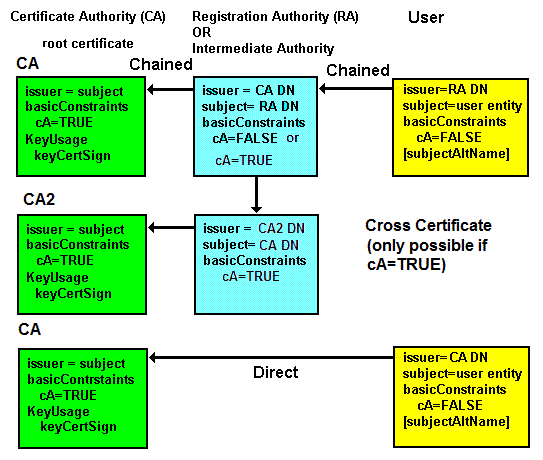
Figure 3 - X.509 Chaining
X.509 Certificate Usage
The issuer of a certificate is identified using a Distinguished Name (DN) format which was originally designed to represent a location within a DAP or LDAP DIT (Data Information Tree). The DN should not be confused with a network address or URL/URI. The DN will typically have a format such as CN=Type of Certificate, OU=Certificate Division, O=Certificate Company name,C=Country (CN=, OU=, O=, C= format) but may use simply an OU=, O=, C= format or even a CN=, O=, C= format and to make matters yet more complicated it could use CN=, OU=, DC=, DC= format. It can vary - a lot. A DN consists of a number of comma separated RDNs (Relative Distinguished Names), thus CN= or C= are RDNs in a DN. An X.509 certificate does not contain a URI to obtain any chained certificates via a network interface - but it may contain (in other attributes) a URI to obtain CRLs. Applications that use certificates - such as a browser or client email software - must have previously obtained the root certificate, and if the certificate is chained - all intermediate certificates, by some out of band or off-line process. Most common CA root certificates are distributed with browsers (and made available to their associated client email software). Handling certificates using common browsers.
Note: The root certificates distributed with common browser (and email client) software are added according to criteria defined by the browser supplier and vary from "pay us lots of cash" through to full proof of a CA audit and other requirements.
When an application accesses a TLS/SSL based service the server certificate (or a certificate bundle) is obtained during the initial TLS/SSL Handshake dialog. The application, such as a browser, will extract the CN of the subject DN attribute (and/or the subjectAltName - see RFC 6125) to verify the entity (say a web server address, for instance, www.example.com). It then uses the issuer attribute DN of the server's X.509 certificate to find the appropriate root certificate from its local store (and generate an exception - normally involving a highly confusing, and potentially dangerous, user dialog - if one is not found). If a valid root certificate is found this authenticates the server supplied certificate. The net result, assuming all goes well, is that the public key contained in the X.509 certificate is safe (is trusted) and can be used to communicate with the defined entity (the Subject).
Servers typically only require their own certificate(s) and do not require root certificates - they simply send their certificates to the client and do not have to validate certificates. However TLS/SSL does allow mutual validation - both server and client send certificates. If client certificates are required in the application then the server is required to validate the client certificate and must be provisioned with all the required root and intermediate certificates by some out of band process - such as email or obtaining them from CA web sites.
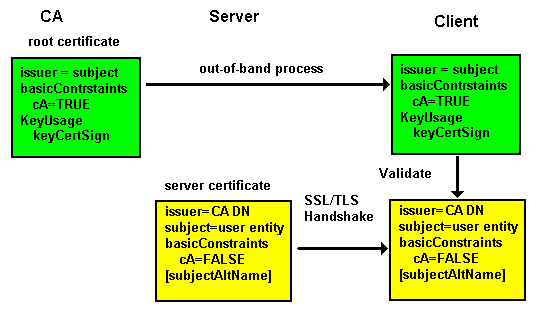
Figure 3 - X.509 Usage
Additional Notes on Certificate Subject and subjectAltName
X.509 Certificates in Web Hosting Organizations
Web site owners are coming under significant pressure to implement X.509 (SSL) from a variety of well intentioned (but ulimately misguided) sources.
In cases where a web site owner is the web site operator this presents few problems. The site owner/operator simply has to decide whether it is cost-effective to implement TLS. Many web site owners, however, have chosen to delegate site operation to a specialist web hosting company (a so-called multi-tenant site). Here the problem becomes a tad more serious serious.
So what is the problem?
The problem relates to the issuance of X.509 certificates and the ownership of private keys associated with those X.509 certificate. In particular there is a single (in most cases) transaction (item (5) in this diagram of the TLS Protocol) which requires the server to have access to the private key of the certificate (recall that in a public-private key system if the client encrypts with the public key only the owner of the private key - the server in this case - can decrypt the message).
Now, assume the owner of example.com has delegated operation of the web site for their domain to a web hosting organization who have a domain name of example.net. If a user's browser connects to a TLS service at www.example.com it expects to see a certificate with the name of www.example.com (the name of the web site it connected to). If it receives a certificate with the name www.example.net (the domain name of the hosting organization) it gets a little upset (in point of fact it gets jolly angry and starts to either output nasty messages or resort to angry colors (red) on the address bar).
To alleviate this problem RFC 6066 introduced SNI (Server Name Indication) which allows the client (the browser) to explicitly state that it is connecting to www.example.com in the ServerHello message enabling our super smart server to deliver the expected (www.example.com) certificate. Phew, fixed that one. Happy browsers are here again, tra la.
Not so fast.
No sane Certificate Authority (CA) will issue a certificate for example.com to example.net, only the domain owner (who has to prove ownership in some way) can get a certificate for their domain. However, item 5 on the TLS diagram reminds us that the host server not only needs the certificate but also needs the private key associated with the certificate. Ouch. Cue lawyers to enter from stage left (most likely stage right and center also). Double Ouch.
RFC 7711 proposes a solution whereby a user (example.com) can (using a DNS SRV Resource Record (RR)) explicitly delegate SSL certificate coverage to a third party (example.net in our case) by pointing to a web hosted JSON formatted record. The user does not have to buy a fiendishly expensive SSL certificate and consequently does not have to give their private key to their hosting provider. The theory being that before accessing the user's web site, our browser will do a DNS SRV lookup, then, using the resulting URL, will read a delegation record (let's assume it delegates to example.net in this case). Having received this information it will then be very happy to accept a certificate from example.net when it connects to example.com. Our browser will not get angry. It will not output nasty messages and it will not turn on angry colors. Everyone but the lawyers will be jolly happy.
Note: The RFC also optionally allows the user to indicate that is has deliberately given its hosting provider its X.509 certificate (and implicity its private key).
There is another possible solution using DNSSEC and DANE that we will get around to documenting one of these fine days. Just don't hold your breath.
Additional Notes on Certificate Subject and subjectAltName
Certificate Protocols (CMP, CMC/CMS, CRMF, SCVP, OCSP, HTTP)
An X.509 certificate is a data structure. Various protocols allow the certificates to be manipulated via a communications network. These X.509 Certificate Operations, such as sending a signing request, returning a signed certificate etc. are defined in, among others, the Certificate Management Protocol (CMP) - RFC 4210 - as well as PKCS #10 (RFC 2986) and further described in this guide.
Overview: A number of protocols are defined to manipulate certificates and CRLs (Certificate Revocation Lists). The Certificate Management Protocol (CMP RFC 4210 updated by RFC 6712) provides protocol methods to manipulate certificates (the format of the certificate messages (Certificate Request Message Format - CRMF) is defined in RFC 4211). RFC 4210 defines a number of communication methods (such as HTTPS) which may be used to transport certificate requests across a network but does not explicity define a transport protocol for certificate handling (see CMC/CMS next).
CMC/CMS (Certificate Management over CMS) defined in RFC 5272, RFC 5273, RFC 5274 and updated by RFC 6402 allows the secure transport of certificate requests from the requestor to the CA (including any intermediate RA(s)) and back. The message format may be either PKCS #10 (RFC 2896) or CRMF (RFC 4211). This protocol should always be referred to as CMC but is occasionally referred to as CMS. Technically, CMS is Cryptographic Message Syntax and describes only the envelope format for the request and response (in PKCS #10 or CRMF format). The protocol defines a number of operations that may be performed on certificates, including updating the trust anchors (root certificates) maintained by the certificate requestor. This is a big and juicy (read complex) protocol.
Online Certificate Status Protocol (OCSP RFC 6960) is a protocol for the on-line verification of certificates. RFC 6066 extends TLS to allow a client to request OCSP certificate status during the Handshake Protocol phase (and RFC 6961 defines a simplified 'certificate_request_v2' which attempts to reduce OCSP server traffic volumes).
Server-Based Certificate Validation Protocol (SCVP RFC 5055) allows multiple client functions to be delegated to an untrusted server, specifically certificate path validation and certificate path discovery. In the case where the SCVP server is trusted addition functionality may be provided such as certificate status (also provided by OCSP) and obtain intermediate certificates (also provided by CMP).
RFC 4387 defines some limited manipulation of X.509 certificates, keys or CRLs over HTTP using a GET method (which was the method we used the last time we paid filthy lucre for an X.509 certificate). RFC 4386 defines use of the DNS SRV RR to discover Certificate repositories, and OCSP services.
Certificate Management Protocol (CMP)
The Certificate Management Protocol (CMP) is defined in RFC 4210 (updated by RFC 6712) and the message format is defined in Certificate Request Message Format (CRMF RFC 4211).
To be supplied.
Server-Based Certificate Validation Protocol (SCVP)
To be supplied. Largely superseded by OCSP variants.
Certificate Management over CMS (CMC/CMS)
To be supplied.
Online Certificate Status Protocol (OCSP)
The Online Certificate Status Protocol (OCSP) is defined in RFC 6960 and a streamlined, high-throughput, message format is defined in RFC 5019 (The Lightweight Online Certificate Status Protocol (OCSP) Profile for High-Volume Environments) which, in essence, sensibly reduces OCSP requests to a single certificate and removes most of the OPTIONAL attributes in requests and responses as noted below. RFC 6960 (which obsoletes RFC 2560 and 6277) simply clarifies a few points in the original RFCs, makes the RFC more compatible with RFC 5019 and adds its own, entirely new, obfuscation to the specification. RFC 6961 defines a new 'certificate_request_v2' which allows servers to cache (save) responses and allows information about all relevant certificates (including intermediary ones) to be sent in a single message request.
OCSP is an on-line alternative to a Certificate Revokation List (CRL). The URI of the service is typically identified in the AuthorityInfoAccess (AIA) attribute of a certificate if the CA supports an OCSP service (issuers of EV certificates are mandated to support OSCP). A client will send an optionally signed request identifying the certificate to be verified and receive a signed reply from the OCSP server indicating the status as being good, revoked or unknown. The RFC allows for a number of different transport protocols (and specifically mentions LDAP, SMTP and HTTP as examples) to transmit the request and responses with the specific transport scheme identified in the URI of the AIA attribute of the certificate being validated. The RFC also defines the format of HTTP messages (using GET and POST) when used for OCSP. The request and response messages are outlined below:
# request format
OCSPRequest
  TBSRequest
    version                      0 = v1
    requestorName                OPTIONAL
    requestList (one or more)    (single request in the case of RFC 5019)
      reqCert
        hashAlgorithm            AlgorithmIdentifier
        issuerNameHash           Hash of Issuer's DN
        issuerKeyHash            Hash of Issuers public key
        serialNumber             CertificateSerialNumber
        singleRequestExtensions  OPTIONAL
    requestExtensions            OPTIONAL
  optionalSignature              OPTIONAL
Notes:
Signature of the OCSP request is optional and if present the requestorName will indicate the signer. Clearly, for the receiver to verify the signature it must have the public key of the signer (or its delegated agent).
Providers of EV (Extended Validation) certificates must provide an OCSP service, for all other certificate types it is optional.
# response format
OCSPResponse
  responseStatus
    successful        0  --Response has valid confirmations
    malformedRequest  1  --Illegal request format
    internalError     2  --Internal error in issuer
    tryLater          3  --Try again later
                          --(4) is not used
    sigRequired       5  --Must sign the request
    unauthorized      6  --Request unauthorized
  responseBytes       OPTIONAL
    responseType      OID (1.3.6.1.5.5.7.48.1.1 =BasicOCSPResponse)
      BasicOCSPResponse
       response
        ResponseData
          version          0 - Version DEFAULT v1
          responderID      EITHER OF
            byName         1 - Name
            byKey          2 - Hash of Issuers Public Key
          producedAt       GeneralizedTime
          responses
            certID
              hashAlgorithm       AlgorithmIdentifier
              issuerNameHash      -- Hash of Issuer's DN
              issuerKeyHash       -- Hash of Issuers public key
              serialNumber        CertificateSerialNumber
            certStatus       CertStatus
              good           0
              revoked        1
              unknown        2
            thisUpdate       GeneralizedTime
            nextUpdate       GeneralizedTime OPTIONAL
            singleExtensions OPTIONAL
          responseExtensions OPTIONAL
        signatureAlgorithm   AlgorithmIdentifier,
        signature            Hash of Response data
        certs                OPTIONAL
Notes:
A certStatus of good is defined in the RFC to mean 'not revoked' but additional information may be available in Extension attributes.
The responseStatus of unauthorized indicates the responder has no authoritative information about this certificate.
A number of extensions are defined in RFC 6960 and in addition any of the CRL Extensions (RFC 2459) may be included.
The response is normally signed by the CA that issued the certificate identified in serialNumber but the protocol allows for a delegated authority to sign the response in which case the response must include a certificate (carrying the delegated signers public key) in certs and which must be signed by the issuer of the certificate defined in serialNumber.
RFC 5019 defines a streamlined message format - which is entirely compatible with the full OCSP format - by removing most of the OPTIONAL attributes to assist message throughput. PROTOCOL: Supports OCSP over HTTP only using GET and POST methods. REQUESTS: Limits the request to a single certificate (requestList will be 1), dispenses with the OPTIONAL attribute singleRequestExtensions, and the OPTIONAL structures requestExtensions and optionalSignature (if the request is signed, responders are free to ignore the signature). RESPONSES: By insisting on a single certificate per request RFC 5019 has already reduced complexity (and size) in the response, in addition the OPTIONAL responseExtensions is removed (but singleResponseExtensions may be included). Again, if the response is signed by a delegated authority the response must include a certificate (carrying the delegated signers public key) in certs and which must be signed by the issuer of the certificate defined in serialNumber.
OCSP Issues
OCSP is designed as a real-time system (unlike the batch nature of classic CRLs) thus, clients can theoretically, verify the status of any certificate before acceptance and use. Particularly when handling an EV certificate any client implementation, for example, a browser is really obliged to perform an OCSP check to meaningfully implement EV security. This means, for example, that every access to an HTTPS service can (in the case of EV should) result in an additional check to the OCSP service of the CA. As more sites implement the well intentioned, but ultimately misguided, policy of using HTTPS for everything (rather than the more meaningful and secure DNSSEC) OCSP server performance is rapidly degraded and servers are brought to their knees in a kind of benignly intended DDoS onslaught.
RFC 6066 extends TLS by allowing the client to request certificate status from the TLS server (OCSPStatusRequest) and may have further exacerbated the OCSP load problem by making the OCSP interrogation trivial to implement - encouraging every client to request it. RFC 6961 tries to fix the OCSP load problem by using a new TLS 'certificate_request_v2' which seems (it is not definitive on when a server should interrogate OCSP) to allow caching of OCSP responses (thus reducing OCSP loads at the expense of real-time validity checks) at the server and enables multiple certificate status messages (including all intermediate certificates) to be sent in a single frame. And finally, one hopes, because all those intermediate certificates can build up to a serious volume RFC 7924 defines a method whereby the client can tell the server that it already has all that intermediate stuff.
X.509 Certificate Format
This section describes, in gruesome - but incomplete - detail, the format and meaning of the major fields (technically called attributes) within an X.509 certificate. The format is defined in RFC 5280 (Updated by RFC 6818).
Note: While the current NIST recommendation until 2030 is for a 2048 RSA key, RFC 8603 mandates use of RSA with 3072 or 4096 (or ECDSA P-384) for X.509 certificates used in CNSA (Commercial National Security Algorithm) Suite.
An X.509 certificate is an ASN.1 (X.680) structure encoded using the Distinguished Encoding Rules (DER) of X.690 and includes multiple references to globally unique Object Identifiers (OIDs)..
Notes:
Much use is made in X.509 (and LDAP) of that gruesome pseudo-Hungarian notation (or lowerCamelCase if you prefer the term) when defining DNs. In general, poor implementations are case sensitive, good ones are not. Further, all the LDAP matching rules related to DN handling are case insensitive meaning that attribute names used in DNs are not case sensitive.
RFC 7250 defines a vestigal certificate format for cases where the public key has been obtained by other (out-of-band) trusted methods. This minimal certificate format uses only the subjectPublicKeyInfo attribute (and its two sub-fields). Use of this minimal certificate format is indicated during the ClientHello and ServerHello messages during the TLS/SSL handshake.
The X.509 certificate definition is written in ASN.1 and looks like this (from RFC 5912 Section 14):
TBSCertificate  ::=  SEQUENCE  {
      version         [0]  Version DEFAULT v1,
      serialNumber         CertificateSerialNumber,
      signature            AlgorithmIdentifier{SIGNATURE-ALGORITHM,
                                {SignatureAlgorithms}},
      issuer               Name,
      validity             Validity,
      subject              Name,
      subjectPublicKeyInfo SubjectPublicKeyInfo,
      ... ,
      [[2:               -- If present, version MUST be v2
      issuerUniqueID  [1]  IMPLICIT UniqueIdentifier OPTIONAL,
      subjectUniqueID [2]  IMPLICIT UniqueIdentifier OPTIONAL
      ]],
      [[3:               -- If present, version MUST be v3 --
      extensions      [3]  Extensions{{CertExtensions}} OPTIONAL
      ]], ... }
Horrible stuff. If you need to understand this (one hopes not) use this ASN.1 and DER Survival Guide. Warning: following this link may have an adverse effect on your mental health.
An X.509 certificate printed by Openssl looks like this (the major attributes are described below):
Certificate:
 Data:
  Version: 3 (0x2)
  Serial Number:
   bb:7c:54:9b:75:7b:28:9d
  Signature Algorithm: sha1WithRSAEncryption
  Issuer: C=MY, ST=STATE, O=CA COMPANY NAME, L=CITY, OU=X.509, CN=CA ROOT
  Validity
   Not Before: Apr 15 22:21:10 2008 GMT
   Not After : Mar 10 22:21:10 2011 GMT
  Subject: C=MY, ST=STATE, L=CITY, O=ONE INC, OU=IT, CN=www.example.com
  Subject Public Key Info:
   Public Key Algorithm: rsaEncryption
    RSA Public Key: (1024 bit)
     Modulus (1024 bit):
      00:ae:19:86:44:3c:dd...
      ...
      99:20:b8:f7:c0:9c:e8...
      38:c8:52:97:cc:76:c9...
   Exponent: 65537 (0x10001)
 X509v3 extensions:
  X509v3 Basic Constraints:
   CA:FALSE
 Netscape Comment:
  OpenSSL Generated Certificate
 X509v3 Subject Key Identifier:
  EE:D9:4A:74:03:AC:FB...
 X509v3 Authority Key Identifier:
  keyid:54:0D:DE:E3:37...

 Signature Algorithm: sha1WithRSAEncryption
  52:3d:bc:bd:3f:50:92...
  ...
  51:35:49:8d:c3:9a:bb...
  b8:74
Note Lines have been truncated and omitted (replaced with ... in all cases) in the above since the deleted material does nothing to aid understanding.
The X.509 certificate consists of the following fields (Attributes):
| Version |
In general this should indicate version 3 (X.509v3). Since the numbering starts from zero this will have a value of 2. If omitted version 1 (value 0) is assumed.
|
| Serial Number |
Positive number up to a maximum of 20 octets. Defines a unique serial number for each certificate issued by a particular Certification Authority (thus is not, of itself, a unique number) and used, among other purposes, in Certificate Revocation Lists (CRLs).
|
| Signature |
Must be the same OID as that defined in SignatureAlgorithm below.
|
| Issuer |
The DN (Distinguished Name) of the Authority that signed and therefore issued the certificate. This may or may not be the Certification Authority (CA). The issuer may comprise a subset of domainComponent (DC=), countryName (C=), commonName (CN=), surname (SN=), givenName (GN=), pseudonym=, serialNumber=, title=, initials=, organizationName (O=), organizationalUnitName (OU=), stateOrProvinceName (ST=) and localityName (L=) attributes. Only CN=, C=, ST=, O=, OU= and serialNumber= must be supported the rest are optional (serialNumber= is rarely present - but mandated for EV certificates - and L= is frequently present though widely misunderstood but its use is clarified for EV certificates) RFC 5280 appears to allow either of the globally unique methods (X.500 format O=, C= or the IETF format DC=, DC=) but the X.500 format seems universally preferred. An example issuer DN would look something like:
# shown split across two lines for presentation reasons only
C=MY,ST=some state,L=some city,O=Expensive Certs inc,
 OU=X.509 certs,CN=very expensive certs
# various interpretations of the RDN attributes exist
# the following are presented as generally accepted
# values.
# C = ISO3166 two character country code
# ST = state or province
# L = Locality; generally - city
# O = Organization - Company Name
# OU = Organization Unit - typically certificate type or brand
# CN = CommonName - typically product name/brand
|
| Validity |
Provides two sub-fields (Attributes) notBefore and notAfter which define the time period for which the certificate is valid - or if one is of a cynical persuasion the NotAfter value defines the point at which the user has to shell out more filthy lucre to the CA or issuer. Dates up to 2049 are encoded as UTCTime (format is YYMMDDHHMMSSZ - yes a 2 digit year) after 2050 as GeneralizedTime (format is YYYYMMDDHHMMSSZ - finally a 4 digit year). Where Z is a literal constant indicating Zulu Time (UCT aka Greenwich Mean Time) - its absence would imply local time. |
| Subject |
A DN defining the entity associated with this certificate. If this is a root certificate then issuer and subject will be the same DN (and BasicConstraints CA TRUE will be set). In an end user/server certificate the subject DN identifies in some way the end entity. Typically the CN attribute (RDN) of the DN will identify some unique name of the end entity being certified or authenticated. The subject may comprise a subset of domainComponent (DC=), countryName (C=), commonName (CN=), surname (SN=), givenName (GN=), pseudonym, serialNumber, title, organizationName (O=), organizationalUnitName (OU=), stateOrProvinceName (ST=) and localityName (L=) atributes. An example subject DN that will authenticate access to a web site could look something like:
# shown split across two lines for presentation reasons only
C=MY,ST=another state,L=another city,O=my company,OU=certs,
 CN=www.example.com
# various interpretations of the RDN attributes exist
# the following are presented as generally accepted
# values. In the case of personal certificates GN=, SN= or pseudonym=
# attributes can appear
# C = ISO3166 two character country code
# ST = state or province
# L = Locality; generally means city
# O = Organization - Company Name
# OU = Organization Unit - division or unit
# CN = CommonName - end entity name e.g. www.example.com
However, some certs use the issuer's DN and replace the CN attribute (RDN) with the name of the entity being authenticated thus the above could, based on the issuer example above, become:
# shown split across line for presentation reasons only
C=MY,ST=some state,L=some city,O=Expensive Certs inc,
 OU=X.509 certs,CN=www.example.com
In the above example CN=www.example.com will work when the web site access URL is http://www.example.com, if the web site access also uses http://example.com the certificate checking process will fail and in this case the subjectAltName can be used to extend the certificate scope to include example.com (or any other domain name that is covered by this certificate - called a SAN certificate by many vendors).
While the majority of certificates currently (2011) use the CN= RDN of the subject attribute to describe the entity, RFC 6125 now recommends that the subjectAltName be used (containing the end entity name) and that the subjectAltName attribute be used in preference to CN= in the subject for validating the entity name. It may be some time before all applications and certificate issuers follow these principles and therefore to handle all possibilities the entity should appear in both a CN= (in the subject attribute) and in a subjectAltName attribute.
The subject attribute can be empty in which case the entity being authenticated is defined in the subjectAltName.
The form CN=www.example.com/emailAddress=me@example.com is frequently seen and generally created by default by OpenSSL tools when generating a Certificate Signing Request (CSR) and defines a second attribute (emailAddress) and which may, or may not, be present. Most CAs request that the email address prompt is left blank during the creation of the CSR when using OpenSSL - perhaps because they can sell you a second SSL certificate to protect your email addresses. Or is that excessively cynical? Additional Notes on Certificate Subject and subjectAltName.
|
| SubjectPublicKeyInfo |
Contains two sub-fields (attributes), algorithm (the OID of the public key algorithm from the list defined in RFC 3279) and subjectPublicKey (the entity's public key as a bit string). An example of a the algorithm attribute when using an RSA algorithm (rsaEncryption) OID is shown below:
1.2.840.113549.1.1.1
Note The vestigal certificate format defined by RFC 7250 consists only of this attribute and its two sub-fields.
|
| IssuerUniqueIdentifier |
Optional. Defines a unique value for the issuer. The RFC recommends that this attribute is NOT present. |
| SubjectUniqueIdentifier |
Optional. Defines a unique value for the entity being authenticated. The RFC recommends that this attribute is NOT present. |
| Extensions |
Tons of extensions are defined in the various RFCs - the following are only the most, IOHO, significant. Extensions may be marked as CRITICAL. Note: CRITICAL has an interesting and nuanced interpretation. If the software handling the certificate sees the CRITICAL value (which it can always interpret) but does not understand the extension it MUST abandon processing and NOT accept the certificate.
Notes:
RFC 5280 defines standard extensions (defined by the original X.509 standards under the OID 2.5.29) and what it terms Private Extensions (defined under the OID 1.3.6.1.5.5.7.1). The Private Internet extension OID numbering is maintained by IANA. Unless noted otherwise below the following extensions are standard (under OID 2.5.29). RFC 7633 defines a Private Internet X.509 certificate extension (OID 1.3.6.1.5.5.7.1.24 id-pe-tlsfeature) that allows a certificate to include TLS feature extensions (identified by their TLS code values) - essentially allowing the client to detect a potentially fraudulent server. Thus, if the certificate contains the TLS feature extension status_request but the server did not return this information (in a CertificateStatus message) then the client may conclude the session is potentially insecure.
|
| |
| AuthorityInfoAccess |
Private Internet Extension (OID 1.3.6.1.5.5.7.1.1) Frequently known by the abbreviation AIA (though this is not its LDAP alias name - it does not have one). Used to contain information about CA services including any Online Certificate Status Protocol (OCSP). Interestingly, while EV Certificates demand a 24/7 certificate status service and most frequently provide it using OCSP the actual EV standard does not reference the use of this attribute.
AuthorityInfoAccess = AuthorityInfoAccessSyntax
# multiple AuthorityInfoAccessSyntax elements may exist
# each is comprised of:
 accessMethod  = OID
# may take the values:
# 1.3.6.1.5.5.7.48.1 = ocsp
# accessLocation = URI of the CA's OCSP service
# for the issuer CA
# 1.3.6.1.5.5.7.48.2 = caIssuers
# used only if certificate signer is not
# the root CA
# accessLocation = URI of root CA description

 accessLocation = URI (exceptionally an email address
                       or X.500 DirectoryString)
|
| authorityKeyIdentifier |
[OID: 2.5.29.35 ] Optional. May contain three attributes:
keyIdentifier             [0] KeyIdentifier
authorityCertIssuer       [1] GeneralNames
authorityCertSerialNumber [2] CertificateSerialNumber
The standard recommends the use of the keyIdentifier value for all but root certificates. The keyIdentifier is normally a 160 bit SHA-1 hash of the subjectPublicKeyInfo but other methods are defined. Presence of this attribute facilitates certificate path (chain) creation and allows CAs to have multiple root certificates each of which may have a different key referenced by this extension.
|
| subjectKeyIdentifier |
[OID: 2.5.29.14] Optional but the standard recommends the use of this value in all certificates as an aid to certificate path (chain) construction. The SubjectKeyIdentifier is normally a 160 bit SHA-1 hash of the subjectPublicKeyInfo but other methods are defined.
|
| KeyUsage |
[OID: 2.5.29.15] Bit string which defines the purposes for which the public key may be used and may take the following values:
digitalSignature (0)
nonRepudiation   (1)
keyEncipherment  (2)
dataEncipherment (3)
keyAgreement     (4)
keyCertSign      (5) # indicates this is CA cert
cRLSign          (6)
encipherOnly     (7)
decipherOnly     (8)
If keyCertSign is set then BasicConstraints cA TRUE MUST also be set, however if BasicConstraints CA TRUE is present then KeyUsage keyCertSign need not be present.
|
| ExtendedKeyUsage |
[OID: 2.5.29.37] When present refines the purposes for which the public key may be used and must be compatible with the KeyUsage attribute. It may take the following values:
serverAuth  (1) TLS WWW server authentication
      (valid with digitalSignature, keyEncipherment or keyAgreement)
clientAuth  (2) TLS WWW client authentication
      (valid with digitalSignature or keyAgreement)
codeSigning (3) Signing of downloadable executable code
      (valid with digitalSignature)
emailProtection (4)  Email protection
      (valid with digitalSignature, nonRepudiation,
       and/or (keyEncipherment or keyAgreement)
timeStamping (8) Binding the hash of an object to a time
      (valid with digitalSignature and/or nonRepudiation)
OCSPSigning (9) Signing OCSP responses
      (valid with digitalSignature and/or nonRepudiation)
If keyCertSign is set then BasicConstraints cA TRUE MUST also be set, however if BasicConstraints CA TRUE is present then KeyUsage keyCertSign need not be present.
|
| Basic Constraints |
[OID: 2.5.29.19] A boolean which defines whether the certificate is a CA or root certificate (TRUE) or not (FALSE). Can take an optional attribute (pathLenConstraint) which defines the maxim chaining depth.
cA               TRUE | FALSE
pathLenConstraint   INTEGER
|
| CRL Distribution Points |
[OID: 2.5.29.31] Optional but RECOMMENDED by the RFC (go figure). Defines one or more URLs (and other optional information) where Certificate Revocation Lists (CRLs) may be obtained for the CA that issued the certificate (the issuer). Each CRL location (called a DistributionPoint) has the following format:
# (O) = OPTIONAL
distributionPoint  DistributionPointName (O)
# points to a structure defined below
reasons            ReasonFlags (O)
cRLIssuer          GeneralNames (O)
# DN of CRL Issuer if not the same as this
# certificates issuer
# the DN could be used in an LDAP search request

# DistributionPointName is either
fullName                  GeneralNames
# may contain either a URI
# e.g. http://crl.example.com
# OR a Protocol name such as HTTP, LDAP, FTP etc.
# used to obtain the CRL
# OR
nameRelativeToCRLIssuer
# RDN appended to issuer DN to get CRL

# The ReasonFlags may take one of the values:
unused                  0
keyCompromise           1
cACompromise            2
affiliationChanged      3
superseded              4
cessationOfOperation    5
certificateHold         6
privilegeWithdrawn      7
aACompromise            8
Multiple entries are allowed.
|
| CertificatePolicies |
[OID: 2.5.29.32] Optional. Can be used to identify the particular policies of the issuer CA. The extension allows both an OID (in CertPolicyId) and other optional attributes that essentially provide displayable text but the RFC RECOMMENDS only the use of the OID. The OID in this attribute is also used to identify a EV Certificate. May take any of the attributes below:
policyIdentifier   CertPolicyId # OID
policyQualifiers  # multiple values allowed
                  # typically a URI to a text
                  # statement of policy or just text
|
| subjectAltName |
[OID: 2.5.29.17] Sometimes abbreviated as SAN. Optional, but RFC 6125 recommends that for server certificates this attribute always be present and contain the entity name for which the certificate is issued (the rationale being that the dNSName attribute was defined to contain a server name whereas the CN= attribute of the subject can contain a multitude of formats). Can also be used to extend the entities covered by the certificate (the subject is non-empty) or as an alternative (subject is empty and the subjectAltName extension is marked as CRITICAL). May take any of the attribute types below:
otherName                  type=, value= pairs including
                           Kerberos names (RFC 4556):
                            oid = 1.3.6.1.5.2.2
                            kerberos-principal (IA5String)
                           OR
                           SRVName (RFC 4985):
                            oid = 1.3.6.1.5.5.7.8.7
                            srv-name (IA5String)
rfc822Name                 email me@example.com
dNSName                    DNS Name host1.example.com
x400Address                If you are into
                           X.400 mail addresses
directoryName              Alternative DN
ediPartyName               EDI stuff
uniformResourceIdentifier  URI ldap://ldap.example.com
iPAddress                  IP V4/V6 192.168.0.1
registeredID               OID
Multiple entries are allowed. Use of subjectAltName is a way of handing the problem where a server may appear under multiple names in the DNS. For example, if a server is accessed using https://www.example.com and https://example.com then www.example.com could appear in the CN= part of the subject attribute and example.com could appear as a dNSName attribute or more commonly both www.example.com and example.com would appear as dNSName attributes. Note: Any domain name can appear in these attributes, for example, www.example.com and www.example.net could both appear. There is no requirement for a common domain name root. Not all CAs support use of subjectAltName. Generating subjectAltName entries is a tad messy with OpenSSL self-signed certificates and the process is fully detailed. Additional Notes on Certificate subject and subjectAltName.
|
|
| SignatureAlgorithm |
The algorithm used to sign the certificate identified by its OID and any associated parameters. The following illustrates the RSA with SHA1 digital signature OID (sha1WithRSAEncryption):
1.2.840.113549.1.1.5
This value must be the same as that identified in the signature attribute of the certificate. The currently valid OIDs for use with X.509 certificates are defined in RFC 3279. |
| SignatureValue |
Bit string containing the digital signature. |
All attributes with the exception of SignatureAlgorithm and SignatureValue are encoded using ASN.1 DER (Distinguished Encoding Rules) defined by ITU-T X.690. The signature covers all DER encoded elements thus, obviously, excluding itself.
Multiple standards bodies (countries, industry organizations or governmental agencies) define specific profiles that refine the meaning of certain attributes or mandate specific attributes. All very confusing.
Certificate Subject and subjectAltName Notes
X.509 Certificates are used for a number of purposes. The following notes describe the constraints or additional rules used or imposed to cover certain functionality.
X.509 Certificate Domain Name Validation
RFC 6125 defines a set of rules to reduce the confusion between clients, servers and issuing CAs over how end entities should or could be described in the subject and subjectAltName attributes. (RFC 6186) describes email host discovery using SRV and RFC 7817 clarifies RFC6125 for email.) Historically the end entity was defined by the CN= RDN in the subject attribute, while this is still supported (for mostly historical reasons) RFC 6125 prefers the use of subjectAltName attribute to provide greater flexibility and clarity. RFC 6125 defines defines four possibilities for end system validation:
Note: In all cases, when using subjectAltName more than one name type may be present and that more than one entry in each type may be present. The end entities described by all types present constitute the certificate's end entity coverage. In the case of subject only a single end entity described by a single CN= RDN is covered (though in this case a subjectAltName attribute may also be present).
subjectAltName contains a type dNSName then the name is the end entity covered by the certificate.
RFC 7817 indicates that for email the end enity should be either the domain part of the RFC822 address, for example if the email address is user@example.com then the end entity will be example.com, and/or the end entity can be the FQDN of the receiving mail host, for example, mail.example.com.
subject contains a single cn=hostname attribute value (other RDNs may exist but are ignored for domain name validation purposes) where hostname is the end entity covered by the certicate.
RFC 7817 indicates that for email the end entity should be either the domain part of the RFC822 address, for example if the email address is user@example.com then the end entity will be example.com and/or the FQDN of the receiving mail host, for example, mail.example.com.
subjectAltName contains a type otherName attribute and the type of otherName is SRV (oid = 1.3.6.1.5.5.7.8.7) (deifined in RFC 4985)
RFC 6186 defines the use of SRV RRs in email (and has a - relatively - strange format), RFC 7817 follows this recmmendation.
subjectaltName contains a type uniformResourceIdentifier attribute in which the servive type is explicity identified.
Certificate Revocation Lists (CRLs)
Certificate Revocation Lists (CRLs) are a method by which certificates may be invalidated before their NotAfter date has expired. CRLs are normally issued by the CA that issued the certificate and can be obtained by a variety of methods, for instance, LDAP, HTTP or FTP. CRLs (specifically CRLv2 the current version) are defined in RFC 5280 and updated by RFC 6818.
Theoretically, when a certificate has been received from a server the receiving software should verify that the certificate obtained does not appear in a CRL (has not been revoked). To minimise delay in catching revoked certificates the CRL check should be done by fetching the latest CRL whenever a certificate is received from a server. Since a CRL contains a list of all revoked certificates from any given CA it can be of considerable size thus creating, perhaps, an unacceptable overhead to a TLS/SSL initial connection. Further, depending on the CA's policy, the CRL may be updated every hour or 12 hours or daily etc.. The bottom line being that fetching a CRL file(s), even if it is done for every received certificate, may still yield an out-of-date result.
In practice a per certificate CRL fetch is rarely, if ever, performed and many systems rely on CRL caches that are periodically updated. RFC 5280 uses the weasely term suitably-recent to describe the CRL update frequency. An on-line version of the revocation list, known as Online Certificate Status Protocol (OCSP) is defined in RFC 2560, streamlined by RFC 5019 and updated by RFC 6277. A CRL has the following format:
| Version |
Optional. In general this should indicate version 2 (CRLv2). Since the numbering starts from zero this will have a value of 1. If omitted version 2 (value 1) is assumed. |
| Signature |
Must be the same OID as that defined in SignatureAlgorithm below. |
| Issuer |
A DN of the Authority that signed and therefore issued the CRL. This may or may not be the Certification Authority. See also notes on issuer DN |
| ThisUpdate |
The time and date at which the CRL was created. Date format may be UTCTime (format is YYMMDDHHMMSSZ) or GeneralizedTime (format is YYYYMMDDHHMMSSZ). Where Z is a literal constant indicating offset from Zulu Time (Greenwich Mean Time(GMT)/ UCT) - its absence would imply local time.
|
| NextUpdate |
The time and date at which the next CRL will be created. Date format may be UTCTime UTCTime (format is YYMMDDHHMMSSZ) or GeneralizedTime (format is YYYYMMDDHHMMSSZ). Where Z is a literal constant indicating Zulu Time (Greenwich Mean Time) - its absence would imply local time.
|
| RevokedCerticates |
The CRL identifies the revoked certificate by its serial number. Serial numbers are not globally unique but are defined to unique within CA therefore any client must use the a combination of the issuer to obtain a unique match.
userCertificate      CertificateSerialNumber
revocationDate       Time
crlEntryExtensions   Extensions OPTIONAL
|
| Extensions |
Multiple CRL extensions are defined in RFC 3280 none of which are marked as being CRITICAL and many are only relevant if the CRL is indirect, that is the CRL was issued by a party (an issuer) which was not the issuer of the certificates being revoked.
|
| SignatureAlgorithm |
The algorithm used to sign the CRL identified by its OID and any associated parameters. The following illustrates the RSA with SHA1 digital signature OID (sha1WithRSAEncryption):
1.2.840.113549.1.1.5
This value must be the same as that identified in the signature attribute of the certificate. The currently valid OIDs for use with X.509 certificates are defined in RFC 3279. |
| SignatureValue |
Bit string containing the digital signature for the CRL. |
Process and Trust - CAs and X.509 Certificates
As described previously an X.509 certificate is trusted to contain the public key of the entity defined (normally specifically the CN of the subject or subjectAltName). Trust is created during the certificate creation process. The process of obtaining an X.509 certificate will vary in detail from CA to CA but generally consists of the following steps:
The first, or topmost, link in the chain of trust is the Certification Authority (CA). CAs are deemed to be trusted organizations either because they say so or because they have passed some standard. In North America WebTrust is the most widely recognized CA standards organization and most CAs carry their seal indicating they have undergone an audit by a WebTrust accredited auditor (increasingly the major International auditing firms are also performing such audits). The very existence of the CA marks the first step in the establishment of the line of trust. The CA has, at some point in time, generated one or more asymmetric keys and, using the private key, has self-signed a certificate (the issuer and subject attributes of the X.509 certificate are the same and BasicConstraints cA is TRUE). This certificate is the root or CA certificate and the private key, whose public key is contained in the root certificate, is used to sign user certificates. Root (or CA) certificates are distributed to end user clients by a trusted out-of-band process, most frequently with browser installations.
A user who desires a certificate will review the products from the various Certificate Authorities (CAs) and select a preferred CA. An application is made to the selected CA - or one of its agents or Registration Authorities (RA) - for a particular type of SSL (X.509) certificate. Depending on the certificate type various information is required and (usually) verified such as name of business, business registration number or other identifying information. Again depending on the type of certificate further proof of identity may be required. This is essentially a clerical process (which may be automated to a greater or lesser extent) that establishes the next trust link.
The CA, which is trusted, is trusted to have established that the user is who they say they are. More or less.
Having selected the SSL product, supplied the required identification information and had it verified by the CA the user is then requested to generate a set of asymmetric keys and use the private key to sign a Certificate Signing Request (CSR) which will contain the public key of the generated public-private pair among other information. The CSR format is defined by RFC 2986 (a re-publication of the RSA standard PKCS#10 - updated by 5967) which consists of the following data:
| Version |
Version 0. |
| Subject |
A DN defining the entity to be associated with this certificate. In general, depending on the CA policies, this will be the subject that will appear in the returned X.509 certificate.
|
| SubjectPublicKeyInfo |
Contains two sub-fields (attributes), algorithm (the OID of the public key algorithm from the list defined in RFC 3279) and subjectPublicKey (the entity's public key as a bit string). An example of an RSA algorithm (rsaEncryption) OID is shown below:
1.2.840.113549.1.1.1
|
| Attributes |
Optional. Attributes may contain a number of sub-fields (attributes) of which the following are noted, challengePassword (a password to further secure the CSR - most CAs insist this attribute is NOT present) and unstructuredName (any suitable text - again normally not required by CAs or ignored if present).
|
| SignatureAlgorithm |
The algorithm used to sign the CSR identified by its OID and any associated parameters. The following illustrates the RSA with SHA1 digital signature OID (sha1WithRSAEncryption):
1.2.840.113549.1.1.5
Notes:
The CSR is signed using the private key of the private-public key pair whose public key appears in the SubjectPublicKeyInfo of this CSR. Certificate extensions that will appear in the final certificate can also be present is self-signing is being used. Few commercial CAs support extensions.
|
| SignatureValue |
Bit string containing the digital signature. |
A CSR is created using this procedure.
The CSR is uploaded to the CA (typically using FTP or HTTP) which uses the data in the CSR and perhaps other information obtained during the SSL certificate application to create the user's X.509 certificate which typically has a validity period ranging from 1 to 3 years. The CA finally signs the user's certificate (the SignatureAlgorithm and SignatureValue) using the private key of the public-private key pair whose public key is contained in the CA's root certificate. The X.509 certificate is sent to the user using a variety of processes (FTP/HTTP/EMAIL).
The trust loop is therefore completed by the CA's digital signature. The digital signature of the user's certificate can only be verified by using the public key of the issuer which is contained in the CA's root certificate obtained by a (trusted) off-line process (normally via a browser installation).
When a certificate is received by a browser from a web site (during the Handshake Protocol of TLS/SSL) it must be verified all the way to the root or CA certificate (there may be one or more levels of certificates depending on the certifcate vendor). The root/CA (and any required intermediate) certificates are typically distributed with major browser software. Root/CA certificates distributed in this way are generically called trust anchors - a widely used term used to describe any base structure or information obtained by a trusted distribution route that may be used to validate/authenticate received information. RFC 5914 (with some support from RFC 5937) defines how such trust anchors may be organized, used and processed in the specific case of X.509/SSL certificates.
EV Certificates
Extended Validation (EV) Certificates are defined by the CA/Browser Forum and include a mixture of improved clerical validation as well as technical processes. The objective behind EV certificates is to provide increased confidence to end users though the standard explicitly states that it does not guarantee the business practices of the certificate owner - merely that the owner does exist.
When using a supporting browser the user sees a normal padlock icon but the status bar shows up in GREEN when an EV certificate is encountered. Currently EV supporting browsers are: MSIE 7 only and the latest versions of Konqueror, Firefox (v3+) and Opera(9.5+). In general EV certificates are significantly more expensive than other types of certificates. The EV issuing standard has the following characteristics:
The CA has to be audited for EV compliance and undergo a yearly audit renewal.
Enhanced user verification - notably it demands that the CA verify that the applicant does indeed own the domain name that it is seeking to authenticate!
CAs follow the practices defined in RFC 3647 which has INFORMATIONAL status for the rest of us.
Standardizes the use and meaning of certain attributes in the subject DN and adds some new ones. Specifically it defines the following to be REQUIRED (the EV standard's version of the RFC MUST)
- O - organizationalName (OID 2.5.4.10) Full legal name of the user organization
- businessCategory (OID 2.5.4.15) defines which category of certificate is involved - may be section 5b, 5c or 5d.
- C - Country - (OID 2.5.4.6), ST - stateOrProvinceName - (OID 2.5.4.8) and L - localityName - (OID 2.5.4.7) are all defined to be the legal jurisdiction of the business entity (not, say, the location of a web server).
- serialNumber (OID 2.5.4.5) business registration number
- CN - CommonName - (OID 2.5.4.3) host domain name, for instance, www.example.com
Mandates EV CAs provide on-line capabilities (24x7) to verify the status of any EV certificate. In general this is done using the Online Certificate Status Protocol (OCSP) (RFC 2560).
Mandates that EV certificates may only be issued for server authentication at this time, that is, CN= must be a server name such as www.example.com or mail.example.com.
EV certificates are recognised definitively by the use of a registered OID (unique for each CA) in the CertificatePolicies attribute.
Certificate and CSR Creation Using OpenSSL
There are a confusing number of file formats with sometimes (in)appropriate file suffixes used for certificates, keys and other data used within X.509/SSL. This is an overview that may help before you dive into the quagmire:
All SSL related objects (Certificates, keys etc.) use native DER encoding. DER is a binary (8 bit) encoding which means that it cannot be sent by, among others, email. PEM (Privacy Enhanced Mail) is a method of simply encoding the native DER formats, using base64, into something that can be sent by email or other communications systems.
Some PKCS#X standards are containers (encoded in DER format) - notably PKCS#7 (and its IETF CMS equivalent RFC 5652), PKCS12 and PKCS#8 - used to identify multiple objects within the same file. If a file contains a single object, such as a certificate or a CRL, then this object does not require - though it, optionally, may be, enclosed in - a container.
On its face, a single key looks as if it should be a single object and thus not require a container. However, the key use algorithm (as well as other parameters) is also needed and hence a single key does require a container (in this case PPKCS#8) to identify its constituent objects. Conversely, an X.509v3 certificate contains lots of information and therefore looks like it should need a container. However, X.509v3 is itself a container. Thus, where a single certificate appears in a file it does not need a container (for instance, .cer/.crt files). However, when a certificate and a private key both appear in a single file (.p12/.pkx) then in this case there are at least two objects which must be identified and therefore there must be a container (in this case PKCS#12).
Many of the PKCS#X standards are containers (encoded in DER) that will implicitly be sent by a communications system of some sort, for example, a CSR, and thus are always, irrespective, of the file suffix finally encoded as PEM.
In many cases it is context that will determine the content of the file not the suffix. Thus, if you are expecting a single certificate (without a private key) then it may reasonably have the suffix .pem or .crt or .cer.
As a simple test open any file, irrespective of its file suffix, in a text editor. If its gobbledegook it's DER encoded. If you can see '-----BEGIN' it's PEM.
PEM Format
OpenSSL supports Privacy Enhanced Mail (PEM) as its default (native) format. An X.509 certificate's intrinsic format is ASN.1 DER (a binary format) as indeed are all other SSL related objects. PEM encodes binary DER in base 64 (RFC 3548) creating a text (ASCII/IA5 subset) version that may be sent by, among other things, mail systems. Objects encoded by PEM include header lines and trailer lines each starting and finishing with precisely 5 dashes to encapsulate the base64 material and provide a human readable indication of its content. PEM files look something like that shown below:
-----BEGIN CERTIFICATE-----
MIIDHDCCAoWgAwIBAgIJALt8VJ...
...
Cfh/ea7F1El1Ym1Zj2v3wLhRl1...
NH5lEmZybl+m2frlkjUv9KAvxc...
IFgovdU8YPMDds=
-----END CERTIFICATE-----

BLAH BLAH BLAH

-----BEGIN RSA PRIVATE KEY-----
Proc-Type: 4,ENCRYPTED
DEK-Info: DES-EDE3-CBC,6EF6203EF1A9533A

r7LMq15wr1OOmMsD84KyNo+5yY...
El3/msvQ98BkaMihajEn5f2UxO...
...
f6uoSk8HBZLItWTxqRuBRVb8jq...
hdp9hvvdja9XIrAPGQJ0u2QVw==
-----END RSA PRIVATE KEY-----
Note Lines have been truncated and omitted (replaced with ... in both cases) above since the deleted material does nothing to aid understanding of the process.
The text BEGIN CERTIFICATE and END CERTIFICATE in the above may take different values that describe the functionality and format of the material contained within. There may be more than one item in any PEM file (each de-limited by the -----BEGIN -----END sequence) and the file may have other information before, after and between, but not within the de-limiters. PEM is defined in RFC 1421 for use by S/MIME (RFC 3850).
PEM BEGIN Keywords
RFC 7468 identifies a number of keywords (or labels) that may appear in PEM encoded files in -----BEGIN and -----END markers (but, perhaps surprisingly, does not establish an IANA repository for these keywords). In addition the header file pem.h from the Openssl package (version 1.0.2d) contains other keywords (some of which are explicitly deprecated by RFC 7468, some of which may be implicitly deprecated - see notes below). The following table contains an amalgam of the two sources with appropropriate decriptions and notes added:
Note: The Keywords must appear in both the BEGIN and END labels in a PEM encoded file. For brevity neither the -----BEGIN or ----END string is shown. Thus, in the table the keyword CERTIFICATE appears. In a PEM encoded file this would appear twice as -----BEGIN CERTIFICATE----- and -----END CERTIFICATE-----.
| Keyword |
Source |
Usage |
Notes |
| CERTIFICATE |
RFC 7468 |
Contains single DER encoded X.509v3 certificate as defined by RFC 5280 Section 4 |
RFC 7468 deprecates X509 CERTIFICATE and X.509 CERTIFICATE |
| X509 CRL |
RFC 7468 |
Contains single DER encoded X.509 certificate list as defined by RFC 5280 Section 5 |
RFC 7468 deprecates CRL |
| CERTIFICATE REQUEST |
RFC 7468 |
Contains single DER encoded PKCS#10 certificate request (aka CSR) as defined by RFC 2986 updated by RFC 5967 |
RFC 7468 deprecates NEW CERTIFICATE REQUEST |
| PKCS7 |
RFC 7468 |
Contains DER encoded PKCS#7 (CMS) container (which may include multiple certificates) as defined by RFC 2315 |
RFC 7468 deprecates CERTIFICATE CHAIN and implicitly discourages the use of multiple certificates in a PKCS#7 structure (RFC 7468 encourages replacement of PKCS#7 by IETF CMS RFC 5652 - see below). |
| CMS |
RFC 7468 |
Contains DER encoded CMS container (which may include multiple certificates) as defined by RFC 5652 |
Mostly backward compatible with PKCS#7 above |
| PRIVATE KEY |
RFC 7468 |
Contains unencrypted DER encoded PKCS#8 container with a single key as defined by RFC 5958 Section 2 |
RFC 5958 renames PrivateKeyInfo (from RFC 5208) to OneAsymmetricKey which allows for both public and private keys within the container. However, RFC 7468 does NOT support this format for PEM encoded public keys (see PUBLIC KEY below). Since the PKCS#8 container identifies the key algorithm it implicity deprecates (but does not do so explicity) RSA PRIVATE KEY, DSA PRIVATE KEY, EC PRIVATE KEY or ANY PRIVATE KEY, DSA PARAMETERS, EC PARAMETERS, DH PARAMETERS all of which may be generated by OpenSSL. |
| ENCRYPTED PRIVATE KEY |
RFC 7468 |
Contains an encrypted DER encoded PKCS#8 container with a single key as defined by RFC 5958 Section 3 |
|
| PUBLIC KEY |
RFC 7468 |
Contains an DER encoded SubjectPublicKeyInfo structure (a mini-container) with a single public key as defined by RFC 5280 Section 4.1.2.7 |
The SubjectPublicKeyInfo structure describes the key algorithm and therefore RFC 7468 implicitly deprecates (but does not do so explicitly) DSA PUBLIC KEY, RSA PUBLIC KEY and ECSDA PUBLIC KEY all of which can be generated by OpenSSL. |
| ATTRIBUTE CERTIFICATE |
RFC 7468 |
Contains an DER encoded Attribute certificate as defined by RFC 5755 |
Attribute Certificates are DER encoded X.509 which do NOT contain public keys. They are used primarily for authorization (not authentication) purposes. OpenSSL (1.0.2d) has no valid PEM keyword in pem.h for this certificate type. |
| CERTIFICATE PAIR |
pem.h |
?? |
Defined in OpenSSL pem.h header file but not addressed by RFC 7468. Content target currently unknown. |
| TRUSTED CERTIFICATE |
pem.h |
?? |
Defined in OpenSSL pem.h header file but not addressed by RFC 7468. Content target currently unknown but suspected to be a certificate with basicConstraints, cA TRUE.. |
| PKCS #7 SIGNED DATA |
pem.h |
?? |
Defined in OpenSSL pem.h header file but not addressed by RFC 7468. PKCS#7 allows a number of 'content types', one of which is signed data - this feature is not widely implemented. |
| SSL SESSION PARAMETERS |
pem.h |
?? |
Defined in OpenSSL pem.h header file but not addressed by RFC 7468. Content target currently unknown. |
| X9.42 DH PARAMETERS |
pem.h |
?? |
Defined in OpenSSL pem.h header file but not addressed by RFC 7468. Content target currently unknown. |
File Extensions (Suffix)
In many cases the file extension (suffix) is relatively meaningless as a means of identifying the content. If you know the context (what the file should contain) then the following information may help:
| Use |
Suffix |
Private Key |
Format |
Notes |
| Key |
.pem |
yes |
PEM |
PEM encoded DER key in PKCS#8/RFC 5958 container, may be encrypted or unencrypted (PEM keyword will differentiate), though conventionally unencrypted due to its normal usage. PEM label PRIVATE KEY or ENCRYPTED PRIVATE KEY. Version 1 (0) only supports private keys, version 2 (1) supports use of public keys as well as private keys in PKCS#8. |
|
.der |
yes |
DER |
Not widely used. DER encoded raw private key. No wrapper or algorithm identifier. |
|
.key |
yes |
PEM |
Suffix used on many *nix systems to identify private key. DER key in PKCS#8/RFC 5958 container, may be encrypted or unencrypted, though conventionally unencrypted due to its normal usage. PEM label PRIVATE KEY or ENCRYPTED PRIVATE KEY. |
|
.p8 |
yes |
DER |
RFC 5958 recommends use of this suffix/extension for PKCS#8 binary (DER encoded) files. Version 1 (0) supports only private keys, version 2 (1) supports paired public and private keys. Equivalent of PEM label types PRIVATE KEY and ENCRYPTED PRIVATE KEY. |
| Certificate |
.crt |
No |
PEM or DER |
Normally in PEM format (RFC 7468 suggest suffix always denotes PEM). Contains an X.509v3 certificate only. No container. Format accepted by MSIE, Firefox and Chrome browsers. |
|
.cer |
No |
PEM or DER |
Normally in DER format (RFC 7468 suggest suffix always denotes DER). Contains an X.509v3 certificate only. No container. Format accepted by MSIE, Firefox and Chrome browsers. |
|
.pem |
May |
PEM |
The suffix is not an indicator of the file content. May contain almost anything, from a single key to multiple certificates in a ca-bundle, encapsulated in a PKCS#7 (CMS) or even PKCS#10 certificate request. PEM label will describe contents. In some contexts this file is assumed to be the exact equivalent of .crt. Firefox uniquely accepts this format. |
|
.der |
May |
DER |
The suffix is not an indicator of the file content. May contain almost anything, from a single key to multiple certificates in a ca-bundle, encapsulated in a PKCS#7 (CMS) or even PKCS#12 container or not. In some contexts this file is assumed to be the exact equivalent of .cer. Firefox uniquely accepts this format. |
|
.p12 |
May |
PKCS#12 (RFC 7292) |
PKCS#12 (RFC 7292) is a generic DER encoded container format. May (typically) contain one or more X.509v3 certificate and may (typically) contain a DER encoded private key as well as other types of data. Format accepted by MSIE and Chrome browsers. |
|
.pfx |
Yes |
RFC 7292 |
PKCS#12 (RFC 7292) is a generic DER encoded container format. Same as .p12 but typically used on Microsoft systems and by convention has one (or more) DER X.509v3 certificate(s) and a DER private key. Format accepted by MSIE and Chrome browsers. |
|
.p7b |
No |
PKCS#7 (or RFC 5652) |
PKCS#7 (or RFC 5652) CMS DER container encoded as PEM. May contain one or more certificates as well as other objects. Format accepted by MSIE, Firefox and Chrome browsers. |
| Miscellaneous |
.csr |
No |
PEM/PKCS#10 |
May also use the suffix .pem. Certificate Signing Request (typically known as a CSR). Contains a PEM encoded PKCS#10 (RFC 7292) DER format container consisting of the user's public key, algorithm type and required attributes to be added to the certifcate. |
|
.crl |
No |
PKCS#7 or certificate list structure |
Certificate Revokation List (CRL) is a DER encoded certificate list structure. May be contained in a PKCS#7 (RFC 2315 container or more typically a single DER encoded certificate list structure defined by RFC 5280 Section 5. Normally PEM encoded. Format accepted by MSIE and Chrome browsers. |
Certificate Bundles
Nominally a client is responsible for validating any end-entity certificate it receives from a server. This increasingly involves Intermediate and/or Cross certificates. Thus, what historically used to be a single certificate distribution is increasingly becoming a multi-certificate distribution. Such multi-certificate distributions are typically called certificate bundles or ca-bundles or certificate chains. Updating millions of clients in a timely fashion presents serious logistics problems so it is becoming increasing popular to distribute any Intermediate or Cross certificates (even root certificates) in bundles with the server certificate as part of the TLS handshake.
There are three broad methods by which multi-certificate bundles can be created:
Using a PKCS#7 (or RFC 5652) structure - usually with a file of suffix .p7b (supported by MSIE and Chrome for multi-certificate import). This file suffix will never have a private key.
Using a PKCS#12 (RFC 7292) structure (which is a super container for PKCS#7 and PKCS#8) - may have file suffix .p12 or .pkx (supported by MSIE and Chrome for multi-certificate import). By convention .pkx has both a certificate (PKCS#7) and a private key (PKCS#8), .p12 may or may not have a private key. .pfx is the suffix required by IIS Web Servers (though .p12 is also supported).
Concatenated PEM encoded certificates in a particular order. Since PEM certificate files (PEM keyword CERTIFICATE) are text files they can be concatenated manually using a text editor or using a unix command like:
cat intermediate2.crt intermediate1.crt root.crt > ca.pem
# the order in which these files appear reflects the
# validation sequence used by the client
# from server cert thru intermediate/cross certs to root cert
# resulting file (ca.pem in this case) would use
# SSLCACertificateFile Apache 2  directive
This PEM format kluge is widely adopted because of its support by Apache. These certificate bundles will never have a private key.
OpenSSL Conversion, Extraction and Manipulation
The following commands show a number of manipulations using the OpenSSL package. OpenSSL uses a native PEM format.
# conversion PKCS12 > Extract PEM Certificate
openssl pkcs12 -clcerts -nokeys -in cert.p12 -out usercert.pem
openssl pkcs12 -clcerts -nokeys -in cert.p12 -out usercert.crt
# extracts certificate only

openssl pkcs12 -nocerts -in cert.p12 -out userkey.pem
openssl pkcs12 -nocerts -in cert.p12 -out userkey.key
# extracts key only

# conversion PEM > PKCS12 (.p12 or .pfx)
# The result .p12 or .pfx file is in DER (binary format)
openssl pkcs12 -export -out cert.p12 -inkey ./userkey.pem -in ./usercert.pem
openssl pkcs12 -export -out cert.pfx -inkey ./userkey.pem -in ./usercert.pem
#NOTE: in both the above cases a passphrase will be requested, to suppress just hit enter
# at the request for password and its verification or use the following command
openssl pkcs12 -export -out cert.p12 -inkey ./userkey.pem -in ./usercert.pem - nodes -passout pass:
# converts PEM encoded cert and key to a DER encoded PKCS#12 format
PKCS#X to RFC Table
The following table cross-references commonly used PKCS standards to their RFC equivalent:
| PKCS No. |
RFC(s) |
Notes |
| PKCS#1 |
RFC 8017 |
Container for RSA algorithm covering cryptographic primitives, encryption schemes and signature schemes. |
| PKCS#5 |
RFC 8018 |
Method for password protection of encrypted data (used in PCKS#8, PKCS#7 and PKCS#12). |
| PKCS#7 |
RFC 2315 |
Cryptographic Message Syntax (CMS) container. Usually PEM encoded. Used for, among other entities, one or more CRLs (may be used with file suffix .crl though rarely), and one or more (ExtendedCertificatesAndCertificates) certificates (.p7b). A separate IETF CMS standard (broadly, but not perfectly, compatible with PKCS#7) is defined by RFC 5652. |
| PKCS#8 |
RFC 5958 |
RFC replaces the PKCS#8 specification. Key container version 2 (1) supports both private and public keys but version 1 (0) supports only private keys. Optionally may be encrypted (dangerous if not!). If PEM encoded RFC recommends use of file suffix .pem, if DER encoded use of file suffix .p8 (not widely supported). |
| PKCS#9 |
RFC 2985 and RFC 7894 |
Extended Attributes that may be used in PKCS#7, PKCS#8 and PKCS#10. |
| PKCS#10 |
RFC 2986 updated by RFC 5967 |
DER encoded Certificate Signing Request container. Contains a number of attributes describing the public key algorithm and attributes that will be incorportated into the final certificate. Amost universally PEM format. File suffix typically .csr |
| PKCS#12 |
RFC 7292 |
Generic container for Personal Information. Container consists of PKCS#7 and PKCS#8 containers inside a secure structure. File suffixes of .p12 and .pkx. DER encoded, never PEM. |
Handling Certificates In Common Browsers
Certificates may be imported into a number of systems/browsers using the procedures defined below. This information changes from time to time. The browser version number is included to indicate the, then current, import method. This section describes importing Root or Intermediate certificates (in the cases of Chrome and MSIE the appropriate tab (Intermediate or Trusted Root) must be selected). Only Firefox will accept a .pem suffix directly. For both MSIE and Chrome any .pem root certificate produced by methods 1, 2 3 or 3A can be simply renamed ca/cacert.pem -> ca/cacert.cer or ca/cacert.crt as you choose.
MSIE (11): MSIE will accept a .cer, .crt, .p7b, .pfx, .p12 suffix (among others). MSIE->Tools->Internet Options->Content Tab->click view certificates button->select appropriate certificate store->click Import and follow the wizard prompts.
For Windows 7+ systems an alternative method is to use the Microsoft Management Console (MMC) with the Certificate Snap-in installed and navigate to the appropriate certificate store, click the Actions menu->All tasks->import then follow the wizard prompts (will accept a .cer, .crt, .p7b, .pfx, .p12 suffix (among others)).
In an AD environment the certificate can also be propagated to all users via Group Policy Object (GPO). Load Administrative Tools->Group Policy Manager->Expand domains->Right click on Default Domain Policy and select Edit->Expand Computer configuration-> Expand Windows Settings->Expand Security Settings->Expand Public Key Settings->Right click Trusted Root Certificate Authorities->select Import and follow wizard Prompts.
Firefox (41.x.x) Firefox will accept either a .pem, .cer, .crt, .der or .p7b suffix. Tools Menu->Options->Advanced->Certificates tab->View Certificates->click import button and select file.
Chrome (46.x.x.x) Chrome will accept either a .cer, .crt, .p7b, .pfx, .p12 suffix (among others). Settings->Enable Advanced Settings->Scroll to HTTPS/SSL->Manage Certificates->Select Appropriate Tab->click import button and follow the wizard prompts.
Relevant RFCs
List of RFCs relevant to TLS, X.509 certificates and PKI. Most are referred to in the text above. Not exhaustive, but we now update it whenever we update the text or whenever a relevant RFC is published. It should eventually become exhaustive.
| RFC 2315 |
PKCS #7: Cryptographic Message Syntax Version 1.5. B. Kaliski. March 1998. (Format: TXT=69679 bytes) (Status: INFORMATIONAL) (DOI: 10.17487/RFC2315) (see also RFC 5652 for related CMS)
|
| RFC 2585 |
Internet X.509 Public Key Infrastructure Operational Protocols: FTP and HTTP. R. Housley, P. Hoffman. May 1999. (Format: TXT=14813 bytes) (Status: PROPOSED STANDARD) (DOI: 10.17487/RFC2585) (defines list of file suffixes and expected contents)
|
| RFC 2986 |
PKCS #10: Certification Request Syntax Specification Version 1.7. M. Nystrom, B. Kaliski. November 2000. (Format: TXT=27794 bytes) (Obsoletes RFC2314) (Updated by RFC5967) (Status: INFORMATIONAL)
|
| RFC 4210 |
Internet X.509 Public Key Infrastructure Certificate Management Protocol (CMP). C. Adams, S. Farrell, T. Kause, T. Mononen. September 2005. (Format: TXT=212013 bytes) (Obsoletes RFC2510) (Updated by RFC6712) (Status: PROPOSED STANDARD)
|
| RFC 4211 |
Internet X.509 Public Key Infrastructure Certificate Request Message Format (CRMF). J. Schaad. September 2005. (Format: TXT=86136 bytes) (Obsoletes RFC2511) (Status: PROPOSED STANDARD)
|
| RFC 5019 |
The Lightweight Online Certificate Status Protocol (OCSP) Profile for High-Volume Environments. A. Deacon, R. Hurst. September 2007. (Format: TXT=46371 bytes) (Status: PROPOSED STANDARD)
|
| RFC 5246 |
The Transport Layer Security (TLS) Protocol Version 1.2. T. Dierks, E. Rescorla. August 2008. (Format: TXT=222395 bytes) (Obsoletes RFC3268, RFC4346, RFC4366) (Updates RFC4492) (Updated by RFC5746, RFC5878, RFC6176) (Status: PROPOSED STANDARD)
|
| RFC 5272 |
Certificate Management over CMS (CMC). J. Schaad, M. Myers. June 2008. (Format: TXT=167138 bytes) (Obsoletes RFC2797) (Updated by RFC6402) (Status: PROPOSED STANDARD)
|
| RFC 5273 |
Certificate Management over CMS (CMC): Transport Protocols. J. Schaad, M. Myers. June 2008. (Format: TXT=14030 bytes) (Updated by RFC6402) (Status: PROPOSED STANDARD)
|
| RFC 5274 |
Certificate Management Messages over CMS (CMC): Compliance Requirements. J. Schaad, M. Myers. June 2008. (Format: TXT=27380 bytes) (Updated by RFC6402) (Status: PROPOSED STANDARD)
|
| RFC 5280 |
Internet X.509 Public Key Infrastructure Certificate and Certificate Revocation List (CRL) Profile. D. Cooper, S. Santesson, S. Farrell, S. Boeyen, R. Housley, W. Polk. May 2008. (Format: TXT=352580 bytes) (Obsoletes RFC3280, RFC4325, RFC4630) (Updated by RFC6818) (Status: PROPOSED STANDARD) (DOI: 10.17487/RFC5280)
|
| RFC 5652 |
Cryptographic Message Syntax (CMS). R. Housley. September 2009. (Format: TXT=126813 bytes) (Obsoletes RFC3852) (Also STD0070) (Status: INTERNET STANDARD) (DOI: 10.17487/RFC5652) (almost backward compatible with PKCS#7 RFC 2315)
|
| RFC 5746 |
Transport Layer Security (TLS) Renegotiation Indication Extension. E. Rescorla, M. Ray, S. Dispensa, N. Oskov. February 2010. (Format: TXT=33790 bytes) (Updates RFC5246, RFC4366, RFC4347, RFC4346, RFC2246) (Status: PROPOSED STANDARD)
|
| RFC 5878 |
Transport Layer Security (TLS) Authorization Extensions. M. Brown, R. Housley. May 2010. (Format: TXT=44594 bytes) (Updates RFC5246) (Status: EXPERIMENTAL)
|
| RFC 5911 |
New ASN.1 Modules for Cryptographic Message Syntax (CMS) and S/MIME. P. Hoffman, J. Schaad. June 2010. (Format: TXT=101576 bytes) (Updated by RFC6268) (Status: INFORMATIONAL) (DOI: 10.17487/RFC5911)
|
| RFC 5912 |
New ASN.1 Modules for the Public Key Infrastructure Using X.509 (PKIX). P. Hoffman, J. Schaad. June 2010. (Format: TXT=216154 bytes) (Updated by RFC6960) (Status: INFORMATIONAL)
|
| RFC 5914 |
Trust Anchor Format. R. Housley, S. Ashmore, C. Wallace. June 2010. (Format: TXT=28393 bytes) (Status: PROPOSED STANDARD) (DOI: 10.17487/RFC5914)
|
| RFC 5937 |
Using Trust Anchor Constraints during Certification Path Processing. S. Ashmore, C. Wallace. August 2010. (Format: TXT=16900 bytes) (Status: INFORMATIONAL) (DOI: 10.17487/RFC5937)
|
| RFC 5958 |
Asymmetric Key Packages. S. Turner. August 2010. (Format: TXT=26671 bytes) (Obsoletes RFC5208) (Status: PROPOSED STANDARD) (DOI: 10.17487/RFC5958) (replaces PKCS#8)
|
| RFC 5967 |
The application/pkcs10 Media Type. S. Turner. August 2010. (Format: TXT=10928 bytes) (Updates RFC2986) (Status: INFORMATIONAL)
|
| RFC 6066 |
Transport Layer Security (TLS) Extensions: Extension Definitions. D. Eastlake 3rd. January 2011. (Format: TXT=55079 bytes) (Obsoletes RFC4366) (Status: PROPOSED STANDARD)
|
| RFC 6125 |
Representation and Verification of Domain-Based Application Service Identity within Internet Public Key Infrastructure Using X.509 (PKIX) Certificates in the Context of Transport Layer Security (TLS). P. Saint-Andre, J. Hodges. March 2011. (Format: TXT=136507 bytes) (Status: PROPOSED STANDARD)
|
| RFC 6347 |
Datagram Transport Layer Security Version 1.2. E. Rescorla, N. Modadugu. January 2012. (Format: TXT=73546 bytes) (Obsoletes RFC4347) (Updated by RFC7507) (Status: PROPOSED STANDARD) (DOI: 10.17487/RFC6347)
|
| RFC 6176 |
Prohibiting Secure Sockets Layer (SSL) Version 2.0. S. Turner, T. Polk. March 2011. (Format: TXT=7642 bytes) (Updates RFC2246, RFC4346, RFC5246) (Status: PROPOSED STANDARD)
|
| RFC 6268 |
Additional New ASN.1 Modules for the Cryptographic Message Syntax (CMS) and the Public Key Infrastructure Using X.509 (PKIX). J. Schaad, S. Turner. July 2011. (Format: TXT=55693 bytes) (Updates RFC5911) (Status: INFORMATIONAL) (DOI: 10.17487/RFC6268)
|
| RFC 6402 |
Certificate Management over CMS (CMC) Updates. J. Schaad. November 2011. (Format: TXT=66722 bytes) (Updates RFC5272, RFC5273, RFC5274) (Status: PROPOSED STANDARD)
|
| RFC 6712 |
Internet X.509 Public Key Infrastructure -- HTTP Transfer for the Certificate Management Protocol (CMP). T. Kause, M. Peylo. September 2012. (Format: TXT=21308 bytes) (Updates RFC4210) (Status: PROPOSED STANDARD)
|
| RFC 6818 |
Updates to the Internet X.509 Public Key Infrastructure Certificate and Certificate Revokation List (CRL) Profile. P Yee. January 2013. (Format: TXT=17439 bytes) (Updates RFC5280) (Status: PROPOSED STANDARD) (DOI: 10.17487/RFC6818)
|
| RFC 6960 |
X.509 Internet Public Key Infrastructure Online Certificate Status Protocol - OCSP. S. Santesson, M. Myers, R. Ankney, A. Malpani, S. Galperin, C. Adams. June 2013. (Format: TXT=82037 bytes) (Obsoletes RFC2560, RFC6277) (Updates RFC5912) (Status: PROPOSED STANDARD)
|
| RFC 6961 |
The Transport Layer Security (TLS) Multiple Certificate Status Request Extension. Y. Pettersen. June 2013. (Format: TXT=21473 bytes) (Status: PROPOSED STANDARD)
|
| RFC 6962 |
Certificate Transparency. B. Laurie, A. Langley, E. Kasper. June 2013. (Format: TXT=55048 bytes) (Status: EXPERIMENTAL) (DOI: 10.17487/RFC6962)
|
| RFC 7027 |
Elliptic Curve Cryptography (ECC) Brainpool Curves for Transport Layer Security (TLS). J. Merkle, M. Lochter. October 2013. (Format: TXT=16366 bytes) (Updates RFC4492) (Status: INFORMATIONAL)
|
| RFC 7030 |
Enrollment over Secure Transport. M. Pritikin, Ed., P. Yee, Ed., D. Harkins, Ed.. October 2013. (Format: TXT=123989 bytes) (Status: PROPOSED STANDARD)
|
| RFC 7091 |
GOST R 34.10-2012: Digital Signature Algorithm. V. Dolmatov, Ed., A. Degtyarev. December 2013. (Format: TXT=39924 bytes) (Updates RFC5832) (Status: INFORMATIONAL)
|
| RFC 7093 |
Additional Methods for Generating Key Identifiers Values. S. Turner, S. Kent, J. Manger. December 2013. (Format: TXT=7622 bytes) (Status: INFORMATIONAL)
|
| RFC 7250 |
Using Raw Public Keys in Transport Layer Security (TLS) and Datagram Transport Layer Security (DTLS). P. Wouters, Ed., H. Tschofenig, Ed., J. Gilmore, S. Weiler, T. Kivinen. June 2014. (Format: TXT=38040 bytes) (Status: PROPOSED STANDARD)
|
| RFC 7251 |
AES-CCM Elliptic Curve Cryptography (ECC) Cipher Suites for TLS. D. McGrew, D. Bailey, M. Campagna, R. Dugal. June 2014. (Format: TXT=18851 bytes) (Status: INFORMATIONAL)
|
| RFC 7292 |
PKCS #12: Personal Information Exchange Syntax v1.1. K. Moriarty, Ed., M. Nystrom, S. Parkinson, A. Rusch, M. Scott. July 2014. (Format: TXT=58991 bytes) (Status: INFORMATIONAL) (DOI: 10.17487/RFC7292)
|
| RFC 7457 |
Summarizing Known Attacks on Transport Layer Security (TLS) and Datagram TLS (DTLS). Y. Sheffer, R. Holz, P. Saint-Andre. February 2015. (Format: TXT=28614 bytes) (Status: INFORMATIONAL)
|
| RFC 7468 |
Textual Encodings of PKIX, PKCS, and CMS Structures. S. Josefsson, S. Leonard. April 2015. (Format: TXT=41594 bytes) (Status: PROPOSED STANDARD) (DOI: 10.17487/RFC7468)
|
| RFC 7507 |
TLS Fallback Signaling Cipher Suite Value (SCSV) for Preventing Protocol Downgrade Attacks. B. Moeller, A. Langley. April 2015. (Format: TXT=17165 bytes) (Updates RFC2246, RFC4346, RFC4347, RFC5246, RFC6347) (Status: PROPOSED STANDARD) (DOI: 10.17487/RFC7507)
|
| RFC 7525 |
Recommendations for Secure Use of Transport Layer Security (TLS) and Datagram Transport Layer Security (DTLS). Y. Sheffer, R. Holz, P. Saint-Andre. May 2015. (Format: TXT=60283 bytes) (Also BCP0195) (Status: BEST CURRENT PRACTICE) (DOI: 10.17487/RFC7525)
|
| RFC 7568 |
Deprecating Secure Sockets Layer Version 3.0. R. Barnes, M. Thomson, A. Pironti, A. Langley. June 2015. (Format: TXT=13489 bytes) (Updates RFC5246) (Status: PROPOSED STANDARD) (DOI: 10.17487/RFC7568) |
| RFC 7627 |
Transport Layer Security (TLS) Session Hash and Extended Master Secret Extension. K. Bhargavan, Ed., A. Delignat-Lavaud, A. Pironti, A. Langley, M. Ray. September 2015. (Format: TXT=34788 bytes) (Updates RFC5246) (Status: PROPOSED STANDARD) (DOI: 10.17487/RFC7627) |
| RFC 7633 |
X.509v3 Transport Layer Security (TLS) Feature Extension. P. Hallam-Baker. October 2015. (Format: TXT=21839 bytes) (Status: PROPOSED STANDARD) (DOI: 10.17487/RFC7633)
|
| RFC 7670 |
Generic Raw Public-Key Support for IKEv2. T. Kivinen, P. Wouters, H. Tschofenig. January 2016. (Format: TXT=21350 bytes) (Updates RFC7296) (Status: PROPOSED STANDARD) (DOI: 10.17487/RFC7670)
|
| RFC 7685 |
A Transport Layer Security (TLS) ClientHello Padding Extension. A. Langley. October 2015. (Format: TXT=7034 bytes) (Updates RFC5246) (Status: PROPOSED STANDARD) (DOI: 10.17487/RFC7685) |
| RFC 7711 |
PKIX over Secure HTTP (POSH). M. Miller, P. Saint-Andre. November 2015. (Format: TXT=41302 bytes) (Status: PROPOSED STANDARD) (DOI: 10.17487/RFC7711) |
| RFC 7773 |
Authentication Context Certificate Extension. S. Santesson. March 2016. (Format: TXT=33338 bytes) (Status: PROPOSED STANDARD) (DOI: 10.17487/RFC7773) |
| RFC 7804 |
Salted Challenge Response HTTP Authentication Mechanism. A. Melnikov. March 2016. (Format: TXT=39440 bytes) (Status: EXPERIMENTAL) (DOI: 10.17487/RFC7804) |
| RFC 7817 |
Updated Transport Layer Security (TLS) Server Identity Check Procedure for Email-Related Protocols. A. Melnikov. March 2016. (Format: TXT=29855 bytes) (Updates RFC2595, RFC3207, RFC3501, RFC5804) (Status: PROPOSED STANDARD) (DOI: 10.17487/RFC7817) |
| RFC 7894 |
Alternative Challenge Password Attributes for Enrollment over Secure Transport. M. Pritikin, C. Wallace. June 2016. (Format: TXT=19712 bytes) (Status: PROPOSED STANDARD) (DOI: 10.17487/RFC7894) |
| RFC 7906 |
NSA's Cryptographic Message Syntax (CMS) Key Management Attributes. P. Timmel, R. Housley, S. Turner. June 2016. (Format: TXT=145888 bytes) (Status: INFORMATIONAL) (DOI: 10.17487/RFC7906)
|
| RFC 7918 |
Transport Layer Security (TLS) False Start. A. Langley, N. Modadugu, B. Moeller. August 2016. (Format: TXT=23825 bytes) (Status: INFORMATIONAL) (DOI: 10.17487/RFC7918)
|
| RFC 7919 |
Negotiated Finite Field Diffie-Hellman Ephemeral Parameters for Transport Layer Security (TLS). D. Gillmor. August 2016. (Format: TXT=61937 bytes) (Updates RFC2246, RFC4346, RFC4492, RFC5246) (Status: PROPOSED STANDARD) (DOI: 10.17487/RFC7919)
|
| RFC 7924 |
Transport Layer Security (TLS) Cached Information Extension. S. Santesson, H. Tschofenig. July 2016. (Format: TXT=35144 bytes) (Status: PROPOSED STANDARD) (DOI: 10.17487/RFC7924)
|
| RFC 7925 |
Transport Layer Security (TLS) / Datagram Transport Layer Security (DTLS) Profiles for the Internet of Things. H. Tschofenig, Ed., T. Fossati. July 2016. (Format: TXT=141911 bytes) (Status: PROPOSED STANDARD) (DOI: 10.17487/RFC7925)
|
| RFC 7935 |
The Profile for Algorithms and Key Sizes for Use in the Resource Public Key Infrastructure. G. Huston, G. Michaelson, Ed.. August 2016. (Format: TXT=17952 bytes) (Obsoletes RFC6485) (Status: PROPOSED STANDARD) (DOI: 10.17487/RFC7935)
|
| RFC 8017 |
PKCS #1: RSA Cryptography Specifications Version 2.2. K. Moriarty, Ed., B. Kaliski, J. Jonsson, A. Rusch. November 2016. (Format: TXT=154696 bytes) (Obsoletes RFC3447) (Status: INFORMATIONAL) (DOI: 10.17487/RFC8017)
|
| RFC 8018 |
PKCS #5: Password-Based Cryptography Specification Version 2.1. K. Moriarty, Ed., B. Kaliski, A. Rusch. January 2017. (Format: TXT=80887 bytes) (Obsoletes RFC2898) (Status: INFORMATIONAL) (DOI: 10.17487/RFC8018)
|
| RFC 8062 |
Anonymity Support for Kerberos. L. Zhu, P. Leach, S. Hartman, S. Emery, Ed.. February 2017. (Format: TXT=42542 bytes) (Obsoletes RFC6112) (Updates RFC4120, RFC4121, RFC4556) (Status: PROPOSED STANDARD) (DOI: 10.17487/RFC8062)
|
| RFC 8125 |
Requirements for Password-Authenticated Key Agreement (PAKE) Schemes. J. Schmidt. April 2017. (Format: TXT=25375 bytes) (Status: INFORMATIONAL) (DOI: 10.17487/RFC8125)
|
| RFC 8225 |
PASSporT: Personal Assertion Token. C. Wendt, J. Peterson. February 2018. (Format: TXT=48751 bytes) (Status: PROPOSED STANDARD) (DOI: 10.17487/RFC8225)
|
| RFC 8226 |
Secure Telephone Identity Credentials: Certificates. J. Peterson, S. Turner. February 2018. (Format: TXT=54838 bytes) (Status: PROPOSED STANDARD) (DOI: 10.17487/RFC8226)
|
| RFC 8295 |
EST (Enrollment over Secure Transport) Extensions. S. Turner. January 2018. (Format: TXT=115713 bytes) (Status: PROPOSED STANDARD) (DOI: 10.17487/RFC8295)
|
| RFC 8032 |
Edwards-Curve Digital Signature Algorithm (EdDSA). S. Josefsson, I. Liusvaara. January 2017. (Format: TXT=103210 bytes) (Status: INFORMATIONAL) (DOI: 10.17487/RFC8032)
|
| RFC 8314 |
Cleartext Considered Obsolete: Use of Transport Layer Security (TLS) for Email Submission and Access. K. Moore, C. Newman. January 2018. (Format: TXT=62605 bytes) (Updates RFC1939, RFC2595, RFC3501, RFC5068, RFC6186, RFC6409) (Status: PROPOSED STANDARD) (DOI: 10.17487/RFC8314)
|
| RFC 8351 |
The PKCS #8 EncryptedPrivateKeyInfo Media Type. S. Leonard. June 2018. (Format: TXT=14797 bytes) (Status: INFORMATIONAL) (DOI: 10.17487/RFC8351)
|
| RFC 8360 |
Resource Public Key Infrastructure (RPKI) Validation Reconsidered. G. Huston, G. Michaelson, C. Martinez, T. Bruijnzeels, A. Newton, D. Shaw. April 2018. (Format: TXT=52125 bytes) (Status: PROPOSED STANDARD) (DOI: 10.17487/RFC8360)
|
| RFC 8398 |
Internationalized Email Addresses in X.509 Certificates. A. Melnikov, Ed., W. Chuang, Ed.. May 2018. (Format: TXT=26562 bytes) (Updates RFC5280) (Status: PROPOSED STANDARD) (DOI: 10.17487/RFC8398)
|
| RFC 8399 |
Internationalization Updates to RFC 5280. R. Housley. May 2018. (Format: TXT=19372 bytes) (Updates RFC5280) (Status: PROPOSED STANDARD) (DOI: 10.17487/RFC8399)
|
| RFC 8410 |
Algorithm Identifiers for Ed25519, Ed448, X25519, and X448 for Use in the Internet X.509 Public Key Infrastructure. S. Josefsson, J. Schaad. August 2018. (Format: TXT=34896 bytes) (Status: PROPOSED STANDARD) (DOI: 10.17487/RFC8410)
|
| RFC 8411 |
IANA Registration for the Cryptographic Algorithm Object Identifier Range. J. Schaad, R. Andrews. August 2018. (Format: TXT=8985 bytes) (Status: INFORMATIONAL) (DOI: 10.17487/RFC8411)
|
| RFC 8418 |
Use of the Elliptic Curve Diffie-Hellman Key Agreement Algorithm with X25519 and X448 in the Cryptographic Message Syntax (CMS). R. Housley. August 2018. (Format: TXT=36498 bytes) (Status: PROPOSED STANDARD) (DOI: 10.17487/RFC8418)
|
| RFC 8419 |
Use of Edwards-Curve Digital Signature Algorithm (EdDSA) Signatures in the Cryptographic Message Syntax (CMS). R. Housley. August 2018. (Format: TXT=19080 bytes) (Status: PROPOSED STANDARD) (DOI: 10.17487/RFC8419)
|
| RFC 8422 |
Elliptic Curve Cryptography (ECC) Cipher Suites for Transport Layer Security (TLS) Versions 1.2 and Earlier. Y. Nir, S. Josefsson, M. Pegourie-Gonnard. August 2018. (Format: TXT=69965 bytes) (Obsoletes RFC4492) (Status: PROPOSED STANDARD) (DOI: 10.17487/RFC8422)
|
| RFC 8423 |
Reclassification of Suite B Documents to Historic Status. R. Housley, L. Zieglar. July 2018. (Format: TXT=15626 bytes) (Status: INFORMATIONAL) (DOI: 10.17487/RFC8423)
|
| RFC 8442 |
ECDHE_PSK with AES-GCM and AES-CCM Cipher Suites for TLS 1.2 and DTLS 1.2. J. Mattsson, D. Migault. September 2018. (Format: TXT=14317 bytes) (Status: PROPOSED STANDARD) (DOI: 10.17487/RFC8442)
|
| RFC 8446 |
The Transport Layer Security (TLS) Protocol Version 1.3. E. Rescorla. August 2018. (Format: TXT=337736 bytes) (Obsoletes RFC5077, RFC5246, RFC6961) (Updates RFC5705, RFC6066) (Status: PROPOSED STANDARD) (DOI: 10.17487/RFC8446)
|
| RFC 8447 |
IANA Registry Updates for TLS and DTLS. J. Salowey, S. Turner. August 2018. (Format: TXT=44773 bytes) (Updates RFC3749, RFC4680, RFC5077, RFC5246, RFC5705, RFC5878, RFC6520, RFC7301) (Status: PROPOSED STANDARD) (DOI: 10.17487/RFC8447)
|
| RFC 8448 |
Example Handshake Traces for TLS 1.3. M. Thomson. January 2019. (Format: TXT=159343 bytes) (Status: INFORMATIONAL) (DOI: 10.17487/RFC8448)
|
| RFC 8449 |
Record Size Limit Extension for TLS. M. Thomson. August 2018. (Format: TXT=18932 bytes) (Updates RFC6066) (Status: PROPOSED STANDARD) (DOI: 10.17487/RFC8449)
|
| RFC 8452 |
AES-GCM-SIV: Nonce Misuse-Resistant Authenticated Encryption. S. Gueron, A. Langley, Y. Lindell. April 2019. (Format: TXT=102765, HTML=0 bytes) (Status: INFORMATIONAL) (DOI: 10.17487/RFC8452)
|
| RFC 8479 |
Storing Validation Parameters in PKCS#8. N. Mavrogiannopoulos. September 2018. (Format: TXT=11946 bytes) (Status: INFORMATIONAL) (DOI: 10.17487/RFC8479)
|
| RFC 8492 |
Secure Password Ciphersuites for Transport Layer Security (TLS). D. Harkins, Ed.. February 2019. (Format: TXT=87027 bytes) (Status: INFORMATIONAL) (DOI: 10.17487/RFC8492)
|
| RFC 8554 |
Leighton-Micali Hash-Based Signatures. D. McGrew, M. Curcio, S. Fluhrer. April 2019. (Format: TXT=135954, HTML=0 bytes) (Status: INFORMATIONAL) (DOI: 10.17487/RFC8554)
|
| RFC 8555 |
Automatic Certificate Management Environment (ACME). R. Barnes, J. Hoffman-Andrews, D. McCarney, J. Kasten. March 2019. (Format: TXT=196903 bytes) (Status: PROPOSED STANDARD) (DOI: 10.17487/RFC8555)
|
| RFC 8603 |
Commercial National Security Algorithm (CNSA) Suite Certificate and Certificate Revocation List (CRL) Profile. M. Jenkins, L. Zieglar. May 2019. (Format: TXT=26271, HTML=0 bytes) (Status: INFORMATIONAL) (DOI: 10.17487/RFC8603)
|
Change Log
The Page modified date at the foot of this page is always correct.
- 5th December, 2019: Restructured page to put certificate and CSR examples onto separate page to reduce volume. Renumbered examples and added CSRs, updated OpenSSL version number to 1.1.1d.
- 4th June, 2019: Addition of note on increased CNSA Suite key strength in X.509 certificates. RFC update.
- 26th March, 2019: Added notes on use of password for authenticatio (instead of a cert) in TLS and the ACME protocol. Added note about ACME's free certs.
- 22nd March, 2019: RFC updates.
- 6th September, 2018: TLS 1.3 session resumption diagram and notes. Addition of NewSessionTicket in TLS 1.3 full handshake figure.
- 5th September, 2018: TLS 1.3 full hanshake connection diagram and notes.
- 15th August, 2018: TLS 1.3 changes (substantial). Introduction of "record_size_limit" extension (TLS 1.2+). RFC updates.
- 8th August, 2018: RFC updates.
- 1st August, 2018: Replacement of TLS Suite B with CNSA Suite (RFC 8423). Additional notes on names in X.509 certificates. RFC updates.
- 18th April, 2018: Cipher Suites. Link to IANA registry and link to futher info on this site.
- 11th October, 2017: Textual clarification to Certificate Authority definition.
- 14th September, 2017: Addition of .p8 file suffix/extension. Clarification that PKCS v2 supports both private and public keys, v1 only private. Corrected notes on .key file
- 2nd September, 2017: Addition of a change log link in the contents. Some X.509 V3 Extensions used parentheses rather than square brackets to denote Context Sensitive tag values (TaggedTypes). Addition of X.509 ASN.1 fragment. Added some links. Clarified that Method 2 uses the same certificate for both root and server. Corrected typos.
- 23rd August 2017: Minor typos and corrections.
- 12th May 2017: Addition of some more fascinating terminology used by CA suppliers to describe their products.
- 20th April 2017: Replacement of the word 'field' with the technically correct term 'attribute' when describing X.509 elements. The original intent of using the generic word 'field' was to reduce complexity by minimizing exotic terminology but some readers have pointed out that this can lead to confusion especially when reading CA documentation which refers to attributes.
- 20th April 2017: Addition of RFCs 8062 and 8125.
- 25th January 2017: Update PKCS#5 RFC Reference. Addition of PKCS#1 with RFC reference. Addition of RFCs 8017 and 8018.
- 16th September 2016: Typo in CRMF abbreviation. Note of RFC7918 'false start' whereby message transmission from the client may start after sending 'Finished' and prior to receipt of 'Finished' from server. Addition of RFCs 7918, 7918 and 7935.
- 28th July 2016: Updated RFCs and new section on use of subject and subjectAltName in certificates.
- 13th July 2016: Missing hyperlinks.
- 13th February 2016: Updated RFCs, incorrect hyperlink. New section on use of certificates in hosting providers (multi-tenant) environments.
- 2nd November 2015: Additional notes on TLS/SSL/Cert file names, formats and PKCS containers. Updated information about importing certificates for Chrome, Windows, MSIE and Firefox.
- 28th October 2015: RFCs Updated. Addition of End-Entity certificate definition.
- 23rd October 2015: RFCs Updated. Padding extension in ClientHello noted. RFC 7633 Pivate Internet X.509 extension allows cross referencing to TLS features to assist in attack prevention. Addition of OIDs to differentiate between Standard X.509 extensions (under 2.5.29) and Private Internet extensions (under 1.3.6.1.5.5.7.1). Some reformatting for smaller (mobile) screens.
- 29th September 2015: RFCs Updated. Extended Master Secret - note added to TLS/SSL description.
- 14th July 2015: RFCs Updated. Note added over deprecation of SSL v3.0.
- 10th July 2015: RFCs Updated. Note added about Data Transmission Content Protection (DTCP) certificates and their usage in the TLS handshake protocol as defined in RFC 7562.
- 30th May 2015: RFCs Updated. Note added about TLS_FALLBACK_SCSV defined in RFC 7507.
- 15th March 2015: RFCs Updated.
- 5th January 2015: Fixed incorrect href values for x509-chaining, changed incorrect reference to subjectKeyInfo to subjectPublicKeyInfo. Fixed error in subjectAltName to correctly identify use of dNSName attribute.
- 4th July 2014: Note in ClientHello, ServerHello, X.509 amd SubjectPublicKeyInfo about the vestigal certificate format defined in RFC 7250. RFCs updated.
- 21st January 2014: Note in ClientHello about Server Name Indication (SNI). RFCs updated.
- 22nd Dec 2013: RFCs updated.
- 18th Dec 2013: RFCs updated.
- Nov 2013: Page converted to HTML5
- Nov 2013: Reversed order on the page in all cases from SSL/TLS to TLS/SSL to reflect increasing reality.
- Nov 2013: Updated Figure 2
- Oct 2013: RFC update RFC 7027 & 7030. Updated page text covering ECCs
Problems, comments, suggestions, corrections (including broken links) or something to add? Please take the time from a busy life to 'mail us' (at top of screen), the webmaster (below) or info-support at zytrax. You will have a warm inner glow for the rest of the day.



