Chapter 6. LDAP Configuration
This chapter describes, in mind-numbing detail, all parameters and attributes/directives used to control the LDAP systems covered in this Guide (well, eventually it will). Specifically OpenLDAP's OLC (cn=config) and slapd.conf (Server configuration), OpenLDAP's ldap.conf (Client and some Server configuration) and ApacheDS configuration (server.xml).
If you want to get something simple going for OpenLDAP use the samples.
Significant changes to slapd were introduced with version 2.3 and 2.4. The most significant change is that, while slapd.conf is still supported (as of 2.4), increasingly OpenLDAP is moving toward On-Line Configuration (OLC) - frequently also known as cn=config or slapd.d configuration. This method enables most configuration changes to be made without starting and stopping the LDAP server. Converting to, and using, OLC (cn=config) is documented and will increasingly become the normal method of describing configuration in this guide. In general the equivalent cn=config entry consists of the slapd.conf directive name preceded by "olc", as an example the Access directive becomes olcAccess when used in cn=config systems.
Contents
- 6.1 Configuration Overview
- 6.1.1 Using and converting to OLC (cn=config/slapd.d)
- 6.1.1.1 OLC (cn=config) Overview
- 6.1.1.2 Converting from slapd.conf to OLC (cn=config)
- 6.1.1.3 OLC (cn=config) Layout
- 6.1.1.4 Using OLC (cn=config)(Read, Modify)
- 6.1.1.4.1 OLC (cn=config)General Notes
- 6.1.1.4.2 Add/Delete Schemas using OLC (cn=schema,cn=config)
- 6.1.1.4.3 Add/Delete ACPs/ACLs using OLC (cn=config)
- 6.1.1.4.4 Add/Delete Modules using OLC (cn=module{0},cn=config)
- 6.1.1.4.5 Add/Delete Databases using OLC (olcDatabase={Z}xxx,cn=config)
- 6.1.1.4.6 Add/Delete overlays using OLC (olcOverlay={Z}xxx,olcDatabase= {Z}xxx,cn=config)
- 6.2 List of attributes (OLC (cn=config)) or Directives ( slapd.conf)
- 6.3 Global Section attributes ((OLC (cn=config)) or Directives (slapd.conf)
- 6.3.1 TLS attributes (OLC (cn=config)) or Directives (slapd.conf)
- 6.4 Backend Section attributes (OLC (cn=config)) or Directives (slapd.conf)
- 6.5 Database Section attributes (OLC (cn=config)) or Directives (slapd.conf)
- 6.5.1 Overlay attributes (OLC (cn=config)) or Directives (slapd.conf)
- 6.6 ldap.conf Directives
- 6.7 ApacheDS Configuration
Note: slapd daemon command line options.
6.1 Configuration Overview
Configuration parameters are divided into global and database or (DIT) specific. The following notes may be useful:
OpenLDAP version 2.3 introduced a significant, but as of 2.4 optional, change to the method by which configuration changes may be applied to slapd. From version 2.3 the existing slapd.conf file may continue to be used OR a one-time conversion may be made to on-line configuration (OLC) - variously and confusing known as zero down-time configuration, cn=config or slapd.d configuration and which, for brevity, this guide refers to as simply OLC. In summary, the equivalent OLC (cn=config) attribute typically (there are two or three gotchas) consists of the slapd.conf directive name preceded by "olc", as an example the Access directive becomes olcAccess when used in OLC (cn=config) systems. In the descriptions that follow both the OLC (cn=config) attribute and slapd.conf directive form are shown. The procedures, effects, conversion and usage are described. OLC (cn=config) layout and entries.
Global attributes (or global slapd.conf Directives) apply to the LDAP server.
They typically include environmental parameters, such as the location of files. In OLC they are defined using the olcGlobal objectClass in the cn=config entry.
Attributes/Directives form a strict hierarchy: global can be overridden by backend or database directives, backend can be overridden by database directives. If a attribute/directive is specified in a global section and is not overridden its scope (influence) is all the lower sections (backend and database).
In slapd.conf files all lines beginning with # are ignored and assumed to be comments
In slapd.conf files blank lines are ignored - BUT lines beginning with a space are assumed to be the continuation of the previous line. This can have painful consequences. Be very careful. In general slapd.conf is very picky about spaces and blanks.
Every DIT and its properties is defined in a database entry (using a base objectClass of olcDatabaseConfig or slapd.conf file section.
There must be one database entry (or slapd.conf section) for each DIT, for example, if two root DNs are required such as dc=example,dc=com and dc=example,dc=net then there will be two database entries (or slapd.conf sections). There can be any number of these entries (or slapd.conf sections). Each Database is numbered. see this section for OLC (cn=config) entry numbering. In slapd.conf the first database section is given the database number 1, the second 2 and so on.
Configuration information is normally located in:
# OLC (cn=config)
[fc] /etc/openldap/slapd.d
[bsd] /usr/local/etc/openldap/slapd.d

# slapd.conf
[fc] /etc/openldap
[bsd] /usr/local/etc/openldap

6.2 List of Attributes (OLC (cn=config)) or Directives (slapd.conf)
Unless otherwise noted all the attributes/directives below can appear in the global, backend or database entries/sections.
Global Attributes/Directives
olcAccess attribute (access to directive)
olcAllows attribute (allow directive)
olcArgsFile attribute (argsfile directive)
attributetype (olcAttributeTypes)
concurrency (olcConcurrency)
conn_max_pending (olcConnMaxPending)
conn_max_auth (olcConnMaxPendingAuth)
defaultaccess
defaultsearchbase (olcDefaultSearchBase)
disallow (olcDisallows)
gentlehup (olcGentleHUP)
idletimeout (olcIdleTimeout)
include
olcDbIndex (index)
logfile (olcLogFile)
loglevel (olcLogLevel)
olcModuleLoad (moduleload)
modulepath (olcModulePath)
objectclass (olcObjectClasses)
password-hash (olcPasswordHash)
pidfile (olcPidFile)
referral (olcReferral)
replicationinterval
require (olcRequires)
reverse-lookup (olcReverseLookup)
olcRootDSE (rootDSE)
olcSchemaDN (schemadn)
security (olcSecurity)
olcServerID (serverid)
sizelimit (olcSizeLimit)
sockbuf_max_incoming (olcSockBufMaxIncoming)
sockbuf_max_incoming_auth (olcSockBufMaxIncomingAuth)
threads (olcThreads)
timelimit (olcTimeLimit)
TLS/SSL Directives (Global Section)
TLS Server overview - what is a TLS Server
Server (Provider) Directives
TLSCACertificateFile (olcTLSCACertificateFile)
TLSCertificateFile (olcTLSCertificateFile)
TLSCertificateKeyFile (olcTLSCertificateKeyFile)
TLSCipherSuite (olcTLSCipherSuite)
TLSRandFile (olcTLSRandFile)
TLSEphemeralDHParamFile (olcTLSDHParamFile)
TLSVerifyClient (olcTLSVerifyClient)
Client (Consumer) Directives
TLS Server overview - what is a TLS Client
TLS_CACERT
Backend Directives
- backend (olcBackend)
Database Directives
- access to (olcAccess)
- database (olcDatabase)
- olcDbIndex (index)
- mirrormode (olcMirrorMode)
- overlay (olcOverlay)
- readonly (olcReadOnly)
- replica (olcReplica)
- replogfile (olcReplogFile)
- require (olcRequires)
- rootdn (olcRootDN)
- rootpw (olcRootPW)
- suffix (olcSuffix)
- syncrepl (olcSyncrepl)
- updatedn (olcUpdateDN)
- updateref (olcUpdateref)
6.3 Global Section Directives (OLC (cn=config) and slapd.conf)
In all appropriate cases the OLC (cn=config) form is shown first followed by the slapd.conf form in parentheses to reflect the move to OLC (cn=config) form of configuration. In OLC (cn=config) global attributes are defined in the cn=config entry using the olcGlobal objectclass. (See also OLC layout/entry format).
olcAccess (Access to)
Format:
olcAccess: to <what> [ by <who> [<accesslevel>] [<control>] ]+
access to <what> [ by <who> [<accesslevel>] [<control>] ]+
A set of olcAccess (access to) attributes/directives create what are known as either Access Control Lists (ACLs) or Access Control Policies (ACPs).
The olcAccess (access to) directive grants access (specified by <accesslevel>) to a set of entries and/or attributes (specified by <what>) by one or more requesters or requester characteristics (defined in by <who>). The optional <control> parameter defines an exit condition for each by <who> element and if not present defaults to the value stop.
One or more olcAccess (access to) attributes/directives may be included in either or both of the cn=config entry (global section) or a specific DIT (by inclusion in either the olcDatabase={Z}xxx,cn=config entry or a database section of slapd.conf). If the olcAccess (access to) attribute/directive is defined in the global entry/section then it is applied, additively, to any ACLs in all subsequent database section(s) (DITs). This feature can be either a useful shortcut or a nightmare.
olcaccess (access to) attributes/directives work by first matching the <what> condition. If that evaluates to a match then processing continues with each by <who> element. If any of these conditions match the optional <control> part is executed (defaults to stop) and the access control result is success. If, at the end of the olcAccess (access to) attribute/directive none of the by <who> conditions has been met then an implicit <control> of stop is assumed and the access control result is fail. If access to <what> fails to match then control is passed to the next ACL and the process repeats. If no more ACLs exist then an implicit <control> of stop is assumed and the access control result is fail.
The access directive (ACL) is brutally complex. It allows very fine control over who can access what objects and attributes and under what conditions. The side-effect of this complexity and power is that it is very easy to get olcAccess (access to) attributes/directives horribly wrong. You must thoroughly test ACL directives with all possible permissions. slapacl is an automated tool to test access to specific attributes and entries based on the current olcAccess (access to) attributes/directives.
The following section documents the raw parameters first, some of which include limited examples, then provides some worked examples which illustrate the major points. Perhaps the best way to understand this directive is to skim through the detail descriptions, go to the examples, then go back and re-read the detail section to clarify understanding. An alternative strategy is to follow the entire samples section (Chapter 5) which progressively add and use the ACLs described in the worked examples.
| to <what> |
| The entity the access control directive applies to. Multiple what entries - separated by a space - can be included in a single directive. The what clause can take the following forms: |
| * |
A wildcard that stands for all the entries. |
dn[.type]=pattern |
This form defines an entry based on its DN (a quoted string), for instance, dn="ou=people,dc=example,dc=com". type is an optional qualifier which may take one of the following values:
Note: The default value assumed by DN format changed with OpenLDAP version 2.2 from regex to base. While the type parameter is optional, the required value should always be present to both remove ambiguity and to allow forward and backward compatibility (in case they change the default again).
| regex |
(The default value until OpenLDAP version 2.2 - from 2.2 the default is base or exact) If a regular expression is enclosed in parenthesis () the resulting substrings (submatches) may be used in following <who> clauses using the form $digit, with digit ranging from 1 to 9 and $1 being substituted from the first submatch $2 from the second and so on. Example:
# assume supplied dn
# is "ou=something,cn=my name,dc=example,dc=com"
# then $1 = 'my name' at end of match below
# because first regular expression does not have ()
access to dn.regex="ou=[^,]+,cn=([^,]+),dc=example,dc=com"
 by dn.exact,expand="cn=$1,dc=example,dc=com"
Regular Expression guide. |
| base |
base is defaulted if type is omitted (from OpenLDAP version 2.2). Specifies that only the entry addressed by pattern is covered. |
| exact |
exact is an alias for base. |
| one |
indicates all entries immediately (one level) below pattern
|
| subtree |
indicates all the subentries (all lower levels) under pattern including pattern. |
| children |
indicates all the subentries (all lower levels) under pattern but excluding pattern. |
|
attrs=attrlist |
A single, or comma separated list, of attributes to which this access control directive applies. (Note: Previously OpenLDAP accepted either attr or attrs. Current (2.4) is versions are now warning that attr is deprecated so the parameter has been changed to attrs in our documentation and all sample files).
There are three additional pseudo-attributes that may be used:
| entry |
scope limited to this entry |
| children |
allows access to the child objects of the entry identified |
| @objectclass |
OpenLDAP 2.2+ the @ implies all attributes of the objectclass defined, for example, attrs=@inetOrgPerson will include all the attributes of this objectClass and all its parents (organizationalPerson, Person). If the form ! is used then only attributes NOT defined for the objectClass (and its parents) are included thus attrs=!inetOrgPerson excludes all attributes in the MUST and MAY lists for the objectClass (and its parents). |
|
filter=ldapfilters |
String representation of a search filter. |
Examples:
# NOTE: These are snippets only - the dots (...)
#       indicate that there may be more data
#       the dots should not be present on final directive

# access to the defined attributes
access to attrs=userpassword,homephone ...

# OPENLDAP UNTIL VERSION 2.1
# access to the defined DN and all lower levels
# type is missing so regex is defaulted
# covers all DNs below the defined DN as well
access to dn="ou=people,dc=example,dc=com" ...

# OPENLDAP FROM VERSION 2.2
# functionally equivalent to above from version 2.2
# and this format (no default) will work with versions
# prior to 2.2 as well
# access to the defined DN and all lower levels
access to dn.subtree="ou=people,dc=example,dc=com" ...

# access to one level below the defined DN only
access to dn.one="ou=people,dc=example,dc=com" ...

# access to one level below the defined DN only
# for attribute userpassword only
access to dn.one="ou=people,dc=example,dc=com" attrs=userpassword
 ...
| by <who> |
| Multiple <who> clauses can appear in an access control statement. It can take the following forms: |
| * |
A wildcard that stands for everyone. |
anonymous |
Access is granted to unauthenticated users. May be used in conjunction with auth, for example:
... by anonymous auth
Allows OpenLDAP to access an authentication attribute within the server on behalf of an anonymous user solely for the purposes of authenticating that user. The attribute is not disclosed outside of the server.
|
users |
Grants access to all authenticated users. |
self |
Access to an entry is allowed only if the entry authenticates with a password used in that entry. |
| dn[.type[,modifier]]=pattern |
| |
Access is granted to the matching DN. The optional type allows the same choices as for the dn form of the what field. When used in this (<who>) clause only type also allows level{n} where n starts from 0 and defines the single level in the DIT from pattern. Thus level{0} is functionally equivalent to base (or exact), level{1} is functionally equivalent to one and level{3} indicates that only entries on the 3rd level below pattern will match. pattern is a quoted string. The keyword expand may be used in conjunction with type as a modifier which indicates that submatch substitution (from a <what> clause) should be performed on values of the form $<digit>. Note: Version 2.4 will reject the use of the modifier expand when used with regex even if a submatch expression is present. Example:
access to
 dn.regex="^cn=([^,]+),ou=People,dc=example,dc=com$"
# assume cn=my entry,ou=People,dc=example,dc=com
# $1 has the value 'my entry' which is substituted below
 by dn.exact,expand="cn=$1,ou=People,dc=example,dc=com" read
Brain Hurting Warning: submatches of the form $n normally only work when the preceding <what> clause is regex. However, when using type values of base, subtree, one or children in the <what> clause the special submatch value $0 substitutes the whole DN string match from the <what> clause. And, it gets worse, when type is subtree, one or children in the <what> clause then the special submatch value $1 substitutes the rightmost value of the <what> clause. Examples:
# the following two access to directives are
# functionally identical and allow read access
# to everything below example.com
 access to dn.children="dc=example,dc=com"
  by dn.base,expand="$0" read

access to dn.children="dc=example,dc=com"
  by dn.base,expand="$1" read
|
| dnattr=attrname |
| |
Access is granted to requests whose DN is listed in the entry being accessed under the attrname attribute. |
| group[/objectclass[/attrname]][.type]=pattern |
| |
Access is granted to the group entry whose DN is given by pattern. The optional parameters objectclass and attrname may be used to qualify the attribute used to determine group membership (groupOfNames is the default for objectclass and member for attrname). The optional type can be expand (which will permit regular expression substitutions from previous clauses), or exact (the default). pattern is a quoted string. |
peername[.type]=pattern
peername[.ip|ipv6|path]=value |
| |
There are two forms of the peername directive. When used with type The pattern must indicate the match type in the form IP=ip[:port] (for IPv4 and IPv6) or PATH=/full/path when used for a named pipe file name. type can be regex (which implies that regular expression subsitution from previous clauses will occur) or exact (base is an alias). Note: with exact (the default) the IP= or PATH= type indicators are included in the match.
In the second form the explicit type is defined in the qualifier on the left-hand side of the expression and the value defines the format:
peername.ip=ipv4[%netmask][{port}]
peername.ipv6=ipv6[%netmask][{port}]
peername.path=/path/to/named/pipe/file/name
Note: The optional port number is enclosed in braces (curly brackets).
Examples:
# simple IPv4 format
peername.ip=192.168.2.0

# IPv4 netmask format
peername.ip=192.168.2.0%255.255.255.0

# IPv4 from port 5000 only
peername.ip=192.168.2.0{5000}

# simple IPv6 format
peername.ipv6=2001:db8::1

# IPv6 from port 5000 only
peername.ipv6=2001:db8::1{5000)
While some documentation discusses the use of netmask the IP address format does not, from tests (on 2.4.8), support the IP Prefix (or slash notation). Since IPv6 addressing formats only support the IP Prefix format for netmasks it appears that IPv6 subnet masks are not, at this time, supported.
|
sockname[.type]=pattern
sockurl[.type]=pattern |
| |
The named pipe file name (sockname form) or the source URL (sockurl form) are compared against pattern to determine access. The optional type can be regex (which implies that regular expression subsitution from previous clauses will occur) or exact (default).
|
| domain[.type[,modifier]]=pattern |
| |
The source host domain name is compared against pattern to determine access. The optional type can be expand (which implies that regular expression subsitution from previous clauses will occur), exact (default) - or subtree. subtree matches when a fully qualified domain name exactly matches the domain pattern, or its dot-separated trailing (right-hand) part exactly matches the domain pattern. Thus domain.subtree=example.com will match example.com, ftp.example.com or ldap.example.com but not www.anexample.com. The domain name of the source host is obtained by performing a DNS reverse lookup using the source IP. IP addresses are not required in IPv4 to be reverse mapped (but are with IPv6) this use of the domain feature should be used with great care. By default, DNS reverse lookups (required by this feature) are disabled (see reverse-lookup). The ,modifier value can only take the value ,expand such that domain.expand= is functionally equivalent to domain.exact,expand=. |
| set[.style]=pattern |
| |
to be supplied |
ssf=n
transport_ssf=n
tls_ssf=n
sasl_ssf=n |
This version allows use of the cryptographic strength associated with the user to determine access. It is applicable only when used with SASL or TLS/SSL security. The value of n defines the minimum level of security required expressed as the minimum number of bits in any cryptographic key being used - typically in the range 40 to 256 (normally values would be 40, 56, 64, 128, 164 and 256) depending on the algorithm involved. Thus a value of 1 would indicate that any level of cryptographic security is acceptable while a value of 128 would indicate that a cryptographic algorithm with a key length of 128 or higher will pass but one with a key length of, say, 56 will fail. Examples:
# indicates the user requesting access
# MUST be using a TLS/SSL session with a minimum
# cipher key length of 40 (allows for EXPORT grade ciphers)
 by tls_ssf=40

# indicates the user requesting access
# MUST be using a TLS/SSL session with a minimum
# cipher key length of 128 (excludes EXPORT grade
# ciphers and many others e.g. DES)
 by tls_ssf=40

# indicates the user requesting access
# MUST be using SASL with any cipher (don't care)
 by sasl_ssf=1

# indicates the user requesting access
# MUST be using either SASL or TLS/SSL with a cipher
# key length of 64 or greater
 by ssf=64
|
aci=attrname |
Access control is determined by the values in the attrname of the entry itself. ACIs are experimental; they must be enabled at compile time. |
| <accesslevel> |
accesslevel determines the access level or the specific access privileges the who field will have and takes the following form.
[self]{<level>|<priv>}
Parameters are:
|
| self |
The modifier self allows special operations like having a certain access level or privilege only in case the operation involves the name of the user that's requesting the access. It implies the user that requests access is bound. An example is the self write access to the member attribute of a group, which allows one to add/delete its own DN from the member list of a group, without affecting other members. |
level |
level defines the access privileges and may take one the values shown. Each access level implies all the lower levels, thus search allows search, compare, auth and disclose.
May take one of the following values:
| manage |
The objects defined in the <what> clause may be managed. This the highest level of permission analogous to root in a *nix system or rootDN in OpenLDAP. |
| write |
The objects defined in the <what> clause may be written to. |
| read |
The attributes defined in the <what> clause may be read. |
| search |
The attributes defined in the <what> clause are allowed to be accessed for searching. |
| compare |
The objects defined in the <what> clause may be compared. |
| auth |
Means that OpenLDAP is allowed internal access to the attributes defined in the <what> clause for the purposes of authentication/authorization purposes only - for example during a bind operation. |
| disclose |
The attributes defined in the <what> clause may be disclosed on error messages. |
| none |
No access is allowed. |
|
priv |
The priv access model relies on the explicit setting of access privileges for each clause. The = sign resets previously defined accesses and as a consequence, the final access privileges will be only those defined by the clause. The + and - signs add/remove access privileges to the existing ones. The privileges are m = manage, w = write, r = read, s = search, d= disclose, c = compare and x = authentication. More than one privilege can be added in one statement.
has the format:
{=|+|-}{w|r|s|c|x}+
|
| <control> |
control is optional and if present takes one of the following values
|
stop |
The default value if not present. Access checking stops in the case of a match. |
continue |
continue allows for other <who> clauses in the same <access> clause to be considered, so that they may result in incrementally altering the privileges. If no subsequent <who> clause matches then the last matching <who> clause with continue will apply.
|
break |
break allows for other <access> clauses that match the same target to be processed.
|
And that is all there is to the access directive. Pretty simple really!
olcAccess (Access to) worked examples
- Introductory notes
- Default Access
- Limiting Access to Authenticated Users
- Using Groups to control Access
- Public and Private Address Books
Introductory Notes
First some general notes about olcAccess (access to) attributes/directives:
If the binding is to the olcRootDN (rootdn) of the DIT (the superuser) then it is assumed to have magical powers and all ACL rules are ignored. The olcRootDN/rootdn can do anything to anything. No holds barred.
If there is no olcAccess (access) attribute/directive OpenLDAP defaults to:
access to *
       by anonymous  read
       by *          none
Explanation:
- access to * means the policy applies to all attributes and entries in the DIT.
- by anonymous read means anyone (unauthenticated) can read any DIT value including passwords.
- by * none indicates that any user (*) has no access privileges. OpenLDAP also implicitly terminates every access directive with this rule (whether present or not) to close any remaining doors - anything not covered by a preceding clause can do nothing. Given only this access directive (or no access directive which defaults to this one) only the rootdn (superuser) and its rootpw could be used to write to the DIT.
In any parameter formats which contain dnstyle and where dnstyle is defined as regex (regular expression) the supplied pattern is used in regular expression matching so dn="dc=example,dc=com" will apply to all subtree entries, for instance, "ou=people,dc=example,dc=com" but will use a lot of CPU power to achieve the same result as dn.subtree="dc=example,dc=com". It is always wise to avoid the use of regex if another format can be used even if it means more than one directive.
access directives are processed each time a directory access is made starting with the first one defined - order is very important - and are additive. The seconds adds to the functionality of the first and so on. The ACL checking stops as soon as a by <who> rule is hit that grants access or rejects access.
access directive style. The format allowed is freeform and to simplify understanding may be written as:
access to <parameters>
       by <parameters>
       by <parameters>
       ...
Note 1: Each new line within the directive must be indented by at least one space.
Note 2: While the layout of the olcAccess (access to) attribute/directive is very flexible you cannot place comments (lines beginning with #) anywhere within an olcAccess (access to) attribute/directive.
One or more olcAccess (access) attributes/directives may be present and each by <who> rule may have a <control>. Example:
# Access directive 1
# OLC (cn=config form
olcAccess: to <what>
       by <who1> break
       by <who2> read
       ...
# slapd.conf form
access to <what>
       by <who1> break
       by <who2> read
       ...
# Access directive 2
access to <what>
       by <who> write
Explanation:
- In Access directive 1, if the by <who1> break condition is met (true) then processing will immediately move to Access directive 2. The break indicates 'go to next ACL'.
- In Access directive 1, if the by <who2> read condition is met (true) processing will stop with a result of success and Access directive 2 will not be executed. The value stop is defaulted in the absence of any explicit <control> value. This line could have written as by <who2> read stop if that makes it more understandable.
Each olcAccess (access) attribute/directive is terminated by the (normally) silent by * none stop. Conditions not satisfied by preceding by <who> clauses will thus terminate processing. Especially when using global olcAccess (access) attributes/directives (though in other conditions as well) this may not have the intended consequences, thus given:
# global section
# Access directive 1
# OLC (cn=config) form
olcAccess: to <what>
       by <who1> read
       ...
#slapd.conf form
access to <what>
       by <who1> read
       ...
# database section
# Access directive 2
access to <what>
       by <who> write
In Access directive 1, if the by <who1> condition is not met (false) then processing will stop and the Access directive 2 will never be accessed.
To enable Access directive 2 for all processing which does not meet by <who1> the following form should be used:
# global section
# Access directive 1
access to <what>
       by <who1> read
       by * break
       ...
# database section
# Access directive 2
access to <what>
       by <who> write
The break in Access directive 1 will cause all values that fail the by <who1> to proceed to Access directive 2 with no rights granted.
Examples
Limiting Access to Authenticated users
These ACLs are progressively introduced in the samples samples (Chapter 5) to progressively limit access to the target DIT.
Policy: We will force all users to authenticate, disallow access to the password for everyone except the entries owner, allow only the owner to write to (update) their entry, all other authenticated users can read all entries (except password as noted above). This example assumes at least the person objectclass (for userpassword):
# ACL1
# OLC (cn=config) form
olcAccess: to attrs=userpassword
       by self       write
       by anonymous  auth
       by *          none
# slapd.conf form
access to attrs=userpassword
       by self       write
       by anonymous  auth
       by *          none
# ACL2
access to *
       by self       write
       by users      read
       by *          none
Explanation:
ACL1
- ACL1 access to attrs=password means this policy applies to the attribute userpassword only.
- ACL1 by self write grants only the owner of the entry (they authenticated with the userpassword of this entry) write permission to this attribute.
- ACL1 by anonymous auth grants an anonymous user access to this attribute only for authentication purposes (it is used internally by OpenLDAP to authenticate).
- ACL1 by * none means that anything not covered by a previous clause is not permitted, thus any non-owner cannot write to userpassword and even authenticated users cannot read the attribute (no read access is granted).
ACL2
- ACL2 access to * Because access directives are additive this directive means this policy applies to all attributes except userpassword because it was previously defined to have its own rules.
- ACL2 by self write grants only the owner of the entry write permission to the attributes covered by this directive. Since ACL1 granted self access to the attribute userpassword the owner can write all the attributes of their entry.
- ACL2 by users read grants any authenticated user read permission to all the attributes covered by this policy (all except those defined by ACL1 i.e. userpassword). If we had wanted to grant full anonymous read permission (except to userpassword) we could have used by anonymous read.
- ACL2 by * none in this case it means that any non-owner cannot write to any attribute and non-authenticated users cannot read, search or perform any operations on any entry or attribute.
Anonymous access locally
This example forces all external users to authenticate, allows local network users anonymous read access, disallows access to the password for everyone except the entries owner, allows only the owner to write to (update) their entry. All other authenticated users can read all entries (except password as noted above). This example assumes at least the person objectclass (for userpassword) and assumes that the local network is on the class b private network address 192.168.1.0 - 255 (192.168.1.0/24):
# ACL1
# OLC (cn=config) form
olcAccess: to attrs=userpassword
       by self                 write
       by anonymous            auth
       by *                    none
# slapd.conf form
access to attrs=userpassword
       by self                 write
       by anonymous            auth
       by *                    none
# ACL2
access to *
       by self                 write
       by users                read
       by peername=192.168.1.* read
       by *                    none
Explanation:
ACL1
- ACL1 access to attrs=password means this policy applies to the attribute userpassword only.
- ACL1 by self write grants only the owner of the entry (they authenticated with the userpassword of this entry) write permission to this attribute.
- ACL1 by anonymous auth grants an anonymous user access to this attribute only for authentication purposes (it is used internally by OpenLDAP to authenticate).
- ACL1 by * none in this case it means that any non-owner cannot write to userpassword and any authenticated users cannot read the attribute (no read access is granted).
ACL2
- ACL2 access to * Because access directives are additive this directive means this policy applies to all attributes except userpassword because it was previously defined to have its own rules.
- ACL2 by self write grants only the owner of the entry write permission to the attributes covered by this directive (all). Since ACL1 granted self access to the attribute userpassword the owner can write all the attributes.
- ACL2 by users read grants any authenticated user read permission to all the attributes covered by this policy (all except those defined by ACL1 i.e. userpassword). If we had wanted to grant full anonymous read permission (except to userpassword) we could have used by anonymous read.
- ACL2 by peername=192.168.1.* grants any user on the local network (192.168.1.0 to 192.168.1.255) anonymous read permission to all the attributes covered by this policy (all except those defined by ACL1 i.e. userpassword). This directive uses a regular expression test we could have written it as peername.regex=192.168.1.*.
- ACL2 by * none in this case it means that any non-owner cannot write to any attribute and any non-authenticated users cannot read, search or perform any operations on any entry or attribute.
Limiting Access to Parts of the DIT
Building an Access Control Policy (ACP a.k.a. ACL) based on a Corporate Policy (wow) which states:
The directory entry owner is able to see and update ALL the directory attributes including passwords.
Human Resources must be able to update ANY entry but must not be able to read or write the users password.
The Directory entries carlicence, homepostaddress and homephone must not be readable by anyone except human resources and the owner of the directory entry.
All users must authenticate (anonymous access is not allowed).
The IT department must be able to update or change the password entry on all directory entries.
This example assumes at least the inetorgperson objectclass (for carlicense and other attributes) and we assume that two groups of users called hrpeople and itpeople exist:
# ACL1
# OLC (cn=config) form
olcAccess: to attrs=userpassword
       by self       write
       by anonymous  auth
       by group.exact="cn=itpeople,ou=groups,dc=example,dc=com"
                     write
       by *          none
# slapd.conf form
access to attrs=userpassword
       by self       write
       by anonymous  auth
       by group.exact="cn=itpeople,ou=groups,dc=example,dc=com"
                     write
       by *          none
# ACL2
access to attrs=carlicense,homepostaladdress,homephone
       by self       write
       by group.exact="cn=hrpeople,ou=groups,dc=example,dc=com"
                     write
       by *          none
# ACL3
access to *
       by self       write
       by group.exact="cn=hrpeople,ou=groups,dc=example,dc=com"
                     write
       by users      read
       by *          none
Explanation:
ACL1
- ACL1 access to attrs=password means this policy applies to the attribute userpassword only.
- ACL1 by self write grants the owner of the entry (they authenticated with the userpassword of this entry) write permission to this attribute.
- ACL1 by anonymous auth grants any user access to this attribute only for authentication purposes (it is used internally by OpenLDAP to authenticate and is not visible externally).
- ACL1 by group.exact="cn=itpeople,ou=groups,dc=example,dc=com" write grants write permission to this attribute to any member of the itpeople group. exact improves performance by removing the default regex if it were not present.
- ACL1 by * none in this case it means that any non-owner or non itpeople group cannot write to userpassword and any other authenticated users cannot read the attribute (no read access is granted).
ACL2
- ACL2 access to attrs=carlicense,homepostaladdress,homephone means this policy applies to these attributes only.
- ACL2 by self write grants the owner of the entry (they authenticated with the userpassword of this entry) write permission to these attributes.
- ACL2 by group.exact="cn=hrpeople,ou=groups,dc=example,dc=com" write grants write permission to this attribute to any member of the hrpeople group.
- ACL2 by * none in this case it means that any non-owner or non hrpeople group cannot write to the attributes and any other authenticated users cannot read the attribute (no read access is granted).
ACL3
- ACL3 access to * Because access directives are additive this directive means this policy applies to all attributes except userpassword, carlicense, homepostaladdress and homephone because they were previously defined to have their own rules.
- ACL3 by self write grants the owner of the entry write permission to the attributes covered by this directive. Since ACL1 and ACL2 granted self access to the other attributes the owner can write all the attributes of their own entries.
- ACL3 by group.exact="cn=hrpeople,ou=groups,dc=example,dc=com" write grants write permission to any member of the hrpeople group to all the attributes in this ACL and in the previous ACL2 to the attributes carlicense, homepostaladdress and homephone but does not grant this group either read or write permission to userpassword (ACL1 denied this).
- ACL3 by users read grants any authenticated user read permission to all the attributes covered by this policy (all except those defined by ACL1 and ACL2). If we had wanted to grant full anonymous read permission (except to those attributes covered by ACL1 and ACL2) we could have used by anonymous read.
- ACL3 by * none in this case it means that any non-owner or non hrpeople group cannot write to any attribute and any non-authenticated users cannot read, search or perform any operations on any entry or attribute.
Public and Private Address Books
This example will create public and private address books as shown in the diagram below:
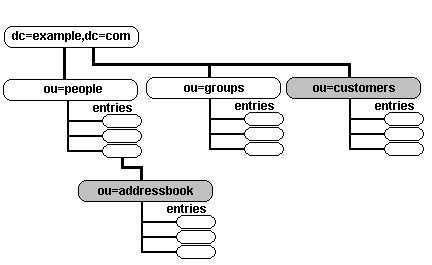
The policy to be adopted is:
All users must be authenticated to access the directory.
All authenticated users can see the Public (under customers branch) Address book.
Only the sales group (salespeople) can write to the customers address book.
The itpeople group will be able to create an addressbook entry under each entry in the people branch.
The owner of an addressbook will be able to read and write to it - no one else can even see the addressbook (except itpeople to create addressbook but not any of its entries). The user will not be able to delete the addressbook entry.
The IT department must be able to update or change the password entry on all directory entries.
Human resources group hrpeople must be able to update or change all user entries except the userpassword - and must not be able to read or change the users addressbook.
This example assumes at least the inetorgperson objectclass (for carlicense and other attributes) and we assume that two groups of users called hrpeople and itpeople exist. Both the addressbook and customers entries use the inteorgperson objectclass:
# ACL Notes
# The following additional notes apply for 2.4:
# 1. attrs is now used instead of attr (to reduce warning messages)
# 2. Removed the ,expand modifier with all regex expressions since
#    2.4 rejected some (but not all) ACL's which contained this modifier
# 3. 2.4 checking is much more rigorous and rejected ACL 8 since it contained
#    attributes to be added later
# 4. If exact or base contains a regular expression substitution then
#    the expand keyword must be used
# ACL1
# OLC (cn=config) form
olcAccess: to attrs=userpassword
  by self       write
  by anonymous  auth
  by group.exact="cn=itpeople,ou=groups,dc=example,dc=com" write
  by *          none
# slapd.conf form
access to attrs=userpassword
  by self       write
  by anonymous  auth
  by group.exact="cn=itpeople,ou=groups,dc=example,dc=com" write
  by *          none

# ACL2
# allow read of addressbook by owner and itpeople; no-one else see it
access to dn.regex="^ou=addressbook,cn=([^,]+),ou=people,dc=example,dc=com$"
    attrs=entry
  by dn.exact,expand="cn=$1,ou=people,dc=example,dc=com" read
  by group.exact="cn=itpeople,ou=groups,dc=example,dc=com" write
  by users none

# ACL3
# allow create of addressbook entry; cannot see entries
access to dn.regex="cn=[^,]+,ou=people,dc=example,dc=com$"
   attrs=children
  by group.exact="cn=itpeople,ou=groups,dc=example,dc=com" write
  by users none break

# ACL4
# allows creation of entries in own addressbook; no-one else can
# access it, needs write access to the ENTRY attribute (ACL5 or ACL6A)
# and the entries CHILDREN (ACL4)
access to dn.regex="ou=addressbook,cn=([^,]+),ou=people,dc=example,dc=com$"
   attrs=children
  by dn.exact,expand="cn=$1,ou=people,dc=example,dc=com" write
  by users none

# ACL5 - required prior to 2.2
# allows creation of entries in own addressbook; no-one else can
# access it, needs write access to the ENTRY attribute (ACL5 or ACL6A)
# and the entries CHILDREN (ACL4)
#access to dn.regex="ou=addressbook,cn=([^,]+),ou=people,dc=example,dc=com$"
#   attrs=entry
#  by dn.regex="cn=$1,ou=people,dc=example,dc=com" write
#  by users none

# ACL6 - required prior to 2.2
# allow access to all entries in own addressbook; no-one else can access it
#access to dn.regex="ou=addressbook,cn=([^,]+),ou=people,dc=example,dc=com$"
#   filter=(objectclass=inetorgperson)
#  by dn.regex="cn=$1,ou=people,dc=example,dc=com" write
#  by users none

# ACL6A - only possible from 2.2+ (combines ACL5 and ALC6)
access to dn.regex="ou=addressbook,cn=([^,]+),ou=people,dc=example,dc=com$"
   attrs=entry,@inetorgperson
  by dn.exact,expand="cn=$1,ou=people,dc=example,dc=com" write
  by users none

# ACL7
# allows sales to create entries in customers
# authenticated user can only read
access to dn.one="ou=customers,dc=example,dc=com"
   attrs=children
  by group.exact="cn=salespeople,ou=groups,dc=example,dc=com" write
  by users read

# ACL8
access to attrs=carlicense,homepostaladdress,homephone
  by self       write
  by group.exact="cn=hrpeople,ou=groups,dc=example,dc=com" write
  by *          none
# ACL9
access to *
  by self       write
  by group.exact="cn=hrpeople,ou=groups,dc=example,dc=com" write
  by users      read
  by *          none
Explanation:
ACL1
- ACL1 access to attrs=password means this policy applies to the attribute userpassword only.
- ACL1 by self write grants the owner of the entry (they authenticated with the userpassword of this entry) write permission to this attribute.
- ACL1 by anonymous auth grants an anonymous user access to this attribute only for authentication purposes (it is used internally by OpenLDAP to authenticate).
- ACL1 by group.exact="cn=itpeople,ou=groups,dc=example,dc=com" write grants write permission to this attribute to any member of the itpeople group. exact improves performance by avoiding the default regex if it were not present.
- ACL1 by * none means that any non-owner or non itpeople group cannot write to userpassword and any other authenticated users cannot read the attribute (no read access is granted).
ACL2
- ACL2 access to dn.regex="^ou=addressbook,cn=([^,]+),ou=people, dc=example,dc=com$" uses a regular expression to apply to entries that start with addressbook (anchored with ^). The variable $1 will contain the users cn (uses parenthesis = ([^,]+)))
- ACL2 attrs=entry a pseudo-attribute that refers to the entry (i.e. addressbook NOT the entries in the addressbook).
- ACL2 by dn.exact,expand="cn=$1,ou=people,dc=example,dc=com" read grants the owner of the entry (they authenticated with the userpassword of this entry) read permission to addressbook. $1 performs substitution with the users cn (obtained from regex above. The effect of this ACL is to allow only the user of the entry to see the private addressbook.
- ACL2 by group.exact="cn=itpeople,ou=groups,dc=example,dc=com" write grants write permission to this entry to any member of the itpeople group. This is required to create the addressbook entry. To allow creation of an entry write permission is required to the entry AND the children of the parent (see ACL3 for children permission).
- ACL2 by users none in this case it means that any non-owner or non itpeople group cannot read the entry (no read access is granted).
ACL3 - children partner of ACL2
- ACL3 access to dn.regex="cn=[^,]+,ou=people,dc=example,dc=com$" uses a regular expression to apply to ANY entries under people (regex is NOT anchored with ^). This is used to give children access to every entry under cn.
- ACL3 attrs=children a pseudo-attribute that refers to the children of the entry under people (i.e. in this case addressbook).
- ACL3 by group.exact="cn=itpeople,ou=groups,dc=example,dc=com" write grants the itpeople group write permission to children of any entry under people. To allow creation of an entry write permission is required to the entry (ACL2) and the child of the parent - this is the children permission part. This ACL and ACL3 allows only itpeople to create and remove the addressbook entry (and NOT the user).
- ACL3 by users none break means that any non-owner or non itpeople group cannot read the entry addressbook (no read access is granted). break is very important since it allows OpenLDAP tests to continue - without break this ACL will fail as OpenLDAP passes through the addressbook level and before it gets to the addressbook entries i.e. the owner (cn), as well as every other user, will be given access permission of none - and hence a write to an entry in the addressbook will fail.
ACL4 - the children partner of ACL5/ACL6/ACL6A
- ACL4 access to dn.regex="ou=addressbook,cn=([^,]+),ou=people,dc=example,dc=com$" uses a regular expression to apply to ANY entries under addressbook (regex is NOT anchored with ^). This ACL gives write permission to the children of the addressbook (the address book entries) required as part of the ability to create an entry. The variable $1 will contain the users cn (uses parenthesis = ([^,]+)).
- ACL4 attrs=children a pseudo-attribute that refers to the children of the entry under people (i.e. in this case entries in the addressbook).
- ACL4 by dn.exact,expand="cn=$1,ou=people,dc=example,dc=com" write. $1 is substituted with the users cn obtained from regex above. This match grants the cn (owner) write permission to children of any entry under cn. To allow creation of an entry write permission is required as the entry (ACL2) and the child of the parent - this is the child permission. This ACL and ACL5/ACL6A allows only cn (owner) to create and remove entries in the addressbook.
- ACL4 by users none means that any non-owner cannot read the addressbook (no read access is granted).
ACL5 - the entry partner of ACL4
- Only required prior to version 2.2. Use ACL6A from 2.2. ACL5 - this is the entry permission partner of ACL4 and is required to allow creating of an new entry in the addressbook. It is exactly the same except for attrs=entry in this ACL. This ACL and ACL4 allows only cn (owner) to create and remove entries IN the addressbook. The order of children and entry are not important.
ACL6 - add any attributes to the addressbook
- Only required prior to 2.2. Use ACL6A from 2.2. ACL6 - this ACL has the same scope and syntax as ACL4 and ACL5 it is present to allow the owner to add any fields in the objectclass inetorgperson by using filter=(objectclass=inetorgperson). This required for OpenLDAP prior to 2.2. In 2.2+ ACL5 and ACL6 may be combined by using the syntax attrs=entry,@inetorgperson. This syntax is not supported prior to OpenLDAP 2.2.
ACL6A - add any attributes to the addressbook
- Only use ACL6A from 2.2, prior to 2.2 ACL5 and ACL6 are required.
- ACL6 - this ACL has the same scope and syntax as ACL4 and it is present to allow the owner to add any fields in the entry objectclass inetorgperson by using attrs=entry,@inetorgperson. This syntax is not supported prior to OpenLDAP 2.2.
ACL7
- ACL7 access to dn.one="ou=customers,dc=example,dc=com" means this policy applies to one level below customers (entries in the public address book).
- ACL7 attrs=children refers to the children of customers only (entries in the public address book).
- ACL7 by group.exact="cn=salespeople,ou=groups,dc=example,dc=com" write grants write permission to entries in the public address book to any member of the salespeople group.
- ACL7 by users read any authenticated user can read the public address book.
ACL8
- ACL8 access to attr=carlicense,homepostaladdress,homephone means this policy applies to these attributes only.
- ACL8 by self write grants the owner of the entry (they authenticated with the userpassword of this entry) write permission to these attributes.
- ACL8 by group.exact="cn=hrpeople,ou=groups,dc=example,dc=com" write grants write permission to this attribute to any member of the hrpeople group.
- ACL8 by * none in this case it means that any non-owner or non hrpeople group cannot write to the attributes and any other authenticated users cannot read the attribute (no read access is granted).
ACL9
- ACL9 access to * Because access directives are additive this directive means this policy applies to all attributes except userpassword, carlicense, homepostaladdress and homephone because they were previously defined to have their own rules.
- ACL9 by self write grants the owner of the entry write permission to the attributes covered by this directive (all). Since ACL1 and ACL2 granted self access to the other attributes the owner can write all the attributes.
- ACL9 by group.exact="cn=hrpeople,ou=groups,dc=example,dc=com" write grants write permission to any member of the hrpeople group to all the attributes in this ACL and in the previous ACL2 to the attributes carlicense, homepostaladdress and homephone but does not grant this group either read or write permission to userpassword.
- ACL9 by users read grants any authenticated user read permission to all the attributes covered by this policy (all except those defined by ACL1 and ACL2). If we had wanted to grant full anonymous read permission (except to those attributes covered by ACL1 and ACL2) we could have used by anonymous read.
- ACL9 by * none in this case it means that any non-owner or non hrpeople group cannot write to any attribute and any non-authenticated users cannot read, search or perform any operations on any entry or attribute.
olcAllows (allow)
allow feature [...]
This global attribute/directive defines features that are permitted by the server. One or more of the following values may be used (separated by white space, for example, space or TAB):
| bind_anon_cred |
Allows a simple bind with credentials but no DN value. If this directive is not specified all such binds are rejected (LDAP_INVALID_CREDENTIALS = 49, x'31). |
| bind_anon_dn |
Allows a simple bind with a DN but no credentials - this is technically an unauthorized bind. If this directive is not specified all such binds are rejected (LDAP_UNWILLING_TO_PERFORM = 53, x'35). |
| bind_v2 |
Allows the server to accept LDAP version 2 binds otherwise they are rejected. |
| prozy_authz_anon |
To be supplied. |
| update_anon |
Allows, subject to ACL controls, anonymous connections to update a DIT. By default anonymous connections, irrespective of the setting of any ACL cannot write to a DIT unless this directive is present. |
Examples:
# slapd.conf fragment
# global
...
allow bind_v2
...

# OLC (cn=config) form
olcAllows: bind_v2
olcArgsFile (argsfile)
Causes OpenLDAP to write the command line arguments with which it was started to the defined file. Example:
# OLC (cn=config) form
olcArgsFile: /var/run/ldap.args

# slapd.conf form
argsfile /var/run/ldap.args
Alternatively you can use a command such as:
ps ax |grep slapd
which will provide the command line args information. If an argsfile directive is not included no args file will be created.
olcAttributeTypes (attributetype)
OpenLDAP - as an artifact of schema processing - allows the definition of one or more attributetypes in the slapd.conf file or olcAttributeTypes in olc (cn=config) systems. attributetype definition is explained in gory detail. It is not clear why you would want to add attributes in this manner using slapd.conf - the preferred method would be to create a user schema file and add this using the include directive. Nevertheless you can if the fancy takes you. In OLC (cn=config) the olcAttributeTypes and olcObjectClasses attribute is used to load all schemas used by OLC (cn=config).
olcConcurrency (concurrency)
Format:
# OLC (cn=config) form
olcConcurrency: integer

# slapd.conf form
concurrency integer
The olcConcurrency (concurrency) attribute/directive if supplied provides a 'hint' to the OpenLDAP thread system. The default is none. Examples:
# OLC (cn=config) form
olcConcurrency: 25

# slapd.conf form
concurrency 25
# hints that 25 threads will be used
# allowing support of 25 concurrent operations
It is not clear what is the relationship between the olcConcurrency (concurrency) attribute/directive and the olcThreads/threads attribute/directive.
olcConnMaxPending (conn_max_pending)
Format:
# OLC (cn=config) form
olcConnMaxPending: integer

# slapd.conf form
conn_max_pending integer
The olcConnMaxPending (conn_max_pending) attribute/directive defines the number of pending (queued) requests within a single anonymous session. If the limit is exceeded the session is closed - but currently queued requests will be processed. The default is 100. Examples:
# OLC (cn=config) form
olcConnMaxPending: 10

# slapd.conf form
conn_max_pending 10
# if more that 10 outstanding requests are queued from a
# single anonymous client session - session will be terminated
olcConnMaxPendingAuth (conn_max_auth)
Format:
# OLC (cn=config) form
olcConnMaxPendingAuth: integer

# slapd.conf form
conn_max_auth integer
The olcConnMaxPendingAuth (conn_max_auth) attribute/directive defines the number of pending (queued) requests within a single authenticated session. If the limit is exceeded the session is closed - but currently queued requests will be processed. The default is 1000. Examples:
# OLC (cn=config) form
olcConnMaxPendingAuth: 100

# slapd.conf form
conn_max_auth 100
# if more that 100 outstanding requests are queued from a
# single authenticated client session - session will be terminated
defaultaccess
Deprecated from OpenLDAP 2.1 - use access to directive. Not supported by OLC (cn=config) other than to allow conversion of slapd.conf files.
The defaultaccess is a catch-all - if you define no access to directive(s) you can use this as global default. The format is:
defaultaccess { none | compare | search | read | write }
The list above is hierarchical to the RIGHT i.e. read access allows search and compare but not write, write will allow read, search and compare. The default if no defaultaccess or access to directives are supplied is:
defaultaccess read
# allows read, search and compare but NOT write
olcDefaultSearchBase (defaultsearchbase)
Format:
# OLC (cn=config) form
olcDefaultSearchBase: dn

# slapd.conf form
defaultsearchbase dn
The olcDefaultSearchBase (defaultsearchbase) attribute/directive if supplied provides a dn that will be used if search with scope of one or sub with a blank DN. The default is the search will be rejected NoSuchObject. Examples:
# OLC (cn=config) form
olcDefaultSearchBase: dc=example,dc=com

# slapd.conf form
defaultsearchbase dc=example,dc=com
# will return search results as if
# the above dn has been supplied instead of blank
When added using OLC (cn=config) this attribute is added to the olcDatabase={-1}frontend,cn=config entry unlike all other global attributes which are added to the cn=config entry.
olcDisallows (disallow)
# OLC (cn=config) form
olcDisallows: feature [...]

# slapd.conf form
disallow feature [...]
This global attribute/directive defines features that are not permitted by the server. One or more of the following keyword values may be used (separated by white space, for example, space or TAB):
| bind_anon |
Prevents anonymous binds, that is, binds without both a DN and credentials (password). In all cases even without this directive a bind with a DN but without credentials will fail (but may be permitted using allow bind_anon_dn directive). Similarly a bind without a DN but with credentials will fail (but may be permitted using allow bind_anon_cred directive). |
| bind_simple |
Disallows any simple binds - either anonymous or authenticated. Use of this keyword means the server will only permit SASL authentication methods. |
| none |
Default value. |
| tls_2_anon |
To be supplied. |
| tls_authc |
To be supplied. |
Examples:
# OLC (cn=config) form
olcDisallows: bind_anon

# slapd.conf form

disallow bind_anon
# server does not permit anonymous binds
olcGentleHUP (gentlehup)
Format:
# OLC (cn=config) form
olcGentleHUP: TRUE | FALSE

# slapd.conf form
gentlehup on | off
The olcgentleHUP (gentlehup) attribute/directive if TRUE (or on) allows OpenLDAP to perform a graceful shutdown when it receives a SIGHUP signal, such as:
kill -HUP PID
OpenLDAP will:
- stop listening to new incoming requests
- continue to process pending or current requests
- return 'unwilling to perform' to pending writes
- shut down when all current operations have terminated
This command is made more effective if olcIdleTimeout/idletimeout and olcTimeLimit/timelimit attributes/directives are in operation. OpenLDAP will as always respond immediately to a SIGTERM signal. Default is FALSE (or off).
Examples:
# OLC (cn=config) form
olcGentleHUP: TRUE

# slapd.conf form
gentlehup on
# allows graceful shutdown to SIGHUP

# OLC (cn=config) form
olcGentleHUP: FALSE

# slapd.conf form
gentlehup off
# default - treats SIGHUP as SIGTERM
olcIdleTimeout (idletimeout)
Format:
# OLC (cn=config) form
olcIdleTimeout: integer

# slapd.conf form
idletimeout integer
The olcIdleTimeout (idletimeout) attribute/directive defines the time in seconds after which an idle client bind connection is forcibly terminated (an unbind operation is forced).
If no olcIdleTimeout (idletimeout) attribute/directive is defined or an period of 0 is used the feature is disabled, that is idle clients bind connections are maintained indefinitely (no unbind operation is forced by the server). Examples:
# OLC (cn=config) form
olcIdleTimeout: 0

# slapd.conf form
idletimeout 0
# do not logout idle clients

# OLC (cn=config) form
olcIdleTimeout: 30

# slapd.conf form
idletimeout 30
# logout idle clients after 30 seconds
Caution: This is a server wide value so that all bind connections are affected by it. If this server is either a replication consumer (using olcSyncRepl/syncrepl with a type value of refreshAndPersist) or a provider (using the overlay syncprov directive with a one of more consumers with a type of refreshAndPersist) then it is highly likely that these links will remain idle for prolonged periods of time. Extreme caution should be used when defining the olcIdleTimeot/idletimeout attribute/directive in either of these conditions because the net effect may be to change such replication connections into type refreshOnly which may not be a welcome side effect.
include
This directive is, by its nature, redundant in OLC (cn=config) configurations and is only supported for slapd.conf conversion purposes. Schemas may be added to olc (cn=config) configurations using this process.
The include directive allows any file to be read in-situ. OpenLDAP performs no checking on this and thus nested include directives can cause problems. The directive format is:
include /path/to/include/file
There are two common uses for this directive:
- including .schema files (normally in /usr/local/etc/openldap/schema or /etc/openldap/schema) which are pre-existing.
- reading files which may contain sensitive information such as passwords which may be protected using chmod to limit access.
Examples:
include /usr/local/etc/openldap/schema/core.schema
# include the distribution core.schema
include /var/myschemas/myschema.schema
# include myschema.schema
include /var/passwords/userpass
# include user password file containing say
# rootpw directive with chmod 0600
olcDbIndex (index)
The index directive of slapd.conf is only effective on initial load of the directory (using ldapadd). If indexes are subsequently changed the directory needs to be re-indexed using slapindex (caution: depending of the version must stop slapd first).
In OLC (cn=config) the attribute used is olcDbIndex which can only appear in an olcDatabase={0}config entry. Additionally re-indexing is done in real time so any change to an attribute immediately triggers an indexing change (slapindex is not required). However, it is not clear using OLC (cn=config) when re-indexing is completed - there is no visible sign to indicate completion.
Format:
# OLC (cn=config) form
olcDbIndex: attrlist | default indices

# slapd.conf form
index attrlist | default indices

# indices = [pres [,approx] [,eq] [,sub] [,special]]
The olcDbIndex/index attribute/directive defines what indexes will be maintained by OpenLDAP. Any number of index parameters may be included. If an attribute does not appear in an index directive it can still be used in a search filter - but if it occurs frequently it will hurt performance - once in a lifetime is not too bad!
attrlist may be either a single attribute or a comma separated list.
The optional parameter default stores the supplied indices and uses them on any subsequent index parameter that does does not have an indices entry. The default value must be defined before any olcDbIndex/index which does not have a indices value. A subsequent default will be used for index parameters following the new default.
pres should be used if use searches of the form 'objectclass=person' or 'attribute=mail' will be used.
approx MUST be used if use searches of the form 'sn~=person' (a 'sounds-like' search) will be used.
eq should be used if searches of the form 'sn=smith' will be used i.e no wildcards are included (uses the EQUALITY rule only).
sub should be used if use searches of the form 'sn=sm*' i.e wildcards are included (uses the SUBSTR rule). This rule may be enhanced by a using subinitial (optimised for 'sn=*s'), subany (optimised for 'sn=*n*') or subfinal (optimised for 'sn=th*'). One or more sub parameters may be included.
special may be either nolang or nosubtypes which are related to subtypes.
Careful attention to what indexes are maintained based on the application requirements will significantly affect directory read performance - conversely there is no point in indexing an attribute if no searches ever access it. If all the searches use EQUALITY rules only then there is no point in indexing for sub. Indexes (indeces) consume memory (more indexes = more memory) and write or modify operations will take longer due to index updates.
Examples:
# simple use of the default value
# OLC (cn=config) form
olcDbIndex: default pres,eq
olcDbIndex: cn,sn,uid

# slapd.conf form
index default pres,eq
index cn,sn,uid

# defines presence and equality indexes for
# attributes cn, sn and uid
# exactly the same as the three index directives below
index cn pres,eq
index sn pres,eq
index uid pres,eq

index cn eq,sub,subinitial
# creates indexes for attribute cn (commonname)
# EQUALITY, SUBSTR searches and further optimises
# for sc=a* type searches

index sn eq,approx,sub
# creates indexes for sn (surname) on
# EQUALITY and SUBSTR searches
# NOTE: The approx index is a waste of time because
#       there is no ORDERING rule for sn approx is present
#       only to illustrate the parameter exists

index mail pres,eq,sub
# creates indexes for attribute mail on
# presence, EQUALITY and SUBSTR

index objectclass eq
# optimises searches of form objectclass=person
See also Performance chapter for a further review of performance.
olcLogFile (logfile)
OpenLDAP logs via syslogd (using LOCAL4) in all cases (see olcLogLevel/loglevel for configuration information on streaming syslogd LDAP messages to a separate file). In addition the olcLogFile (logfile) directive may be used to create a separate file containing just LDAP log information. Even when this directive is used OpenLDAP will only log the information via syslogd. Example:
# OLC (cn=config) form
olcLogFile: /path/to/ldap/log/file

# slapd.conf form
logfile /path/to/ldap/log/file

# file must exist prior to starting OpenLDAP
touch /path/to/ldap/log/file
chown ldap:ldap /path/to/ldap/log/file
olcLogLevel (loglevel)
OpenLDAP logs via syslogd LOCAL4. To stream the LDAP log to a separate file from syslog add a line like this to syslog.conf (normally /etc/syslog.conf):
# add to syslog.conf
local4.* /var/log/ldap.log

# create an empty log file
touch /var/log/ldap.log

# restart syslogd
killall -HUP syslogd
OR
/etc/rc.d/syslogd restart
The above command will log all levels of local4 (OpenLDAP) output to /var/log/ldap.log. Alternatively the olcLogFile/logfile directive may be used.
Note: The -d argument (if present) on the slapd command line overrides any value set in the olcLogLevel/loglevel parameters. When using OLC (cn=config) subsequent attempts to change the log level using olcLogLevel will be saved but not actioned.
The OpenLDAP logging level is set using the following directive:
loglevel number | hex-value | log-name
The possible values for number, hex-value and log-name are:
| number |
hex-value |
log-name |
Logging description |
| -1 |
0xFFFF |
any |
enable all logging |
| 0 |
0x0000 |
- |
logging inhibited - no logging occurs including critical errors. Not recommended. |
| 1 |
0x1 |
trace |
trace function calls |
| 2 |
0x2 |
packets |
debug packet handling |
| 4 |
0x4 |
args |
heavy trace debugging |
| 8 |
0x8 |
conns |
connection management |
| 16 |
0x10 |
BER |
print out packets sent and received |
| 32 |
0x20 |
filter |
search filter processing |
| 64 |
0x40 |
config |
configuration file processing |
| 128 |
0x80 |
ACL |
access control list processing |
| 256 |
0x100 |
stats |
stats log connections/operations/results (default) |
| 512 |
0x200 |
stats2 |
stats log entries sent |
| 1024 |
0x400 |
shell |
print communication with shell backends |
| 2048 |
0x800 |
parse |
entry parsing debugging |
| 4096 |
0x1000 |
cache |
caching (unused) |
| 8192 |
0x2000 |
index |
indexing (unused) |
| 16384 |
0x4000 |
sync |
print syncrepl (replica) logging |
| 32768 |
0x8000 |
none |
A misnomer - it will log messages that are not categorized - specifically including critical messages |
The loglevel directive takes a single value or a space separated list of values, each value may be any combination of number, hex-value or log-name from the table above. The results are OR'd together. It is also possible to set multiple entries in either the number or hex-value as shown in the following examples:
loglevel 255
# sets 1, 2, 4, 8, 16, 32, 64 and 128
# adds all the numbers

loglevel 2176
# 2048 + 128
loglevel 296
# 256 + 32 + 8

# using single hex-value (128)
loglevel 0x80

# multiple hex-values (1 + 128)
loglevel 0x81
# same result as
loglevel 0x1 0x80

# using log-name (single value)
loglevel acl

# multiple log-name values
loglevel acl sync

# combined
loglevel 1 0x40 conns
If no olcLogLevel/loglevel attribute/directive is defined the log defaults to 256 (stats only).
Note: With the -1 setting slapd logs ferocious amounts of data. Reduce this value as quickly as possible to only those items you are interested in or buy new discs - lots of new discs.
olcModuleLoad (moduleload)
A stunning attribute/directive that is the collateral damage of a poorly implemented feature - in this case overlays. What should be automatic based on the configuration, requires manual definition based on a gruesome number of build and configure options which, if RPMs are used, are usually isolated from users. Clearly not from OpenLDAP users.
The olcModuleLoad/moduleload attribute/directive appears in the global section and specifies the name of a dynamically loadable module that is used in the configuration. It is essential if (a) the overlay is dynamic (see below) and (b) the overlay is used (for example in a database directive) or is defined in an overlay directive. The overlay name may be an absolute path name or a simple filename and must include the library suffix such as .la (libtool built library) or .so (shared object libraries). Non-absolute names are searched for in the directories specified by the olcModulePath/modulepath attribute/directive or the PATH, LTDL_LIBRARY_PATH and LD_LIBRARY_PATH if olcModulePath/modulepath is not defined. This directive and the olcModulePath/modulepath attribute/directive are only allowed if the build option --enable-modules (normal for most distributions) is specified.
It should be noted that OpenLDAP modules may be static or dynamic (only dynamic overlays require olcModuleLoad/moduleload directives). As an example to illustrate the difference between static and dynamic, the OpenLDAP configure directive, say, --enable-accesslog=mod builds a separate accesslog overlay and therefore MUST be defined in a olcModuleLoad/moduleload attribute/directive. If, however, the configure directive takes the form --enable-accesslog then this overlay is built into the base slapd - it is built as a static overlay. Specifying a olcModuleLoad/moduleload directive for accesslog in this case will fail since --enable-accesslog inhibits building of the overlay (use ./configure --help from the OpenLDAP's build directory to get a full list of configure options). The best rule of thumb is to look in the directory in which the modules are placed ([bsd] /usr/local/libexec/openldap) [fc] /usr/libexec/openldap or /usr/sbin/openldap) if the module exists and is used it must be defined in a olcModuleLoad/moduleload attribute/directive - else assume it is static. If a module is built with .la and .so suffixes - use .la unless it does not work in which case try .so. If both fail we recommend ritual suicide. Module names of overlays and database directives.
# OLC (cn=config) form
olcModuleLoad: module-name

# slapd.conf form
moduleload module-name

# example - permanent load of the syncprov overlay
# OLC (cn=config) form
olcModuleLoad: syncprov.la

# slapd.conf form
moduleload syncprov.la

# absolute path format
# OLC (cn=config) form
olcModuleLoad: /usr/local/libexec/openldap/syncprov.la

# slapd.conf form
moduleload /usr/local/libexec/openldap/syncprov.la
Note: Both olcModuleLoad and olcModulePath are defined in the cn=modules{0},cn=config entry using the olcModuleList objectClass.
olcModulePath (modulepath)
Defines one or more directories to search for loadable modules (overlays). Multiple paths may be defined in which they are colon-separated (*nix) and semi-colon separated (windows). If not defined the PATH, LTDL_LIBRARY_PATH and LD_LIBRARY_PATH are searched. See also notes on olcModuleLoad/moduleload.
Note: When used in OLC (cn=config) olcModulePath is SINGLE-VALUE. Both olcModuleLoad and olcModulePath are defined in the cn=modules{0},cn=config entry using the olcModuleList objectClass.
olcObjectClasses (objectclass)
OpenLDAP - as an artifact of schema processing - allows the definition of one or more objectclass(es) in the slapd.conf file. objectclass definition is explained here. It is not clear why you would want to add objectclasses in this manner - the preferred method would be to create a user schema file and add this using the include directive. Nevertheless you can if the fancy takes you.
In OLC (cn=config) the attribute used is olcObjectClasses and is used to load schemas required by the olc (cn=config) system.
olcPasswordHash (password-hash)
Allows definition of one or more hash methods used when storing a new password in userPassword with an Extended Modify Password Operation (RFC 3602). Format:
# OLC (cn=config) form
olcPasswordHash: {hash}[,{hash} [, ...]]

# slapd.conf form
password-hash {hash}[,{hash} [, ...]]
The value of hash must be one of the supported methods {SSHA}, {SHA}, {SMD5}, {MD5}, {CRYPT}, or {CLEARTEXT}. The default value is {SSHA}. Example:
# OLC (cn=config) form
olcPasswordHash: {SHA},{SSHA}

# slapd.conf form
password-hash {SHA},{SSHA}
which will set the server-wide default hash to use {SHA) (FIPS-160 with no salt). If multiple values are supplied they must be comma separated with no spaces - otherwise choking sounds are emitted by slapd on loading or - more precisely - not loading.
When used with OLC (cn=config) this attribute appears in/is added to the olcDatabase={-1}frontend,cn=config entry not the global (cn=config) entry.
olcPidFile (pidfile)
Causes OpenLDAP (slapd) to write the PID to the defined file. Example:
# OLC (cn=config) form
olcPidFile:  /var/run/ldap.pid

# slapd.conf form
pidfile /var/run/ldap.pid
The PID can be used to kill or send some other signal to ldap. Alternatively you can use a command such as:
ps ax |grep slapd
which will provide the PID information. If an olcPidFile/pidfile attribute/directive is not included no pid file will be created. Most slapd start/stop/restart scripts only work when there is a PID file and it is in the expected place. You have two alternatives: use a olcPidFile/pidfile attribute/directive to define the expected pid path and happily use all standard scripts; use no olcPidFile/pidfile or use a non-standard path for your system and use a manual stop/start process.
olcReferral (referral)
Format:
# OLC (cn=config) form
olcReferral: uri

# slapd.conf form
referral uri
The olcReferral/referral attribute/directive allows OpenLDAP to return the specified uri as a referral when it cannot find the supplied DN value in any of its database(s)/DITs (defined in a olcSuffix/suffix attribute/directive). Not all clients may be capable of handling the returned uri which should be constructed as a full LDAP URL with as much information as possible and should sensibly point to a site which allows anonymous access using a sensible root DN. Examples:
# OLC (cn=config) form
olcReferral: ldap://ldap.openldap.org/

# slapd.conf form
referral ldap://ldap.openldap.org/
# this URL would attempt to access the rootDSE
# of the openldap site which might not succeed!

# OLC (cn=config) form
olcReferral: ldap://ldap.example.com/dc=example,dc=com??one?(objectclass=*)

# slapd.conf form
referral ldap://ldap.example.com/dc=example,dc=com??one?(objectclass=*)
# the ldap.example.com would be constructed to support these queries
# and return all first level entries supported by all LDAP servers
# at this site - a kind of generic services/scope overview
Note: The olcReferral/referral attribute/directive is used when the server cannot find the DN within its DIT structure. Referrals are normally configured using the referral ObjectClass within the DIT structure. More information and configuration examples of Referrals.
replicationinterval
Obsoleted in 2.4 and only provided in OLC (cn=config) for slapd.conf conversion. Defined in a master and used in slurpd style replication. The directive is read by slurpd and defines the interval in seconds that slurpd will wait before checking the replogfile file for slave updates.
replicationinterval seconds

# example check replogfile every 60 seconds
replicationinterval 60
The directive has a murky genus but seems to have been introduced in OpenLDAP 2.2. It is, like many other things in OpenLDAP, unclear what the default replication interval is if this directive is not present.
olcRequires (require)
# OLC (cn=config) form
olcRequires: policy [...]

# slapd.conf form
require policy [...]
This directive, which may be used globally or within a database section, defines requirements that must be satisfied before any server access is permitted. If used within a database section the value persists until reset (olcRequires: none/require none). Subsequent olcRequires/require attributes/directives which do not reset the olcRequires/require attribute/directive are additive. One or more of the following values may be used (separated by white space, for example, space or TAB):
| authc |
Requires that all DIT access must use LDAP authentication before directory operations are allowed. Use of this value also implies the bind keyword. |
| bind |
Requires that all DIT access must bind before directory operations are allowed. This keyword simply requires binding, which could include anonymous binding, and does not imply any LDAP authentication requirement. |
| LDAPv3 |
Requires that all DIT access must use LDAP version 3 procedures. |
| none |
Default value. Indicates no requirements exist and may be used to reset the value after its use in a database section. In the abscence of any reset (none) the last value of require defined persists for all subsequent database sections and any following olcRequires/require attributes/directives which do not reset the oldRequires/require attribute/directive are additive. |
| SASL |
Mandates that SASL authentication must have occurred prior to DIT operations. Use of this value does not imply LDAP authentication or binding, that is neither authc nor bind are implied. |
| strong |
Mandates that either SASL or TLS procedures have been invoked prior to DIT operations. Use of this value does not imply LDAP authentication or binding, that is neither authc nor bind are implied. |
Examples:
# resets the value of olcRequires/require and forces
# LDAP authentication for this DIT
# OLC (cn=config) form
olcRequires: none authc

# slapd.conf form
require none authc
olcReverseLookup (reverse-lookup)
Format:
# OLC (cn=config) form
olcReverseLookup: TRUE | FALSE

# slapd.conf form
reverse-lookup on | off
The olcReverseLookup/reverse-lookup attribute/directive if TRUE (or on) causes OpenLDAP to use DNS reverse lookup for each client access. The default is FALSE (or off). This attribute/directive is only effective if the build option --enable-rlookups was used. Examples:
# OLC (cn=config) form
oldReverseLookup: TRUE

# slapd.conf form
reverse-lookup on
# causes OpenLDAP to perform a DNS reverse lookup for
# each client access
olcRootDSE (rootDSE)
Format:
# OLC (cn=config) form
olcRootDSE: /path/to/ldif/file

# slapd.conf form
rootDSE /path/to/ldif/file
The olcRootDSE/rootDSE attribute/directive defines an LDIF file containing user defined operational attributes to be added to the existing rootDSE (visible under the subschema subentry). These attributes are additive - in addition to the standard (built-in) attributes.
olcSecurity (security)
# OLC (cn=config) form
olcSecurity: ssf-policy

# slapd.conf form
security ssf-policy [...]
This attribute/directive may be defined in the global section/entry, in which case its scope includes all database sections, or it may be specified within a database section/entry in which case its scope is limited to that DIT only (overrriding any global directives if present). When using secure connections (either TLS or SASL) the olcSecurity/security attribute/directive defines the minimum Security Strength Factor (SSF) applied to either a security type (TLS or SASL) or required to execute a particular type of transaction. One or more ssf-policy values may be defined (separated by spaces) from the following list:
| sasl=n |
If SASL connections are being negotiated then the minimum key length required is defined by n. |
| simple_bind=n |
The server will refuse (LDAP_CONFIDENTIALITY_REQUIRED, 13, x'0D) to accept any bind operations which are not secured by either a TLS or SASL connection with an SSF of n. |
| ssf=n |
If either SASL or TLS connections are being negotiated then the minimum key length required is defined by n. |
| tls=n |
If TLS connections are being negotiated then the minimum key length required is defined by n. |
| update_sasl=n |
The server will refuse to accept any update operations (change. modify, etc.) which are not secured by a SASL connection with an SSF of n. |
| update_ssf=n |
The server will refuse to accept any update operations (change. modify, etc.) which are not secured by either a SASL or a TLS connection with an SSF of n. |
| update_tls=n |
The server will refuse to accept any update operations (change. modify, etc.) which are not secured by a TLS connection with an SSF of n. |
The value of n defines the level of security required expressed as the minimum number of bits in any cryptographic key being used - typically in the range 40 to 256 (normally values would be 40, 56, 64, 128, 164 and 256) depending on the algorithm involved. Thus a value of 1 would indicate that any level of cryptographic security is acceptable while a value of 128 would indicate that a cryptographic algorithm with a key length of 128 or higher will pass but one with a key length of, say, 56 will fail.
olcSchemaDN (schemadn)
Format:
# OLC (cn=config) form
olcSchemaDN: cn=name

# slapd.conf form
schemadn cn=name
The olcSchemaDN/schemadn attribute/directive defines the name of the subschema subentry used by OpenLDAP. The default is 'cn=subschema'. Examples:
# OLC (cn=config) form
olcSchemaDN: cn=ldapsubschema

# slapd.conf form
schemadn cn=ldapsubschema
# changed the name of the subschema subentry from
# (default) subschema to ldapsubschema
It is not at all clear why one would want to use this feature such except, perhaps, to retain compatability with another/previous LDAP implementation.
olcServerID (ServerID)
Format:
# OLC (cn=config) form
olcServerID: number [URL]

# slapd.conf form
serverid number [URL]
Version 2.4+. olcServerID/serverid defines a method by which the server is uniquely identified using either a number (a.k.a SID) or a URL(s). The attribute/directive is used in Multi-master replication supported from OpenLDAP 2.4. The number parameter is an arbitrary 1-3 character number which uniquely defines the server within the Multi-master group. The default value is 000. The server ID (a.k.a SID) is used (as the rid value of the updated (in 2.4) CSN) to uniquely identify a host as the source of an update. If the optional URL form is used the directive may appear multiple times. Many multi-master configurations show all the servers within the multi-master group as being defined with their associated URLs. Experiments have shown this to be not required (the provider information is defined in the syncrepl directive) the number format works perfectly. The key characteristic is that the value defined (either by a number or a URL) uniquely identifies this server over time. Bear in mind two points when selecting this value. First, even though a ServerID number may be currently unique it may not remain unique, for instance, you may subsequently decide to replicate from a server which has already allocated a SID of 001. Second, if the server's cn=config is subsequently replicated to another server which has the same SID the result may be unpredictable. Use of the server's URL may provide a more unique value over time. On the other hand it may not - in which case ritual suicide may be the best option. Finally, there is no relationship between the SID (server ID) and rid parameter used in the olcSyncRepl/syncrepl. Examples:
# OLC (cn=config) form
olcServerID: 001

# slapd.conf form
serverid 001
# or equivalent 1 character form
serverid 1

# URI form
# OLC (cn=config) form
olcServerID: ldap1.example.com

# slapd.conf form
serverid ldap1.example.com
olcSizeLimit (sizelimit)
The olcSizeLimit/sizelimit attribute/directive specifies the number of entries to return to a search request. There are two forms of this command, first form:
# OLC (cn=config) form
olcSizeLimit: integer | unlimited

# slapd.conf form
sizelimit integer | unlimited
Where integer is value between 1 and 65435. unlimited (or -1) places no limits on the number of returned results.
The second form provides more control over the number of returned results and has the following format:
# OLC (cn=config) form
olcSizeLimit: size[.{soft|hard|unchecked}]=integer

# slapd.conf form
sizelimit size[.{soft|hard|unchecked}]=integer
Where integer is the maximum number of entries slapd will return answering a search request. The behaviour of the directive depends on the optional qualifier soft, hard or unchecked as follows:
- If no size limit is explicitly requested by the client, the soft limit is used.
- If the requested size limit exceeds the hard limit, an "Administrative limit exceeded" is returned.
- If the hard limit is set to 0 or to the keyword "soft", the soft limit is used in either case.
- If the hard limit is set to -1 or to the keyword "none", no hard limit is enforced.
- Explicit requests for size limits smaller or equal to the hard limit are honored.
- The unchecked qualifier sets a limit on the number of candidates a search request is allowed to examine. If the selected candidates exceed the unchecked limit, the search will abort with LDAP_UNWILLING_TO_PERFORM (53, x'35). If unchecked is set to -1 or to the keyword "none", no limit is applied (the default).
- If no qualifier is present, the value is assigned to the soft limit, and the hard limit is set to zero, to preserve the original behavior.
If no sizelimit directive is defined the default is 500. Examples:
# OLC (cn=config) form
olcSizeLimit: 0

# slapd.conf form
sizelimit 0
# do not logout idle clients

# OLC (cn=config) form
olcSizeLimit: 100

# slapd.conf form
sizelimit 100
# limit responses to a maximum of 100

# extended form
# OLC (cn=config) form
olcSizeLimit: size=100

# slapd.conf form
sizelimit size=100
# behaves exactly the same as sizelimit 100

# OLC (cn=config) form
olcSizeLimit: size.soft=100 size.hard=200

# slapd.conf form
sizelimit size.soft=100 size.hard=200
# if no client limit = 100
# if client limit > 200 - rejected
# no limits to number of candidates searched

# OLC (cn=config) form
olcSizeLimit: size.unchecked=1000

# slapd.conf form
sizelimit size.unchecked=1000
# if no client limit = 500 max returned (default)
# else client limit
# if client limit > 500 - rejected (default)
# if more than 1000 candidates - rejected
olcSockbufMaxIncoming (sockbuf_max_incoming)
Format:
# OLC (cn=config) form
olcSockbufMaxIncoming: bytes

# slapd.conf form
sockbuf_max_incoming bytes
The olcSockbufMaxIncoming/sockbuf_max_incoming attribute/directive defines the maximum PDU (block size) in bytes for incoming anonymous sessions. The default is 262143. Examples:
# OLC (cn=config) form
olcSockbufMaxIncoming: 5000

# slapd.conf form
sockbuf_max_incoming 5000
# limits the max PDU (block size) to 5000 bytes
# else rejected
olcSockbufMaxIncomingAuth (sockbuf_max_incoming_auth)
Format:
# OLC (cn=config) form
olcSockbufMaxIncomingAuth: integer

# slapd.conf form
sockbuf_max_incoming_auth integer
The olcSockbufMaxIncomingAuth/sockbuf_max_incoming_auth attribute/directive defines the maximum PDU (block size) for incoming authenticated sessions. The default is 4194303. Examples:
sockbuf_max_incoming_auth 5000
# limits the max PDU to 5000 bytes
# else rejected
olcThreads (threads)
Format:
# OLC (cn=config) form
olcThreads: integer

# slapd.conf form
threads integer
The olcThreads/threads attribute/directive defines the number of threads that can be used by OpenLDAP. The higher this value the larger the number of concurrent requests that can be handled. The default value is 16. Examples:
# OLC (cn=config) form
olcThreads: 25

# slapd.conf form
threads 25
# allows a maximum of 25 threads
It is not clear what is the relationship between the olcThreads/threads attribute/directive and the olcConcurrency/concurrency attribute/directive.
olcTimeLimit (timelimit)
The olcTimeLimit/timelimit attribute/directive specifies the time in seconds slapd will spend answering a search request. If a request is not finished in this time, a result indicating an exceeded timelimit will be returned to the client. There are two forms of this command, first form:
# OLC (cn=config) form
olcTimeLimit: seconds | unlimited

# slapd.conf form
timelimit seconds | unlimited
Where seconds is the number of seconds slapd will spend answering a search request, unlimited or -1 applies no limits to search time.
The second (extended) form provides more control over the number of returned results and has the following format:
# OLC (cn=config) form
olcTimeLimit: time[.{soft|hard}]=seconds [..]

# slapd.conf form
timelimit time[.{soft|hard}]=seconds [..]
Where seconds is the number of seconds slapd will spend answering a search request. The optional qualifiers soft and hard determine the actions as follows:
- If no time limit is explicitly requested by the client, the soft limit is used.
- If the requested time limit exceeds the hard limit, an "Administrative limit exceeded" is returned.
- If the hard limit is set to 0 or to the keyword "soft", the soft limit is used in both cases.
- If the hard limit is set to -1 or to the keyword "none", no hard limit is enforced.
- Explicit requests for time limits smaller or equal to the hard limit are honored.
- If neither qualifier is defined, the value is assigned to the soft limit, and the hard limit is set to zero, to preserve the original behavior.
If no timelimit directive is defined a time limit of 3600 is applied (1 hour). Examples:
# OLC (cn=config) form
olcTimeLimit: 15

# slapd.conf form
timelimit 15
# allow 15 seconds to complete the search
# else return time limit exceeded error

# OLC (cn=config) form
olcTimeLimit: 0

# slapd.conf form
timelimit 0
# disables the feature (default = 3600)
timelimit unlimited
# no time limit is applied

# extended format
# OLC (cn=config) form
olcTimeLimit: time=15

# slapd.conf form
timelimit time=15
# behaves exactly the same as timelimit 15

# OLC (cn=config) form
olcTimeLimit: time.soft=15 time.hard=20

# slapd.conf form
timelimit time.soft=15 time.hard=20
# client defines no limit 15 seconds is used
# if client requests time limit > 20 - rejected

# OLC (cn=config) form
olcTimeLimit: time.soft=15

# slapd.conf form
timelimit time.soft=15
# client defines no limit 15 seconds is used
# if client requests any time limit - accepted

# OLC (cn=config) form
olcTimeLimit: time.soft=15 time.hard=none

# slapd.conf form
timelimit time.soft=15 time.hard=none
# client defines no limit 15 seconds is used
# if client requests any time limit - accepted
6.3.1 TLS Directives (OLC (cn=config) and slapd.conf)
TLS Overview - What is a TLS Server/Client?
OpenLDAP differentiates between the attributes/directives necessary for a (TLS) Server and those of a (TLS) Client. The terms LDAP Clients are applied to, say, an LDAPBrowser or a Mail Client which reads an LDAP addressbook whereas OpenLDAP systems are Servers. However, TLS makes it a bit more complicated. What are called LDAP servers can in fact be TLS Servers or TLS Clients or even both TLS Clients and TLS Servers - in the latter case they will require both TLS server and TLS client attributes/directives. The key difference is that a TLS Server never initiates communication whereas a TLS Client always does. This difference occurs at the database entry/section level thus one database entry/section in a slapd.conf (or olcDatabase in cn=config) could be a TLS Server and another a TLS Client. Here are some examples:
An LDAP system which only provides access to external clients, has no syncrepl attributes/directives in any database entry/section and has no overlay chain attributes/directives is only a TLS server.
A database entry/section containing a overlay syncprov entry/directive in a master-slave replication configuration is always a TLS server (the consumer always connects to the provider).
A database entry/section containing a olcSyncrepl/syncrepl attribute/directive in a master-slave replication configuration is always a TLS Client (the consumer always connects to the provider).
A database entry/section containing a olcSyncrepl/syncrepl attribute/directive and a overlay syncprov entry/directive in a multi-master replication configuration is both a TLS Client (for the olcSyncrepl/syncrepl attribute(s)/directive(s) - consumer) and a TLS Server (for the syncprov - provider).
A LDAP server containing a overlay chain entry/directive may be both a TLS Client (for the chaining connections) and a TLS Server (for normal user access).
An LDAP Client such as an LDAP browser, Mail Client etc. you will be delighted to know is always a TLS Client!
A number of worked TLS/SSL configuration examples are defined in Chapter 15. All TLS Server directives are added to cn=config entry or the global section of slapd.conf. All TLS Client directives are added to ldap.conf.
olcTLSCACertificateFile (TLSCACertificateFile)
# OLC (cn=config) form
olcTLSCACertificateFile: /path/to/CA/cert/file.pem

# slapd.conf form
TLSCACertificateFile /path/to/CA/cert/file.pem
TLS Server attribute/directive. Defines the path and file name of the Certificate Authority (CA) certificate (a.k.a the root certificate) and is only used to verify an incoming certificate. This directive is only required when a client certificate is accepted or required by the server (olcTLSVerifyClient/TLSVerifyClient is one of try|demand|allow) - if the olcTLSVerifyClient/TLSVerifyClient default (never) is used this directive is not required. If required it points to a CA root certificate which must be obtained from the X.509 certificate supplier (the CA). This file is normally in PEM (Privacy enhanced Mail) format (and typically has a .pem suffix or, if obtained from an MSIE browser installation, may have a .cer suffix). If the operational X.509 certificate (defined in olcTLSCertificateFile/TLSCertificateFile is signed by intermediate authorities then all these certificates must be present within this PEM format file. PEM is a text format and multiple certificates can edited into the same file in any order - see PEM format notes and samples. This file does not contain sensitive information and therefore no special permissions are required (an X.509 certificate contains only a public key).
Note: If the LDAP server is acting as an TLS Client, for example it has a olcSyncrepl/syncrepl attribute/directive the required CA (root) certificate is added as a TLS_CACERT directive to ldap.conf.
olcTLSCertificateFile (TLSCertificateFile)
# OLC (cn=config) form
olcTLSCertificateFile: /path/to/cert/file.pem

# slapd.conf form
TLSCertificateFile /path/to/cert/file.pem
TLS Server attribute/directive. Defines the path and file name of the operational X.509 server certificate (the subject DN's cn= attribute will denote the URL name of the LDAP server, for example, ldap.example.com) which contains the public key that will be used in the key exchange part of the TLS protocol. This file is normally in PEM (Privacy Enhanced Mail) format (and typically has a .pem suffix). PEM is a text format - see PEM format notes and samples. If this is a self-signed certificate then a olcTLSCACertificateFile/TLSCACertificateFile may, or may not be required depending how the certificate was created. OpenLDAP self-signed certificate configuration examples. This file does not contain sensitive information and therefore no special access permissions are required (an X.509 certificate contains only the public key).
olcTLSCertificateKeyFile (TLSCertificateKeyFile)
# OLC (cn=config) form
olcTLSCertificateKeyFile: /path/to/private/key/file.pem

# slapd.conf form
TLSCertificateKeyFile /path/to/private/key/file.pem
TLS Server attribute/directive. Defines the location of the private key whose public key is contained in the server certificate (defined in olcTLSCertificateFile/TLSCertificateFile) and which is used to decode the bulk data cipher pre-master key sent by the TLS Client during the TLS session handshake. It will typically have a .pem suffix. This private key is extremely sensitive data and ideally should be maintained in a separate directory structure with limited read permissions and, as a minimum, the file itself should have read-only permission (0400) for the account under which OpenLDAP runs - normally ldap. OpenLDAP self-signed certificate configuration examples. Example:
# OLC (cn=config) form
olcTLSCertificateKeyFile: /certs/ldapcert.pem

# slapd.conf form
TLSCertificateKeyFile /certs/ldapcert.pem

# minimum security - file only permissions
# assuming ldap account
chown ldap:ldap /certs/ldapcert.pem
chmod 0400 /certs/ldapcert.pem

# directory plus file security
chown -R ldap:ldap /certs/*
chmod -R 0400 /certs/*
olcTLSCipherSuite (TLSCipherSuite)
# OLC (cn=config) form
olcTLSCipherSuite: cipher-list

# slapd.conf form
TLSCipherSuite cipher-list
TLS Server attribute/directive. Optional directive and defaults to the value ALL (see below). Defines one or more cipher suites to be used during the TLS handshake negotiation. During this negotiation the TLS Client offers a list of cipher suites and the TLS server will accept the first cipher suite defined in its list that matches one from the client. The term cipher-list used in this directive description defines a list (in OpenSSL format) that will be converted by OpenSSL routines to a list of cipher suites in TLS/SSL format. More information about the cipher-list format may be obtained from the OpenSSL ciphers documentation. OpenLDAP self-signed certificate configuration examples.
The list of acceptable cipher-suites (and hence the cipher-list) is determined by the format of the public key contained within the X.509 certificate defined by the olcTLSCerificateFile/TLSCertificateFile attribute/directive. Thus, if this certificate contains an RSA public key then only RSA public key cipher suites can be used for the key-exchange/authentication parts of the TLS handshake.
If mutal certificate validation is required (both the TLS Server and the TLS Client send certificates) then the public-key format of both the TLS Server and the TLS CLient certificates must either be known or the value ALL used (see commands below).
Individual items in the cipher-list are separated by a colon (:), comma or space. The following is a subset of RSA TLSv1 names that could appear in a cipher-list and their equivalent TLS cipher suite text values (they are converted to hex values when sent on the wire. Note: The word EXPORT (or EXP) that appears in some of the following names refers to export strength ciphers, that is, some ciphers are only permitted in certain countries (see US Dept of Commerce Bureau of Industry and Security(BIS) and the Wassenaar Arrangement) and should be considered when configuring TLS systems that will be used internationally.
TLS CIPHER-SUITE NAME                   OPENSSL CIPHER-LIST NAME
==============================          ===================
TLS_RSA_WITH_NULL_MD5                   NULL-MD5
TLS_RSA_WITH_NULL_SHA                   NULL-SHA
TLS_RSA_EXPORT_WITH_RC4_40_MD5          EXP-RC4-MD5
TLS_RSA_WITH_RC4_128_MD5                RC4-MD5
TLS_RSA_WITH_RC4_128_SHA                RC4-SHA
TLS_RSA_EXPORT_WITH_RC2_CBC_40_MD5      EXP-RC2-CBC-MD5
TLS_RSA_WITH_IDEA_CBC_SHA               IDEA-CBC-SHA
TLS_RSA_EXPORT_WITH_DES40_CBC_SHA       EXP-DES-CBC-SHA
TLS_RSA_WITH_DES_CBC_SHA                DES-CBC-SHA
TLS_RSA_WITH_3DES_EDE_CBC_SHA           DES-CBC3-SHA
TLS_RSA_WITH_AES_128_CBC_SHA            AES128-SHA
TLS_RSA_WITH_AES_256_CBC_SHA            AES256-SHA
TLS_RSA_EXPORT1024_WITH_DES_CBC_SHA     EXP1024-DES-CBC-SHA
TLS_RSA_EXPORT1024_WITH_RC4_56_SHA      EXP1024-RC4-SHA
To list the cipher-list values supported by the local OpenSSL installation use:
# ALL valid ciphers
openssl ciphers -v ALL

# ALL valid ciphers for TLSv1 only
openssl ciphers -v -tls1 ALL

# valid ciphers for TLSv1 only that use RSA
# key exchange/authentication algorithm
openssl ciphers -v -tls1 RSA

# valid ciphers for TLSv1 only that use RSA
# key exchange/authentication algorithm
# exclude export strength ciphers
openssl ciphers -v -tls1 RSA:!EXP
# NOTE: on certain shells you need to escape !
openssl ciphers -v -tls1 RSA:\!EXP

# as above but also exclude NULL suites
openssl ciphers -v -tls1 RSA:!EXP:!NULL
# NOTE: on certain shells you need to escape !
openssl ciphers -v -tls1 RSA:\!EXP:\!NULL

# valid ciphers for TLSv1 only that use RSA
# key exchange/authentication algorithm
# only export strength ciphers
openssl ciphers -v -tls1 RSA:EXP
# OR
openssl ciphers -v TLSv1+RSA:EXP
When used with olcTLSCipherSuite/TLSCipherSuite either the generic parameters shown with openssl ciphers command above can be used (in which case the order of preference is defined by openssl) or an explicit list of ciphers can be defined in order of preference. One or more of the supported items in the cipher-list must be supported by the TLS Client. The cipher suite matching algorithm (which cipher suite is selected) is the first (highest preference) cipher suite provided by the client which is also supported by the server becomes the negotiated (session) cipher suite. The following examples use the TLSv1 (SSLv3) subset only:
# Cipher-list contains only RSA based
# authentication and key-exchange suites
# supported by TLSv1 (and SSLv3)

# OLC (cn=config) form
olcTLSCipherSuite: TLSv1+RSA

# slapd.conf form
TLSCipherSuite TLSv1+RSA

# Cipher-list contains only RSA based
# authentication and key-exchange suites
# supported by TLSv1 (and SSLv3)
# excludes EXPORT and NULL suites
# OLC (cn=config) form
olcTLSCipherSuite: TLSv1+RSA:!EXPORT:!NULL

# slapd.conf form
TLSCipherSuite TLSv1+RSA:!EXPORT:!NULL

# Ordered list of RSA based
# authentication and key-exchange suites
# OLC (cn=config) form
olcTLSCipherSuite: DES-CBC-SHA:DES-CBC3-SHA:RC4-SHA:RC4-MD5

# slapd.conf form
TLSCipherSuite DES-CBC-SHA:DES-CBC3-SHA:RC4-SHA:RC4-MD5

# All ciphers excluding NULL
# OLC (cn=config) form
olcTLSCipherSuite: ALL:!NULL

# slapd.conf form
TLSCipherSuite ALL:!NULL

# Default equivalent value if not defined
# OLC (cn=config) form
olcTLSCipherSuite: ALL

# slapd.conf form
TLSCipherSuite ALL
Note: OpenSSL supports a number of cipher suites which may result in NULL bulk data and MAC values (if that is the only mutually supported value between the Server and Client). This means that while authentication is performed securely all data is subsequently sent in the clear. To prevent this from occurring either use the !NULL value in the cipher-list or define an explicit list that excludes NULL ciphers.
olcRandFile (TLSRandFile)
# OLC (cn=config) form
olcTLSRandFile: /path/to/random/file/name

# slapd.conf form
TLSRandFile /path/to/random/file/name
TLS Server attribute/directive. Most *nix systems, such as Linux and BSD, support either /dev/urandom or /dev/random therefore this attribute/directive is not typically required. The attribute/directive may also be used to specify an alternative source of random data if either specialized requirements exist or /dev/urandom (/dev/random) is an unreliable source due to its use by other applications. If defined it specifies a file containing random bits. Alternative forms acceptable to OpenSSL (used by OpenLDAP for its TLS implementation) may be found in the OpenSSL FAQ.
olcTLSHDParamFile (TLSEphemeralDHParamFile)
# OLC (cn=config) form
olcTLSHDParamFile: /path/to/file

# slapd.conf form
TLSEphemeralDHParamFile /path/to/file
TLS Server attribute/directive. This attribute/directive specifies the file that contains parameters for Diffie-Hellman ephemeral key exchange. This directive is only required if a DSA/DSS certificate is contained in the olcTLSCertificateFile/TLSCertificateFile (and olcTLSCertificateKeyFile/TLSCertificateKeyFile points to a DSA/DSS key). Parameters can be generated using the following command:
openssl dhparam [-dsaparam] -out <filename> <numbits>
Further information on DH parameters (dhparam) can be obtained from the openssl site.
olcTLSVerifyClient/TLSVerifyClient
# OLC (cn=config) form
olcTLSVerifyClient: never | allow | try | demand

# slapd.conf form
TLSVerifyClient  never | allow | try | demand
TLS Server attribute/directive. TLS allows for server only authentication (only the server has an X.509 certificate) or mutual authentication (both the client and server have X.509 certificates). olcTLSVerifyClient/TLSVerifyClient defines how the TLS server will implement mutual X.509 certificate authentication: never (default) indicates that the server will never request a client certificate; allow indicates the server will request a client certificate and if one is not provided the session will continue normally, if a client certificate is provided but cannot be verified (a corresponding CA (root) certificate cannot be found) then the certificate will be ignored and the session will continue normally; try indicates the server will request a client certificate and if none is provided the session will continue normally, if a client certificate is provided but cannot be verified (a corresponding CA (root) certificate cannot be found) the session will be terminated; demand indicates the server will request a client certificate and if none is provided the session will terminate, if the client certificate cannot be verified (a corresponding CA (root) certificate cannot be found) the session will also be terminated. The default is never.
6.4 Backend Section Directives (OLC (cn=config) and slapd.conf)
backend
Format:
backend type
The backend directive defines the name of the backend to be used. In OLC (cn=config) the backend is defined by an entry of the form olcBackend={Z}type,cn=config (where Z is an ordered set sequence number) using the olcBackendConfig objectClass. The full list of supported backend types is exactly the same as for the olcDatabase/database attribute/directive - see the note below.
Example:
backend bdb
# uses the Berkeley (Oracle) Database
Note: This entry/directive appears to be not strictly required - viable OLC (cn=config) and slapd.conf configurations can be created by omitting it entirely - indeed our configurations, OLC (cn=config) or slapd.conf) never use a backend. It is especially confusing since it should appear immediately before a database entry/directive with exactly the same value. But hey, what do we know. Perhaps the OpenLDAP designers had an idea for a set of 'generic parameters' that would apply to all databases minimising the need for typing (good idea). However, since many (most) LDAP installations use a single DIT (and hence database entry/section) little is, in practice, gained. In OLC (cn=config) the objectClass used is, essentially, an empty placeholder.
6.5 Database Section Directives (OLC (cn=config) and slapd.conf)
The attributes/directives in the database section consist of general attributes/directives that relate to almost all database types and specific attributes/directives which relate to the type, such as, bdb.
- olcAccess (access to)
- database entry/directive
- olcDbIndex (index)
- olcMirrorMode (mirrormode)
- overlay entry/directive
- olcReadOnly (readonly)
- replica
- replogfile
- olcRootDN (rootdn)
- olcRootPW (rootpw)
- olcSuffix (suffix)
- olcSyncrepl (syncrepl)
- updatedn
- olcUpdateRef (updateref)
Database Entry/Directive
Format:
# slapd.conf form
database type
The database entry/directive defines the beginning of a DIT and how it is mapped onto the file system.
In OLC (cn=config) databases are entries of the form olcDatabase={Z}type,cn=config. Description of the layout/organization of the cn=config DIT. Usage notes on Adding/Deleting Databases.
The following are valid type values supported by OpenLDAP:
| type |
Description |
| bdb |
Oracle's Berkeley Database - historically preferred OpenLDAP option (mdb now preferred). bdb specific options. Dynamic olcModuleLoad/moduleload name = back_bdb.la or back_bdb.so. Beware: there appears to be a tendency to also use the version number in the modulename, for example, back_hdb-2.4.so |
| config |
This a special entry that enables run-time configuration of OpenLDAP using a LDAP browser or LDIF files using the hard codes DIT cn=config. Configuring and using the cn=config feature). |
| dnssrv |
Not really a database but allows slapd to supply referrals by interrogating the DNS SRV records based on a specific suffix. dnssrv specific options. |
| hdb |
Oracle's Berkeley Database - historically preferred OpenLDAP option (mdb now preferred). Exactly the same as bdb except it uses hierarchical layout - if you ever need to perform subtree renames this is the module for you. If you did not understand the last sentence use bdb instead. hdb (same as bdb) specific options. Dynamic olcModuleLoad/moduleload name = back_hdb.la or back_hdb.so. Beware: there appears to be a tendency to also use the version number in the modulename, for example, back_hdb-2.4.so |
| mdb |
Preferred OpenLDAP option. Uses an embedded, bespoke database system and removes Oracle dependancy. mdb specific options. Dynamic olcModuleLoad/moduleload name = back_mdb.la or back_mdb.so. Beware: there appears to be a tendency to also use the version number in the modulename, for example, back_mdb-2.4.so |
| ldap |
Allows LDAP to follow (resolve) referrals rather than simply returning a referral. ldap specific options. Dynamic olcModuleLoad/moduleload name = back_ldap.la or back_ldap.so. Beware: there appears to be a tendency to also use the version number in the modulename, for example, back_ldap-2.4.so |
| ldbm |
LDAP DBM - May use any one of BDB, GNU DBM, MDBM or NDBM. ldbm specific options. Obsoleted from 2.4. |
| meta |
Allows LDAP to follow (resolve) referrals rather than simply returning a referral. An enhanced version of the ldap backend allowing multiple servers and masquerading of naming contexts (DITs). meta specific options. Dynamic olcModuleLoad/moduleload name = back_meta.la or back_meta.so. Beware there appears to be a tendency to also use the version number in the modulename, for example, back_meta-2.4.so |
| monitor |
LDAP backend that maintains status information about slapd. monitor specific options. Dynamic olcModuleLoad/moduleload name = back_monitor.la or back_monitor.so. Beware there appears to be a tendency to also use the version number in the modulename, for example, back_monitor-2.4.so |
| null |
None. LDAP equivalent of /dev/null. |
| passwd |
Very specific configuration which maps searches to the system passwd file. |
| perl |
Allows LDAP to map requests directly to a PERL object to handle them. |
| shell |
Allows LDAP to map requests through a shell interface and run an external program - a poor man's backend API. |
| sql |
Allows LDAP to use ODBC to map a RDBMS solution onto LDAP - an RDBMS wrapper. sql specific options. |
Examples:
slapd.conf form
database bdb
# uses the Berkeley (sleepy cat) Database
olcMirrorMode (mirrormode)
# OLC (cn=config) form
olcMirrorMode: TRUE | FALSE

# slapd.conf form
mirrormode TRUE | FALSE
The olcMirrorMode/mirrormode attribute/directive is theoretically used to indicate that the database is running in "mirrormode" - a variation on multi-mastering developed prior to the availability of N-way multi-mastering with 2.4+. In a multi-master configuration olcMirrorMode/mirrormode TRUE must be present. In the case of slapd.conf this directive must appear AFTER ALL SYNCREPL DIRECTIVES, in every master database section to permit writes. In all cases (slapd.conf and OLC (cn=config)) failure to add this directive will cause write operations to fail in a multi-mastered DIT (one which has both a olcSyncRepl/syncrepl attribute/directive and a overlay syncprov entry/directive). Examples:
# slapd.conf example of positioning
# when used with multi-mastering
# global directives
...

# DIT (database) section fragment
database bdb
...
# first master provider
syncrepl
 ...
# second master provider
syncrepl
 ...
# provider definition
overlay syncprov
...
# after ALL syncrepl directives
mirrormode TRUE
olcOverlay (overlay)
The overlay entry/directive indicates the use of an overlay (or extension). In the case of slapd.conf it is defined in a database section and should always be defined after all other database section directives. Each overlay directive will be followed by one or more overlay specific directives which are described by the overlays documentation (see below). Multiple overlay directives may be defined for each database section (each followed by one or more overlay specific directives) and in this case they will executed in the reverse order to that in which they are defined - that is the overlay defined last will be executed first.
In OLC (cn=config) each overlay is a child entry of the database entry to which it applies and will have a form of olcOverlay={Z}name,olcDatabase={z}type,cn=config. Description of the layout/organization of the cn=config DIT. Usage notes on Adding/Deleting Overlays.
In slapd.conf the overlay directive has the following format:
# slapd.conf form
overlay overlay-name

# example - two overlays with directives
# (overlay accesslog processed first)

overlay syncprov
syncprov-checkpoint 10 100
...
overlay accesslog
logdb cn=accesslog
...
The following defines an incomplete list of overlay-names (complete list use 'man slapd.overlays' 2.4+):
| accesslog |
Access Logging. Saves the changes to a DIT as a series of entries in a separate DIT that can be interrogated. This module is required if delta synchronization is used. Parameters and configuration. More info also use 'man slapo-accesslog'. Dynamic olcModuleLoad/moduleload name = accesslog.la or accesslog.so. |
| chain |
Chaining. Allows referral objects within a DIT to be chased (or chained) such that the result may be returned to the client rather than a simple referral (More information. Parameters and configuration. More info use 'man slapo-chain'. Dynamic olcModuleLoad/moduleload name = chain.la or chain.so |
| dynlist |
Dynamic Groups. A non-standard (there is no RFC) but widely implemented feature whereby groups may be created dynamically using an LDAP query rather than statically using the groupOfNames objectClass. Parameters and configuration. Example configuration and usage. More info use 'man slapo-dynlist'. Dynamic olcModuleLoad/moduleload name = dynlist.la or dynlist.so. |
| pcache |
Proxy caching. Allows an LDAP server to sit in front of a series of LDAP servers and re-direct requests. Parameters and configuration. More info use 'man slapo-pcache'. Dynamic olcModuleLoad/moduleload name = pcache.la or pcache.so. |
| ppolicy |
Password Policy. Provides mechanisms to control the use of passwords such as password aging, mandatory resets etc. Parameters and configuration. More info use 'man slapo-ppolicy'. Dynamic olcModuleLoad/moduleload name = ppolicy.la or ppolicy.so. |
| rwm |
DN re-write. Provides capabilities to rewrite DN before use. Parameters and configuration. More info use 'man slapo-rwm'. |
| syncprov |
Controls the provision of synchronization controls in a syncrepl provider. This module is required in the master (provider) of a olcSynrepl/syncrepl (consumer). Parameters and configuration. More info use 'man slapo-syncprov'. Dynamic olcModuleLoad/moduleload name = syncprov.la or syncprov.so. |
olcReadOnly (readonly)
# OLC (cn=config) form
olcReadOnly: TRUE | FALSE

# slapd.conf form
readonly on | off
The olcReadOnly/readonly attribute/directive disables modify requests (they will return error 53 'unwilling to perform') making the DIT 'read-only'. When operating as a slave DIT (More information and configuration examples of Replication) the DIT is automatically placed in read only mode for all servers except that specified by an olcUpdateDN/updatedn attribute/directive (slurp replication) or that do not have a olcSyncrepl/syncrepl attribute/directive (syncrepl replication) and this directive MUST NOT be present. Example:
# disable modify operations for this DIT
# OLC (cn=config) form
olcReadOnly: TRUE

# slapd.conf form
readonly on
replica
Obsoleted in OpenLDAP 2.4, in OLC (cn=config) only supported to enable slapd.conf conversion. The replica directive is used (together with the replogfile directive) to describe one or more slave servers used in slurpd DIT replication. This directive appears only in the Master DIT definition (database section). The replica directive defines the location and access details of each SLAVE copies of the DIT. More information and configuration examples of Replication. The replica directive is only valid in OpenLDAP up to version 2.3 (using slurpd style replication). In version 2.4 the replica directive was obsoleted and replaced with the olcsyncrepl/syncrepl attribute/directive The generic format of the replica directive is:
replica uri=ldap[s]://hostname[:port]
 [bindmethod={simple|kerberos|sasl}]
 ["binddn=DN"]
 [saslmech=mech]
 [authcid=identity]
 [authzid=identity]
 [credentials=password]
 [srvtab=filename]
The uri= parameter specifies the scheme, host and optionally a port where the slave DIT instance is located. Either a domain name or IP address may be used for hostname. If port is not given, the standard LDAP port number (389 -ldap or 636 -ldaps) is used.
The binddn= parameter defines the DN (in quoted string format) to bind to when updating the slave DIT server instance of the Master. It must be a DN which has read/write access to the slave slapd's database and must also match the updatedn directive in the slave servers slapd.conf file. For reasons of security it is recommended that this DN should not be the same as the rootdn of the master database (though it can be). If the binddn is not the rootdn then it must point to a valid entry in the DIT with a userPassword (or authPassword) attribute.
The bindmethod may be simple or kerberos or sasl and defines the authentication method to be used when updating the slave copy of the DIT. Simple authentication is not recommended unless adequate integrity and privacy protections are in place (for example TLS or IPSEC). Simple authentication requires specification of binddn and credentials parameters.
Kerberos authentication is deprecated in favor of SASL authentication mechanisms, in particular the KERBEROS_V4 and GSSAPI mechanisms. Kerberos authentication requires binddn and srvtab parameters. It is not described further.
SASL authentication is generally recommended. SASL authentication requires specification of a mechanism using the saslmech parameter. Depending on the mechanism, an authentication identity and/or credentials can be specified using authcid and credentials respectively. The authzid parameter may be used to specify an authorization identity.
If multiple slave servers are required then a replica directive must defined for each slave instance.
Examples:
# simple security to slave located at ldap-rep1.example.com
# with a cleartext password
replica uri=ldap://ldap-rep1.example.com bindmethod=simple
  binddn="uid=admin,ou=admin,dc=example,dc=com" credentials=guess

# simple security to slave located at ldap-rep1.example.com
# with a cleartext password
replica uri=ldap://ldap-rep1.example.com bindmethod=simple
  binddn="uid=admin,ou=admin,dc=example,dc=com"
  credentials=dirtysecret
replogfile
Obsoleted in OpenLDAP 2.4, in OLC (cn=config) only supported to enable slapd.conf conversion. The replogfile directive is used (together with the replica directive) to describe one or more slave servers used in slurpd style DIT replication. This directive appears only in the Master DIT definition (database section). The replogfile directive defines the location of the file used to store updates that slurpd will send to one or more slave servers. More information and configuration examples of Replication. The replogfile directive is only valid in OpenLDAP up to version 2.3 (using slurp style replication). In version 2.4 the replogfile directive was obsoleted and has no equivalent when used with syncrepl style replication. The generic format of the replogfile directive is:
replogfile path/to/logfile
Where path/to/logfile may be absolute or relative.
When used for replication this directive is read by slurpd to source the transactions to be sent to the slave defined by the replica directive(s). slurpd updates the file referenced by this directive so appropriate permissions must be applied.
Examples:
# relative format
replogfile ../log/slavedit.log

# absolute format
replogfile /var/log/ldap/slavedit.log
The replogfile directive may also be used without a corresponding replica directive and without running slurpd in which case it will simply generate a transaction log. In this case, the file should be periodically maintained since it will grow indefinitely large.
olcRootDN (rootdn)
Defines the DN of a root (unfortunate and misleading term in this context) or superuser for this DIT. When binding as the rootdn write privileges to all this DITs entries, objectsclases and attributes are automatically granted - no global or local ACLs are applied (it bypasses any rules defined in olcAccess/access attributes/directives). If it is NOT present no superuser privileges are granted. A rootdn is normally required when initially building the directory but once established it can be removed for security reasons. Only LDAP authenticated binds are allowed to the olcRootDN/rootdn.
The superuser is a magic entry and, provided it is used with a olcRootPW/rootpw, does not require to be defined in a normal entry that is, it does not need to be visible in the DIT structure. The user may decide, for security reasons, not to define a corresponding olcRootPW/rootpw attribute/directive. Since a password is always required to access the rootdn/superuser priviliges this password must be stored in valid entry within the DIT referenced by the olcRootDN/rootdn thus, in this case, the entry must be visible within the DIT and have a recongnized password attribute, for example, userPassword from the person objectclass.
The olcRootDN/rootdn should normally lie inside the name space of the DIT being defined in its database entry/section. Thus, if the olcSuffix/suffix is dc=example,dc=com then the olcRootDN/rootdn could be any DN that terminates in dc=example,dc=com such as cn=anything,dc=example,dc=com. If it lies outside this DIT's namespace access may result in a referral depending on other configuration parameters. The optional olcRootPW/rootpw attribute/directive provides authentication when binding to the olcRootDN/rootdn.
Many distributions have an example file with a olcrootDN/rootdn of "cn=Manager,dc=example,dc=com" or similar. The choice of the name cn=Manager is entirely arbitrary - it could just as easily have been cn=gobbledegook.
# OLC (cn=config) form
olcSuffix: dc=example,dc=com
# olcRootDN in this namespace
olcRootDN: cn=joeschmo,dc=example,dc=com

# slapd.conf form
suffix "dc=example,dc=com"
# rootdn DN in this DITs namespace
rootdn "cn=joeschmo,dc=example,dc=com"
olcRootPW (rootpw)
Defines the password that will be applied to the root or superuser for the DIT defined by this database entry/section and is only effective if the olcRootDN/rootdn lies inside this database entry/sections's name space. The password may be defined in cleartext or may use a password-hash format (created with slappasswd utility) for protection. It may also optionally be enclosed in quotes for convenience or when it contains a space character. It should be noted that when a hash is used this is merely a method to protect the password from unintentional leakage. An alternative (slapd.conf only) method could be to set permissions to only allow the ldap group to have read access - typically user = ldap and group = ldap - with a permission mask of 0740 or lower (slapd automatically ensures the correct permissions, changing if necessary, on slapd.conf load). Even when secured in OLC (cn=config) or slapd.conf using a hash when an LDAP client sends the root password for verification it is sent in the clear, any required hash is applied, and the result is compared to the stored olcRootPW/rootpw. Thus, the password is still prone to network snooping (TLS removes this threat).
If the olcRootPW/rootpd attribute/directive is omitted then one of the other security methods (for instance SASL) could be used. Examples:
# OLC (cn=config) form
olcRootDN: cn=good,dc=example,dc=com
# simple clear password version
# beware there are no spaces following secret unless required!
olcRootPW: secret
# delimited version
olcRootPW: "secret"
# SSHA version of secret
olcRootPW: {SSHA}HZvHCuZL/YcWfpi/WkqVWASiCxQnEzfW
# delimited version
olcRootPW: "{SSHA}HZvHCuZL/YcWfpi/WkqVWASiCxQnEzfW"

# slapd.conf form
rootdn "cn=good,dc=example,dc=com"
# simple clear password version
# beware there are no spaces following secret unless required!
rootpw secret
# delimited version
rootpw "secret"
# SSHA version of secret
rootpw {SSHA}HZvHCuZL/YcWfpi/WkqVWASiCxQnEzfW
# delimited version
rootpw "{SSHA}HZvHCuZL/YcWfpi/WkqVWASiCxQnEzfW"
Notes:
- To edit the encrypted version of a password into OLC (cn=config) or slapd.conf file see notes at the end of slappasswd.
- Most of the hashes supported by slappasswd have a salted version. Salt in this case refers to the addition of some random data to the password which significantly reduces the possibility of dictionary based attacks. In general if hashes are used a salted version should be selected.
- To secure a password during transmission either use a SASL method or TLS/SSL.
olcSuffix (suffix)
Suffix is one of the many confusing terms in LDAP (a.k.a root and base). the olcSuffix/suffix attribute/directive defines the Distinguished Name that forms the topmost node in the DIT handled by this database entry/section. You can have multiple DITs each of which has a separate database entry/section. Note: The suffix for database config and database monitor are hardcoded as respectively cn=config and cn=monitor and cannot be changed by the use of an olcSuffix/suffix attribute/directive. Root DN naming can be angst ridden.
# OLC (cn=config) form
# RFC 2377 format
olcSuffix: dc=example,dc=com

# x.500 format
olcSuffix: ou=example,c=us

# slapd.conf form
# RFC 2377 format
suffix "dc=example,dc=com"

# X.500 format
suffix "ou=example,c=us"
olcSyncrepl (syncrepl)
Available from version 2.2+. Defines the current database (DIT) as a replica which is kept up-to-date with another DIT content by establishing the current server as a replication consumer running a syncrepl replication engine. The corresponding master (a.k.a provider) is configured with a overlay syncprov entry/directive. The replicated content is kept synchronized to the master content using the LDAP Content Synchronization protocol (RFC 4533, interestingly, still with EXPERIMENTAL status though widely implemented). From 2.4 OpenLDAP now supports both classic Master-Slave and Multi-Master configurations. More information and configuration examples.
Any consumer (slave) can have multiple simultaneous olcSyncrepl/syncrepl connections each described by a separate attribute/directive.
Notes:
While the majority of implementations may use replication for classic operational backup or simple load balancing which generally require complete copies to be maintained, the feature can be used for a variety of functions. For example, it is possible to extract data of a certain type only, say, jpegPhoto (though to create a viable DIT as a minimum objectClass, + and all mandatory attributes for all possible objectClasses would also have to included). Alternatively, in a multi-master environment it is possible to sync only those attributes to selected masters that the user wishes to be updated at those masters (information hiding). Creative readers will undoubtedly find more applications.
When connecting to the provider (the operation defined by olcSynrepl/syncrepl) slapd is acting as a client (not a server) and therefore sources its default parameters from ldap.conf not cn=config (or slapd.conf).
# OLC (cn=config) form
olcSynrepl:

# slapd.conf form
syncrepl
 [attrs=attr-list]
 [attrsonly]
 [authcid=identity]
 [authzid=identity]
 [binddn=dn]
 [bindmethod=simple|sasl]
 [credentials=passwd]
 [filter=filter-str]
 [interval=dd:hh:mm:ss]
 [keepalive=idle-seconds:probe-number:interval-seconds]
 [logbase=base DN]
 [logfilter=filter str]
 [network-timeout=seconds]
 provider=ldap[s]://hostname[:port]
 [realm=realm]
 [retry=retry-interval num-retries | + ]
 rid=replica-ID
 [saslmech=mech]
 [schemachecking=on|off]
 [scope=sub|one|base]
 searchbase=base DN
 [secprops=properties]
 [sizelimit=number-of-entries | 0 (unlimited)]
 [starttls=yes|critical]
 [suffixmassage=rename-dn]
 [syncdata=default|accesslog|changelog]
 [timelimit=seconds | 0 (unlimited)]
 [timeout=seconds]
 [tls_cacert=/path/to/file.ext]
 [tls_certdir=/path/to/directory]
 [tls_cert=/path/to/file.ext]
 [tls_cipher-suite=cipher-list]
 [tls_crlcheck=none|peer|all]
 [tls_key=/path/to/file.ext]
 [tls_protocol_min=major[.minor]]
 [tls_reqcert=allow|demand|try]
 [type=refreshOnly|refreshAndPersist]
Mandatory parameters are rid, provider and searchbase all others are optional.
| attrs=attr-list |
Defines a double-quote enclosed, comma separated list of those attributes that should be replicated. If omitted it defaults to "*,+" (all user and operational attributes) which will yield a useable and exact replica. If the attrs list leaves out any attributes this will result in a, perhaps useable, but incomplete copy of the provider (master). In general, leaving out operational attributes is a bad idea but especially createTimestamp, modifyTimestamp, creatorsName and modifiersName should always be included or simply use +. Note Operational attributes are generally modest in size. Omtting this parameter or defensively defining it with its default value as shown will ensure a fully operational and complete copy of the master:
# starts with comment symbol - indicates explantory text only
# copy all attributes (user and operational) for every objectClass
# if omitted defaults to this value
attrs="*,+"

# @objectClass format
# following will include all user attributes for objectClass
# inetOrgPerson (but not operational attributes)
attrs="@inetOrgPerson"

# create an minimal DIT extract based on inetOrgPerson jpegPhoto
attrs="+,objectclass,sn,cn,jpegPhoto"
In general, only use the attrs, exattrs and attrsoly parameters if you have a very specific or unusual requirement (see Note.
|
| attrsonly |
If present only the attribute name is syncrohonized not the value. If not present both the attribute name and its value are synchronized.
|
| authcid=identity |
Only relevant if bindmethod=sasl - defines the authenication identity.
|
| authzid=identity |
Only relevant if bindmethod=sasl - defines the authorization identity.
|
| binddn=dn |
The binddn is optional. When present it defines a DN (and typically requires credentials authentication information depending on the bindmethod selected) that will allow access to the searchbase. While it is tempting to use the rootdn of the target DIT this should be avoided whenever possible. The binddn user only requires read (search) permission for the required DIT or DIT fragment being replicated. In general the lowest possible security level DN should be used or a unique ACL created to provide minimal (read) access. If the parameter is omitted an anonymous bind is performed - which is pretty scary. |
| bindmethod=simple|sasl |
May take the values simple or sasl. A bindmethod=simple requires the options binddn (quoted string) and credentials. If simple is used then all data, possibly including passwords, are sent in the clear and thus liable to network snooping unless either IPSec or TLS is used. TLS may be invoked either directly by specifying LDAPS in the provider URL, for example, provider=ldaps://ldap.example.com or using startttls=yes or starttls=critical. IPSec would be configured externally and thus be invisible to OpenLDAP configuration. bindmethod=sasl requires the parameter saslmech. Depending on the mechanism, an authentication identity and/or credentials can be specified using authcid and credentials. The authzid parameter may be used to specify an proxy authorization identity. Specific security properties (as the sasl-secprops keyword above) for a SASL bind can be set with the secprops parameter. A non default SASL realm can be set with the realm option. |
| credentials=secret |
The credentials parameter is always required with bindmethod=simple if bindmethod=dn is present and, depending on the SASL method, may be required with bindmethod=sasl and defines the password to be used to authenticate when binding to the binddn. The default is CLEARTEXT which will cause the password to be sent in the clear and thus be liable to network snooping unless TLS or IPSec are in use (see bindmethod description for TLS options). Examples:
# send the authentication password in CLEARTEXT
# OLC (cn=config) form
olcSynrepl:
 ...
 bindmethod=simple
 binddn="cn=goodguy,dc=example,dc=com"
 credentials=dirtysecret
 ...
# slapd.conf form
syncrepl
 ...
 bindmethod=simple
 binddn="cn=goodguy,dc=example,dc=com"
 credentials=dirtysecret
 ...

# send the authentication password over TLS
# OLC (cn=config) form
olcSynrepl:
 ...
 provider=ldaps://ldap.example.com
 bindmethod=simple
 binddn="cn=goodguy,dc=example,dc=com"
 credentials=dirtysecret
 ...
# slapd.conf form
syncrepl
 ...
 provider=ldaps://ldap.example.com
 bindmethod=simple
 binddn="cn=goodguy,dc=example,dc=com"
 credentials=dirtysecret
 ...
|
| exattrs=attr-list |
If the list of attributes that will not be replicated is smaller than that to be replicated the exattrs may offer a quicker way of defining them. The attributes to be replicated are the set defined by attrs minus those defined by exattrs as shown:
# exclude one attribute only
# OLC (cn=config) form
olcSynrepl:
 ...
 attrs="*,+"
 exattrs="jpegPhoto"
 ...
# slapd.conf form
syncrepl
 ...
 attrs="*,+"
 exattrs="jpegPhoto"
 ...
|
| filter=filter-str |
All synchronization operation are based on a search to the provider. This defines the search filter to be used. If omitted it defaults to (objectClass=*) (a presence filter for the objectClass attribute present in every objectclass therefore every entry) which means sync every entry thus ensuring a complete replica. It can, however, be any valid Filter String if DIT subsets are being replicated thus (objectClass=inetOrgPerson) will only sync entries with the inetOrgPerson objectClass or (mail=*n) will only sync entries that have a mail attribute ending in n or N. |
| interval=seconds |
Only relevant with RefreshOnly and defines the time between synchronization processes. May be defined either using dd:hh:mm:ss format or the number of seconds. Thus interval=00:01:00:00 (or interval=3600 using seconds format) will attempt to synchronize every hour. The default is 1 day = 86400 seconds or 1:00:00:00. |
| keepalive=idle-seconds:probe-number:interval-seconds |
Synchronization uses a TCP connection. Many TCP implementations provide some form of keepalive mechanism and some allow this behavior to be controlled by applications. The keepalive paramater is only relevant in the later case and allows the user to define the idle-seconds (period in seconds) after which a connection is assumed to be idle and in which probes may be send every interval-seconds. probe-number defines the number of consecutive non-response probes before the connection is closed. |
| logbase |
Required only when syncdata=accesslog is used to invoke delta synchronization (explanation and configuration examples) and defines the suffix of the accesslog DIT (it must match the logdb value defined for the overlay accesslog in the provider of the DIT being replicated.
|
| logfilter |
Required only when syncdata=accesslog is used to invoke delta synchronization (explanation and configuration examples) and defines the search filter used when reading the accesslog. Typical logfilter value when used in delta synchronization operations is:
# OLC (cn=config) form
olcSynrepl:
 ...
 syncdata=accesslog
 logfilter=(&(objectclass=auditWriteObject)(reqResult=0))

# slapd.conf form
syncrepl
 ...
 syncdata=accesslog
 logfilter=(&(objectclass=auditWriteObject)(reqResult=0))
The objectClass auditWriteObject is used to write log entries in the accesslog. The attribute reqResult=0 references the saved operation result code for the operation and the value 0 indicates that only successful operations should be returned in the search.
|
| network-timeout=seconds |
Defines how long the consumer (slave) will wait to establish a network connection to the provider (master). Once established, the parameter determines how long the consumer will then wait for the initial Bind request to complete. If not defined the value of NETWORK_TIMEOUT in the ldap.conf file is used (its default is 0 or unlimited). |
| provider=uri |
Specifies the replication provider site containing the master content as an LDAP URI which has the generic format ldap[s]::/domain-name[:port]. If port is not defined, the standard LDAP (389) or LDAPS (636) port is used.
# non-TLS connection using port 386
# OLC (cn=config) form
olcSynrepl:
 ...
 provider=ldap://ldap.example.com
# optionally use starttls
 starttls=yes
 ...
# slapd.conf form
syncrepl
 ...
 provider=ldap://ldap.example.com
# optionally use starttls
 starttls=yes
 ...

# TLS connection using port 636
# OLC (cn=config) form
olcSynrepl:
 ...
 provider=ldaps://ldap.example.com
 # starttls must not be present
 ...
# slapd.conf form
syncrepl
 ...
 provider=ldaps://ldap.example.com
# starttls must not be present
 ...
|
| retry=retry-interval num-retries | + |
If an error occurs during replication (either refreshOnly or refreshAndPersist), the consumer will attempt to reconnect according to the retry parameter which is a list of retry-interval and num-retries pairs. For example, retry="60 10 300 3" directs the consumer to retry every 60 seconds for the first 10 times and then retry every 300 seconds for the next 3 times before it stops retrying. num-retries may be set to '+' in which the consumer will retry indefinitely, thus retry="300 +" will retry every 300 seconds indefinitely. |
| realm=realm |
Only relevant if bindmethod=sasl - defines the realm when using Kerberos within SASL. |
| rid |
Identifies the current syncrepl directive within the replication consumer server. It is an arbitrary, unique, non-negative integer having no more than three digits. Thus if there is a single olcSyncrepl/syncrepl attribute/directive you could use rid=000 (or rid=001 or any 1 - 3 digit string for that matter), if there are two olcSyncrepl/syncrepl attributes/directives then the first could be rid=000 and the second rid=001 (or rid=17) and so on. Thus, the rid parameter must be unique within this server. There is no relationship between the rid and the olcServerID/ServerID (a.k.a SID) value required in multi-master configurations. |
| saslmech=mech |
bindmethod=sasl - defines the SASL mechanism that will be used bfrom the compiled in options in openLDAP. |
| schemachecking |
schemachecking performs normal schema checks. The default is off. |
| scope=sub|one|base |
Defines the depth of the search and hnce what replication will occur. The default is sub which means all entries in the provider. A scope of one will only replication the seachbase and one level below which, depending on the DIT structure, may provide only a partial replication. A scope of base will only replication the seachbase entry which, depending on the DIT structure, will typically provide only a partial replication. |
| searchbase |
The content of the olcSyncrepl/syncrepl replica is defined using a standard LDAP search specification - thus it is possible for a consumer (slave) to replicate the whole or part of any DIT. The consumer server will send search requests to the provider server according to the search specification. The search specification is defined by searchbase (a quoted string), scope (default is sub), filter (default is (objectclass=*)), attrs (default "*,+") as modified by exattrs, sizelimit (default is unlimited), and timelimit (default is unlimited) parameters which have the same meanings as in a normal search specification.
# replicate whole DIT
# OLC (cn=config) form
olcSynrepl:
 ...
 searchbase="dc=example,dc=com"
 ...
# slapd.conf form
syncrepl
 ...
 searchbase="dc=example,dc=com"
 ...

# replicate subset of same DIT
# OLC (cn=config) form
olcSynrepl:
 ...
 searchbase="ou=people,dc=example,dc=com"
 ...
# slapd.conf form
syncrepl
 ...
 searchbase="ou=people,dc=example,dc=com"
 ...
|
| secprops=properties |
Optional. Defines properties for Cyrus SASL and its documentation should be consulted for values. |
| sizelimit=number-of-entries | 0 (unlimited) |
Defines the maximum number of entries in each block that will be returned from the search. Multiple reads must be issued to get remaining data. The default is 0 = unlimited. |
| starttls=yes|critical |
Specifies use of the StartTLS extended operation to establish a TLS session before binding to the provider. May take the values yes (the connection will continue if the TLS handshake fails) or critical (the connection will be terminated if the TLS handshake fails). This parameter is only required if the provider parameter uses a scheme of ldap, for example, provider=ldap://ldap1.example.com. If the ldaps scheme is used, for example provider=ldaps://ldap1.example.com, the parameter is not required and should be omitted. |
| suffixmassage=rename-dn |
Allows the synchronized entries to have their DNs modified. When present that part of the DN on an incoming entry which matches the searchbase will be replaced with rename-DN:
# renames incoming DNs from dc=example,dc=com to dc=example,dc=net
# OLC (cn=config) form
olcSynrepl:
 ...
 searchbase="dc=example,dc=com"
 suffixmassage="dc=example,dc=net"
 ...
# slapd.conf form
syncrepl
 ...
 searchbase="dc=example,dc=com"
 suffixmassage="dc=example,dc=net"
 ...
|
| syncdata |
Optional syncdata is used to invoke delta synchronization (explanation and configuration examples) and is used to define the source of the changes to be applied to the replicated DIT. Valid valid values are default (no delta synchronization), changelog (an obsolete format) or accesslog (invoke delta synchronization). The logbase and logfilter parameters must be set appropriately for the log that will be used.
|
| timelimit=seconds | 0 (unlimited) |
Defines the maximum time allowed for the search before it is deemed to have failed. The default is 0 = unlimited. |
| timeout=seconds |
Optional. Defines the time in seconds after which any non-search operation times out. Value of 0 (default) means no time limit. Default is TIMEOUT in ldap.conf.
|
When using TLS normally, LDAP Server certificates will be validated against client Trusted Keystores and thus needs to be a globally acceptable, typically commercial, certificate. When operating in a provider/consumer environment this need not be the case since the relationship is peer-to-peer, thus, non-standard certificates (such as self-signed) can be used. The parameter set defined below additionally allows configuration on a connection-by-connection basis. Finally, to reiterate a previous point when acting in a consumer environment slapd is acting as a client and hence ldap.conf values are used as defaults (not cn=config/slapd.conf) if any parameter is undefined. |
| tls_cacert=/path/to/file |
Root certificate/certificate bundle required to validate incoming TLS Server certificates - functional description and default is TLS_CACERT in ldap.conf.
|
| tls_cacertdir=/path/to/directory |
>Optional. Alternative method defining root certificate - functional description and default is TLS_CACERTDIR in ldap.conf.
|
| tls_cert=/path/to/file.ext |
Optional. Only used in mutual authentication and defines the certificate to be sent to the server - functional description and default is TLS_CERT in ldap.conf.
|
| tls_cipher_suite=cipher-spec |
Optional. Allows selection of specific cipher suites to override defaults - functional description and default is TLS_CIPHER_SUITE in ldap.conf.
|
| tls_crlcheck=none|peer|all |
Optional. Only relevant if OpenLDAP build uses OpenSSL's CRL processing - functional description and default is TLS_CRLCHECK in ldap.conf.
|
| tls_key=/path/to/file.ext |
Optional. Only only required if client certificate to be sent (mutual authentication) - functional description and default is TLS_KEY in ldap.conf.
|
| tls_protocol_min=major[.minor] |
Optional. Defines the minimum protocol version that the peer must support if < than this version the connection is terminated. Thus, if tls_protocol_min=1.2 is specified and the peer (provider) only supports 1.1 or 1.0 the connection is terminated. If omitted the default is to accept any TLS version offered by the provider.
|
| tls_reqcert=allow|demand|try |
Optional. Indicates what will happen f the server fials to send a certiciate or sends an invalid certificate (or one that cannot be validated) - functional description and default is TLS_REQCERT in ldap.conf. Note: The never option of TLS_REQCERT is disalllowed in this parameter.
|
| type |
The LDAP Content Synchronization protocol supports two operation types. In refreshOnly operation, the synchronization (search) operations are periodically scheduled at an interval. On completion of the synchronization session a syncCookie is returned by the provider and the connection is terminated. Another session is initiated by the consumer after interval time and the last session's syncCookie is provided to scope the changes - essentially only changes since the last session only are provided (if possible). When type is refreshAndPersist, the start of the session is the same as the refreshOnly type but once initial synchronization is completed the connection is maintained and changes (within the synchronization search scope searchbase) are sent from the provider to the consumer as they occur providing almost instantaneous update propagation. When a new replication is initiated there is no syncCookie so the scope of synchronization is the whole search base (typically the whole DIT) and thus permits a new replication to start with an empty consumer DIT. Where large DITs are involved this can take a considerable period of time.
|
The syncrepl replication mechanism is supported by database backends back-bdb and back-hdb only (2.4.31).
Examples:
The consumer will request updates from the master every 1 hour from master-ldap.example.com (using default port 389). In the event of failure to access the provider (master) the consumer will retry every 5 seconds for 5 attempts and then every 300 seconds (5 minutes) indefinitely. The whole DIT is covered (assuming the master suffix is dc=example,dc=com). All entries are transfered (no filter parameter) and all user and operational attributes (attrs="*,+"). The bind is simple with a cleartext password for cn=admin,ou=people,dc=example,dc=com. More information and configuration examples.
# OLC (cn=config) form
olcSuffix: rid=000
  provider=ldap://master-ldap.example.com
  type=refreshOnly
  interval=00:1:00:00
  retry="5 5 300 +"
  searchbase="dc=example,dc=com"
  attrs="*,+"
  bindmethod=simple
  binddn="cn=admin,ou=people,dc=example,dc=com"
  credentials=guess

# slapd.conf form
syncrepl rid=000
  provider=ldap://master-ldap.example.com
  type=refreshOnly
  interval=00:1:00:00
  retry="5 5 300 +"
  searchbase="dc=example,dc=com"
  attrs="*,+"
  bindmethod=simple
  binddn="cn=admin,ou=people,dc=example,dc=com"
  credentials=guess
For more information and configuration examples.
updatedn
Obsoleted in OpenLDAP 2.4, in OLC (cn=config) only supported to enable slapd.conf conversion. This directive is only applicable in a slave server's DIT instance when using slurpd style replication in OpenLDAP up to version 2.3 (it is obsoleted in version 2.4 and replaced with the syncrepl directive). More information and configuration examples of Replication.
The directive specifies the DN allowed to make changes to the replica.
updatedn DN | SASL-identity
This may be the DN slurpd binds as when making changes to the replica (used when the replica directive of the master uses a bindmethod of simple) or the DN associated with a SASL identity (if the replica directive's bindmethod is sasl).
# DN Example:
updatedn "cn=admin,dc=example,dc=com"

# SASL-based Example:
updatedn "uid=slurpd,cn=example.com,cn=digest-md5,cn=auth"
olcUpdateRef (updateref)
The olcUpdateRef/updateref attribute/directive is only applicable in a slave (or consumer) configuration and is used with both slurpd and syncrepl style replication. More information and configuration examples of Replication. Since slave (or consumer) servers are read only it specifies the URL to return to clients which submit modify (update) requests to the slave DIT instance.
# OLC (cn=config) form
olcUpdateRef: uri

# slapd.conf form
updateref uri
Where uri is in the normal scheme://host[:port] format. If updateref is defined multiple times, each URL is provided in the returned referral.
Examples:
# defaults to 389
# OLC (cn=config) form
olcUpdateRef: ldap://ldap.example.com

# slapd.conf form
updateref ldap://ldap.example.com

# non standard port
# OLC (cn=config) form
olcUpdateRef: ldap://ldap.example.com:10389

# slapd.conf form
updateref ldap://ldap.example.com:10389

# secure ldap default port (636)
# OLC (cn=config) form
olcUpdateRef: ldaps://ldaps.example.com

# slapd.conf form
updateref ldaps://ldaps.example.com
6.5.7 slapd.conf Database Specific Directives - null
Placeholder
6.5.8 slapd.conf Database Specific Directives - passwd
Placeholder
Problems, comments, suggestions, corrections (including broken links) or something to add? Please take the time from a busy life to 'mail us' (at top of screen), the webmaster (below) or info-support at zytrax. You will have a warm inner glow for the rest of the day.



