
3.1 Reverse Mapping Overview
A normal DNS query would be of the form 'what is the IP of host=www in domain=mydomain.com'. There are times however when we want to be able to find out the name of the host whose IP address = x.x.x.x (or x:x:x:x:x for IPv6). Sometimes this is required for diagnostic purposes, more frequently these days it is used for security purposes to trace a hacker or spammer. Indeed, most modern mailing systems use reverse mapping to provide simple, first-cut, authentication using a dual look-up process - IP to name and name to IP. IPv4 reverse mapping is not mandatory though, as indicated by the mail example, it is essential for hosts that send mail, using either a Mail Transfer Agent (MTA) or a Mail User Agent (MUA). In the case of IPv6 reverse-mapping was originally mandatory but as part of the seemingly relentless move to relax the goals of the original specifications (doubtless for good operational reasons) it is no longer a mandatory requirement. It seems to have fallen into the Jolly Useful ™ category.
In order to perform Reverse Mapping using normal recursive and Iterative (non-recursive) queries the DNS designers defined the special (reserved) Domain Name of IN-ADDR.ARPA for IPv4 addresses and IP6.ARPA for IPv6 addresses.

3.1.1 IP Address Allocation and Delegation
IP Addresses are allocated in blocks from IANA (currently managed by ICAAN) through five Regional Internet Registries (RIRs - ARIN (North America), RIPE (Europe, Middle East and parts of Central Asia), AFRNIC (Africa), APNIC (Asia Pacific), LACNIC (South America)), which in turn may allocate them to National Internet Registries (NIRs - though this national level is not always present) and so down to what are called Local Internet Registries (LIRs) which are typically ISPs/SPs. These LIRs are responsible for allocating blocks of addresses to customers. Historically, IPv4 address were allocated in /8 blocks to RIRs but due to IPv4 address depletion this is no longer possible. IPv6 addresses are typically allocated to the RIRs in /12 to /23 blocks depending on demand and cicumstances. The allocation of IP address is essentially a delegation of the authority to reverse map these addresses. Thus, as an RIR is allocated a block if IP addresses it picks up the authoritative responsibility to delegate the revesre map as well (and operate the reverse map DNS infrastructure at its level). Similarly the LIR (and/or NIR) continues the delegation until it reaches the end customer. Figure 3.0 shows this relationship.
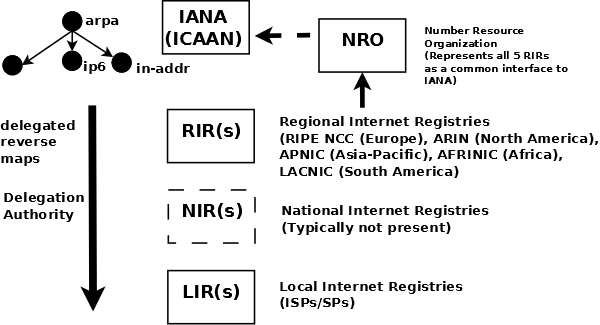
Figure 3.0 IP Address Allocation and Delegation
3.2 IPv4 IN-ADDR.ARPA Reverse Mapping Domain
Reverse Mapping looks horribly complicated. It is not. As with all things when we understand what is being done and why - all becomes as clear as mud.
We defined the normal domain name structure as a tree starting from the root. We write a normal domain name LEFT to RIGHT but the hierarchical structure is RIGHT to LEFT.
domain name = www.example.com
highest node in tree is = .com
(technically the normally silent . for root is the highest but...)
next (lower) = .example
next (lower) = www
An IPv4 address is written as:
192.168.23.17
This IPv4 address defines a host (17) which happens to be in a Class C address range (192.168.23.x). In this case the most important part (the highest node in the address hierarchy) is on the LEFT (192) not the RIGHT. This is a tad awkward and would make it impossible to construct a sensible tree structure that could be searched in a single lifetime.
The solution is to reverse the order of the address and place the result under the special domain IN-ADDR.ARPA (you will see this also written as in-addr.arpa which is perfectly legitimate since domain names are case insensitive but the case should be preserved between query and response - you can elect to use whatever format you wish including IN-addr.Arpa if that is your preference).
The last part of the IPv4 Address (17) is the host address and hosts, from our previous reading, are typically defined inside a zone file so we will ignore it and only use the Class C address base. The result of our manipulations are:
IP address =192.168.23.17
Class C base = 192.168.23 ; omits the host address = 17
Reversed Class C base = 23.168.192
Added to IN-ADDR.ARPA domain = 23.168.192.IN-ADDR.ARPA
This is shown in figure 3.1 below.
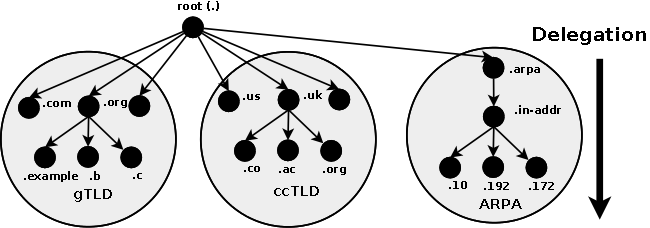
Figure 3.1 IN-ADDR.ARPA Reverse Mapping
Finally, we construct a zone file to describe all the hosts (nodes) in the Reverse Mapped zone using PTR Records. The resulting file will look something like this:
$TTL 2d  ; 172800 seconds
$ORIGIN 23.168.192.IN-ADDR.ARPA.
@             IN      SOA   ns1.example.com. hostmaster.example.com. (
                              2003080800 ; serial number
                              3h         ; refresh
                              15m        ; update retry
                              3w         ; expiry
                              3h         ; nx = nxdomain ttl
                              )
              IN      NS      ns1.example.com.
              IN      NS      ns2.example.com.
1             IN      PTR     www.example.com. ; qualified name
2             IN      PTR     joe.example.com.
.....
17            IN      PTR     bill.example.com.
.....
74            IN      PTR     fred.example.com.
....
Notes:
We must use qualified names ending with a dot (in fact they are Fully Qualified Domain Names - FQDNs) with the PTR target (left-hand) name in reverse mapped zone files because if we did not our $ORIGIN directive would lead to some strange results. For example, if we wrote an unqualified name such as:
74 IN PTR fred
Using the $ORIGIN substitution rule the above would expand to fred.23.168.192.IN-ADDR.ARPA. which is probably not what we intended.
If a reverse-map zone file for local IP addresses is not included in our DNS configuration then, as normal, the query will pass to the DNS hierarchy. In the case where local IP addreses are globally routable (increasingly rare) an ISP or service provider may be responsible for maintaining the reverse map in which case such reverse-map queries must access the DNS hierarchy.
Most frequently, private IP addresses are used, such as 192.168.x.x, 10.x.x.x or some IP ranges in 172.x.x.x, in local networks (and exclusively with home networks) with a NAT configuration translating to a global address before being routed to the public network. In such configurations it is imperative that a reverse-map covering the range of private IP addresses be included in the local DNS configuration. Failure to do so may cause local applications to fail or give strange results (none of them good) because the reverse-map request will be responded to by the DNS hierarchy where such requests are meaningless and pollute the root servers with useless traffic. (one of the most significant sources of DNS traffic pollution is forward and reverse mapping of the loopback IP address (127.0.0.1) - again poorly configured DNS services).
In order to limit the negative effect of such mis-configuration BIND introduced the empty-zones-enable statement which defaults to a state that will minimise damage to the DNS hierarchy. However, BIND's default option does not solve the problem for local applications which may depend upon correct local results from a reverse-map query. It is, and remains, a serious mis-configuration of DNS to not include a reverse-map for all local (RFC 1918) addresses.
There are no A RRs in the reverse map zone file for the NS names (respectively ns1.example.com and ns2.example.com) since both are out-of-zone names. Any lookup is done via the forward zone file for example.com in which suitable A RRs for these names must exist.
Skeleton files may be generated using the IPv4 reverse map zone file tool.
3.3 Reverse Map Delegation
Classless Reverse Map Delegation is defined by RFC 2317 which has Best Current Practice status and should be regarded as a definitive reference. Classless routing allows allocation of sub-nets on non-octet boundaries, that is, less that 256 addresses from a Class C (/24) address may be allocated and routed. The technique defined in the RFC is attributed to Glen A. Herrmannsfeldt (a.k.a. one smart cookie).
Normal domain name mapping as we have seen maps the domain name to an IP address. This process is independent of the ISP or other authority that allocated the IP addresses (or IP name space). If the assigned IP addresses were to change then the owner of the domain that maps these IP addresses would be able to make the necessary changes directly with either the relevant registrar, that is, change the IP address of DNS's for the domain or change the zone file(s) that describe the domain.
The rule is that entities can be delegated only once in the domain name tree this includes IN-ADDR.ARPA. When a Class C (/24) subnet is assigned by an ISP or other authority, for example, 192.168.23.64/27 (a 32 IP address subnet) the responsibility for reverse mapping for the whole Class C (192.168.23/24) address has already been assigned (delegated) to the ISP or Authority. If you want to change the host names in the assigned subnet they must be notified to the authority for that Class C address. Generally, this is unacceptable since such requests may encounter indifference, cost or questions. It is most desirable that responsibility for reverse mapping be delegated when the IP address subnet is assigned though this does require support and co-operation with the currently delegated reverse map authority (ISP or other organization).
The technique defined in RFC 2317 provides for such delegation to take place using CNAME Resource Records (rather than the more normal PTR Resource Records) in an expanded IN-ADDR.ARPA name space.
The IPv4 Reverse Map Generator can be used to generate all the necessary RRs or even just let you experiment with various delegation scenarios.
Note: RFC 2317 uses the CNAME RR to implement the solution as shown in the following zone file fragments. For reverse delegations of >= /24 (for example /24 or /26 - essentially a sub Class C block) the CNAME solution is the most efficient and understandable. For reverse map delegations of < /24 (for example /20 or /18 - essentially a sub Class B or Class A block) the DNAME RR may also be used to provide the same functionality while creating a significantly smaller and more flexible configuration.
The following fragment shows our 192.168.23.64/27 subnet as a fragment of the reverse mapping zone file located at the ISP or other Authority that assigned the subnet:
$TTL 2d ; 172800 seconds
$ORIGIN 23.168.192.IN-ADDR.ARPA.
@            IN  SOA   ns1.isp.com. hostmaster.isp.com. (
                              2003080800 ; serial number
                              3h         ; refresh
                              15m        ; update retry
                              3w         ; expiry
                              3h         ; nx = nxdomain ttl
                              )
              IN  NS      ns1.isp.com.
              IN  NS      ns2.isp.com.
; definition of other IP address 0 - 63
....

; definition of our target 192.168.23.64/27 subnet
; name servers for subnet reverse map
64/27         IN  NS  ns1.example.com.
64/27         IN  NS  ns2.example.com.
; IPs addresses in the subnet - all need to be defined
; except 64 and 95 since they are the subnets
; network and broadcast addresses not hosts/nodes
65            IN  CNAME   65.64/27.23.168.192.IN-ADDR.ARPA. ;qualified
66            IN  CNAME   66.64/27 ;unqualified name
67            IN  CNAME   67.64/27
....
93            IN  CNAME   93.64/27
94            IN  CNAME   94.64/27
; end of 192.168.23.64/27 subnet
.....
; other subnet definitions
; which may be delegated or local
....
; local IP definitions
; CNAME and PTR RRs may be mixed in the same file
129           IN  PTR bill.isp.com.
....
The 64/27 construct is an artificial (but legitimate) way of constructing the additional space to allow delegation. Prior to RFC 2181 '/' was not a legal character for a domain name or label so an alternate construct using '-' could be used instead, for example:
...
64-27         IN  NS  ns1.example.com.
...
94            IN  CNAME   94.64-27
Notes:
Only the zone file at the ISP/Delegation Authority is changed. No change is required to the named.conf file. Reason: If, say, the CNAME 65.64/27.23.168.192.IN-ADDR.ARPA is obtained during the search of the zone file 23.168.192.IN-ADDR.ARPA, DNS software will, as normal, attempt to follow the CNAME since the domain name part is within the current zone. In this case the NS RRs for 64/27 are encountered resulting in a referral to the name servers ns1.example.com and ns2.example.com being returned but with a CNAME (essentially a new query name) of, for instance, of 65.64/27.23.168.192.IN-ADDR.ARPA..
The extended name space ,say, 64/27.23.168.192.IN-ADDR.ARPA (as in the example above) is only 'visible' from the parent zone (which contains the CNAME RRs) to the sibling reverse delegation map zones which implement the extended addresses. The DNS hierarchy continues to see a normal IP address reverse lookup and delegates normally through the IN-ADDR.ARPA domain chain. Thus, to do a reverse lookup in the example above for 192.168.23.66 a normal query is issued to the DNS hierachy for a PRT RR at 66.23.168.192.IN-ADDR.ARPA..
The zone file at the DNS serving the Reverse Map (ns1.example.com in the above example) looks like this:
$TTL 2d ; 172800
$ORIGIN 64/27.23.168.192.IN-ADDR.ARPA.
@            IN  SOA   ns1.example.com. hostmaster.example.com. (
                              2003080800 ; serial number
                              3h         ; refresh
                              15m        ; update retry
                              3w         ; expiry
                              3h      ; nx = nxdomain ttl
                              )
              IN  NS      ns1.example.com.
              IN  NS      ns2.example.com.
; IPs addresses in the subnet - all need to be defined
; except 64 and 95 since they are the subnets
; network and broadcast addresses not hosts/nodes
65            IN  PTR   fred.example.com. ;qualified
66            IN  PTR   joe.example.com.
67            IN  PTR   bill.example.com.
....
93            IN  PTR   web.example.com.
94            IN  PTR   ftp.example.com.
; end of 192.168.23.64/27 subnet
If the alternate construct using '-' is used the $ORIGIN directive above would look as shown below:
$ORIGIN 64-27.23.168.192.IN-ADDR.ARPA.
Now you have to change your reverse map zone names in the named.conf file to reflect the above change. The following examples shows the reverse map declaration before and after the change to reflect the configuration above:
//  before change the reverse map zone declaration would look
// something like this
zone "23.168.192.in-addr.arpa" in{
  type master;
  file "192.168.23.rev";
};
The above - normal - reverse map declaration resolves reverse lookups for 192.168.23.x locally and without the need for access to any other zone or DNS.
Change to reflect the delegated zone name.
//  after change the reverse map zone declaration would look
// something like this
zone "64/27.23.168.192.in-addr.arpa" in{
// or zone "64-27.23.168.192.in-addr.arpa in {
  type master;
  file "192.169.23.rev";
};
Notes:
The above configuration will only resolve by querying the master zone for 23.168.192.IN-ADDR.ARPA and following down the delegation route to itself. If changes are not made at the ISP or issuing Authority, or have not yet propagated, then this configuration will generate 'nslookup' and 'dig' errors or incorrect results.
To test the local extended reverse map, the following command must be used to force access to the local domain:
dig 66.64/27.23.168.192.IN-ADDR.ARPA
Once the extended ISP delegation has been actioned then the normal dig command will work:
dig -x 192.168.23.66
3.4 IPv6 Reverse Mapping
IPv6 addresses are forward-mapped using AAAA RRs and reverse mapped using normal PTR RRs. There is an description of IPv6 Address formats here.
Unlike IPv4, where reverse mapping is frequently not delegated to the end user, IPv6 allows and encourages delegated reverse mapping. The end user can therefore be responsible for creation of reverse-mapping zone files using the IP6.ARPA domain for the address range they have been assigned, depending on the policies of the IPv6 address assignor - RIR/LIR(ISP/SP) (Regional Internet Registry/Local Internet Registry (Internet Service Provider/Service Provider)). The IP6.ARPA domain is similar to the IN-ADDR.ARPA domain used for reverse mapping of IPv4 addresses and is shown in Figure 3.2 below.
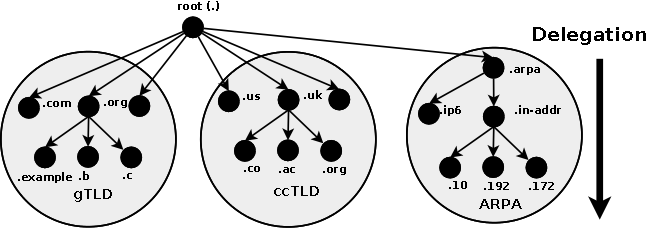
Figure 3.2 IP6.ARPA Reverse Mapping
Assume the user has been allocated from a RIR (Regional Internet Registry) or an LIR(ISP/SP) a fairly typical IPv6 range:
2001:db8:0::/48
Note IPv6 block allocations, like many other issues in IPv6, are still relatively fluid but are typically /48 or /56 - exceptionally /64.
Assume also, that the user has been delegated, by the RIR/LIR(ISP/SP), the responsibility for reverse mapping the 80-bit addresses in this range (128 - 48 = 80 = user part). (As previously noted IPv6 has removed the original mandatory reverse map requirement. It is enough to focus only on essential reverse map entries such as mail servers.) IPv6 reverse mapping uses the normal principle of reversing the address and placing the result, in the case of IPv6, under the domain IP6.ARPA. The key difference from the IPv4 IN-ADDR.ARPA domain (described previously) is that a nibble is the unit of delegation. A nibble is one of those hilarious terms that have survived to enter the jargon. Each byte (or octet) is comprised of 8 bits; a nibble is part of a byte and consists of 4 bits. So a nibble is a small byte! (It might not appear so hilarious to non-native users of English - just trust us, it's, at least in this author's opinion, hilarious.) In the context of reverse mapping, each hexadecimal character in the IPv6 address string constitutes a nibble. To illustrate how this works, we must write each character - with no zero elimination - of the assigned addresses range:
2001:0db8:0000::/48
Use the IPv6 Calculator to expand IPv6 addresses and automatically generate the reverse zone name.
Each character is reversed and separated with the normal dot notation to give a reverse-map domain name as shown here:
0.0.0.0.8.b.d.0.1.0.0.2.IP6.ARPA
Experiment using the IPv6 Address Calculator.
Now assume, purely for the sake of simplicity, that only 256 active host addresses are used:
2001:db8:0::/120 # 256 hosts
# range 2001:db8:0::0 to 2001:db8:0::FF
Based on this we can construct a zone file to contain the definitions as shown here:
; reverse IPV6 zone file for example.com
$TTL 2d    ; default TTL for zone
$ORIGIN 0.0.0.0.8.b.d.0.1.0.0.2.IP6.ARPA.
; Start of Authority RR defining the key characteristics of the zone (domain)
@         IN      SOA   ns1.example.com. hostmaster.example.com. (
                        2010121500 ; sn = serial number
                        12h        ; refresh = refresh
                        15m        ; retry = refresh retry
                        3w         ; expiry = expiry
                        2h         ; nx = nxdomain ttl
                        )
; name server RRs for the domain
          IN      NS      ns1.example.com.
; the second name server is
; external to this zone (domain).
          IN      NS      ns2.example.net.
; PTR RR maps a IPv6 address to a host name

1.0.0.0.0.0.0.0.0.0.0.0.0.0.0.0.0.0.0.0         IN      PTR     ns1.example.com.
2.0.0.0.0.0.0.0.0.0.0.0.0.0.0.0.0.0.0.0         IN      PTR     mail.example.com.
....
F.F.0.0.0.0.0.0.0.0.0.0.0.0.0.0.0.0.0.0         IN      PTR     fred.example.com.
IPv6 reverse zone names (and skeleton reverse zone files) may be generated using the IPv6 address tool.
The individual PTR address labels can become brutally long. The constructed domain name, however, does not have to reflect the address segmentation between the global routing prefix and the end-user part of the address as shown in the preceding example. If we assume that we will only ever have a maximum of 65,535 hosts (uses only the right-most 16 bits of the Interface ID or 2001:db8::/112), then we can move some more of the end-user address into the zone domain name, which is written once, to reduce the address part in each PTR line, which may be written many hundreds of times. Thus, the IPv6 address splits in the table below achieve the same result.
| Zone Name |
PTR Part |
Note |
| 0.0.0.0.8.b.d.0.1.0.0.2.IP6.ARPA. |
1.0.0.0.0.0.0.0.0.0.0.0.0.0.0.0.0.0.0.0 |
Uses a split based on the global routing prefix. |
| 0.0.0.0.0.0.0.0.0.0.0.0.0.0.0.0.0.0.0.0.8.b.d.0.1.0.0.2.IP6.ARPA. |
1.0.0.0 |
Uses a split based on user convenience to reduce the size of each PTR RR. |
The zone file to implement this alternate structure is shown next:
; reverse IPV6 zone file for example.com
$TTL 2d    ; default TTL for zone
$ORIGIN 0.0.0.0.0.0.0.0.0.0.0.0.0.0.0.0.0.0.0.0.8.b.d.0.1.0.0.2.IP6.ARPA.
; Start of Authority RR defining the key characteristics of the zone (domain)
@         IN      SOA   ns1.example.com. hostmaster.example.com. (
                        2010121500 ; sn = serial number
                        12h        ; refresh = refresh
                        15m        ; retry = refresh retry
                        3w         ; expiry = expiry
                        2h         ; nx =  = nxdomain ttl
                        )
; name server RRs for the domain
          IN      NS      ns1.example.com.
; the second name server is
; external to this zone (domain).
          IN      NS      ns2.example.net.
; PTR RR maps a IPv6 address to the hostnames

; PTR RR maps a IPv6 address to the hostnames
1.0.0.0.            IN      PTR     joe.example.com.
2.0.0.0             IN      PTR     www.example.com.
....
F.F.0.0             IN      PTR     fred.example.com.
Experiment using the IPv6 Address Calculator and reverse map file generator.
The DNAME RR may have a limited role to play in reducing files sizes in IPv6 reverse name mapping.
Note: Any address not defined in either of the above zone files will, as normal, generate an NXDOMAIN (name error) response. In the case of IPv6 reverse-mapping (and forward-mapping) may not be a simple process as discussed in the next section.
3.5 IPv6 Reverse Mapping Considerations
End-user delegation of IPv6 addresses is typically either a /48 (80 bits of user addresses), a /56 (72 bits of user addresses) or a /64. In the case of an end-user connection to a DSL or Cable Service Provider any address mapping would typically be handled either in the DSL/Cable modem or further upstream in the Service Provider's network.
In the case of an IPv6 end-user delegation, the normal expectation of IPv6 is that any address that is forward mapped using an AAAA (colloquially a Quad A) RR is also reverse mapped using a PTR RR. Specifically, RFC 1912 (an INFORMATIONAL RFC) says "PTR records must point back to a valid A record" and that administrators should "Make sure your PTR and A records match." For the following reasons this may not be as simple as it sounds when using IPv6:
In many cases IPv6 addresses are configured using SLAAC (StateLess Address Auto Configuration) or DHCPv6 and therefore may not be known other than by manual inspection. Methods involving DHCPv6 may be configured to provide Dynamic DNS (DDNS) updates to the forward and reverse-mapped zones though in the case of very large networks even this can be problematic due to the potentially large number of hosts involved.
Some modern OSes (notably the Windows family) can generate essentially random IPv6 addresses for each session to provide some level of end-user/host privacy (defined by RFC 4941). These changes can only be mapped using DDNS since they are by nature both dynamic and transient. However, RFC 4941 also notes that a DNS entry defeats the object of privacy and instead recommends to either not register in the forward or reverse map, or to use some randomized host name if forced to do so by operational needs (some security systems do a reverse DNS lookup and reject failures).
This topic is currently the subject of considerable discussion (Dec 2010). It is worth noting however, that as with the equivalent IPv4 addresses, the only current applications which are known to use reverse mapping consistently are mail systems. Thus, steps should be taken to ensure that, at least, these hosts have a valid IPv6 reverse-map.
Note: While it is possible to use a DNS wildcard to at least provide some generic answer to the reverse-mapping problem the equivalent wildcard forward-mapping possibility does not exist. At best it is a kludge, at worst, positively confusing.
This tool uses local javascript to perform some simple manipulation of IPv4 and IPv6 prefix (or slash) notation addresses, reverse addresses, skeleton reverse map zone file generation, and a reverse map delegation zone file (as described here). If it's useful, joy will reign unbounded throughout the land. And if it's not useful, well, that's just plain sad.
<grovel> The reverse map file generator for IPv4 and IPv6 incorrectly generated a email address of the form hostmster@domain in the SOA RR. This should obviously have used the form hostmaster.domain and has been corrected. We have decided in future to read our own documentation before starting to code. Many thanks to Dmitriy Bogdanov for taking the time to point out this error. </grovel>
The tool has two parts that are interrelated but are invoked separately. The first part is essentially a simple IPv4 calculator and is invoked using the IPv4 Info button. The second part will generate a skeleton IPv4 reverse mapping file using the data supplied in the first part. This part is invoked with the Generate IPv4 Reverse File button.
IPv4 Calculator: Enter an IPv4 address with its /Prefix (or slash) notation in the IPv4/Prefix: box and click IPv4 Info. The calculator will populate No. of IPs (covered by the /Prefix or slash value), IPv4 Netmask in dotted decimal format (a dotted hex format is also shown enclosed in []) represented by the /Prefix, IPv4 Range lists the start and end IPv4 addresses covered by the /prefix (a dotted hex format is also shown enclosed in []). Finally, the reverse map zone name of the IPv4 address is calculated based on the /Prefix value and is shown in FQDN format in Reverse Zone (IPv4 addresses below - to the left of - this name will be defined in the reverse zone file).
Alternatively, enter a single IPv4 address (that lies anywhere in the desired range) without the /prefix in IPv4/Prefix and the number of desired IP addresses (if it is not a power of 2 it will be rounded up to the nearest power of 2) in No. of IPs then click IPv4 Info. The calculator will populate IPv4/Prefix (with the calculated /Prefix to cover the required or calculated number of IP addresses), No. of IPs will be updated if needed (due to any power of 2 rounding required) and IPv4 Netmask, IPv4 Range and Reverse Zone will be populated normally.
The Clear button zaps ALL entries in the IPv4 Calculator only.
Notes:
Validation and other errors are shown in the IPv4 Netmask box for no very good reason.
When entering a /prefix IPv4 address you only need to enter as many dotted elements as are required by the /prefix (more is not a problem), if you enter less than the required number the calculator silently pads with zeros on the right.
IPv4 Reverse Zone Generator: This part generates a skeleton reverse zone which can be copy/pasted/edited to create a suitable reverse zone file. It uses data supplied in the IPv4/Prefix: box to calculate the entries and adds $TTL, $ORIGIN, SOA and one or more NS RRs (which you can always edit manually if required). Each PTR entry added will be of the form X[.X.X.X] PTR hostY.domain.name.. The IPv4 address part that appears inside the zone file (X[.X.X.X]) is calculated from the /prefix value of IPv4/Prefix:, host is the string that appears in Host Label: (always without a dot), Y is a sequential number starting from 0 to the number calculated in No. of IPs:, domain.name. is the value entered in Domain Label: and should terminate with a dot.
Enter an IPv4 address with its /Prefix (or slash) notation in the IPv4/Prefix: box (there is no need to click the IPv4 Info button if not required - but it does no harm to do so - since the generator will always invoke it automatically). Enter the Host Label: and Domain Label: as explained above. Enter the name of the first NS server for this zone in NS 1: (this value must be present) and should either be an FQDN or if an name is entered without the trailing dot then the value of Domain Label: will be appended. Enter the name of the second NS server (a unqualified name or a FQDN) for this zone in NS 2: (for externally visible domains this is required, for private domains this is not essential, but is usually present through habit or for resilience). Since, by definition, the NS servers for this zone lie in an out-of-zone domain no A/AAAA (glue) RRs are required. By default the generator appends the Domain Label: to each PTR RR, entering an alternative label in the PTR Label: box allows you control the reversed map names. Thus, if the zone example.com maintains the reverse file for the IPv4 addresses delegated to example.net placing example.net in the PTR Label: box will generate the desired result. Click the Generate IPv4 Reverse Zone to activate and the results will appear in Reverse Zone.
The IPv4 Reverse Zone Generator can also be used to generate a delegated reverse map zone file and the corresponding CNAME or DNAME RRs for the delegater's reverse file (the reverse file at the ISP or whatever organization is delegating the reverse map). Checking the Delegate: box will generate a reverse map zone file in the Reverse File: box as normal. In addition, the Delegation RRs (CNAME or DNAME) that should be added to the ISP's (or delegater's) reverse map file, as described in IPv4 Reverse Map Delegation, are generated in Delegation RRs:. These RRs can be copied and pasted directly into the appropriate place in the reverse zone file and do not include any ancilliary RRs (such as SOA, NS etc.). By default if the /Prefix is > 24 the generator will use CNAME RRs, if the /Prefix is < 24 the delegation will use DNAME RRs. When the /Prefix is < /24 there may be a number of delegated reverse zone files (depending on architecture) each of which can be very big. To these avoid problems the generator does not generate the Reverse Files: in these cases. See the notes section below for methods by which the reverse zone files may be generated. The calculator will use the X/Y format defined in IPv4 Reverse Map Delegation by default, by checking the Use X-Y: box a - (dash) format will be used. There is little obvious point in generating a reverse delegation zone if the /Prefix is any multiple of 8 (/24, /16, or /8), however, the calculator makes no checks.
Clear will zap all entries in the IPv4 Reverse Zone Generator part only.
Notes:
Where a trailing dot is essential for an FQDN (Domain Label: and PTR Label:) the calculator will silently add it, if required, to ensure a viable zone is created. However, if you terminate either NS 1: or NS 2: without a dot then Domain Label: will be added. This may work for you or against you just like DNS. But it can save some typing if you get it right.
Validation or other errors will appear in Reverse Zone or IPv4 Netmask: in neither case for very good reasons.
Reverse zone files can get very big, very quickly, however, to prevent unintentional errors the calculator always prompts when more than 4096 entries will appear in the reverse zone.
When generating delegated reverse zones with prefixes < /24 the Delegated RRs are generated for the complete address block. Thus, if the IPv4/Prefix: is 192.168.0/20 it assumes that 16 subnets (each with a reverse map zone file of 4096 IP Addresses) are to be generated. If this is not the case selected Delegated RRs: need to be cut and pasted as appropriate. In such the < 24 prefix case the Reverse File: entries are not generated (due to potentially huge volumes involved). To generate such files, if required, after creating the Delegation RRs: simply uncheck Delegate: and click Generate IPv4 Reverse Zone again. Edit the $ORIGIN statement in the resulting Reverse File: to reflect that defined in the appropriate DNAME RR. Repeat as many times as necesssary, modifying IPv4/Prefix: as appropriate, to generate the required files.
To create a zone file, simply copy the contents of Reverse File: to the clipboard and paste into any suitable text editor, make any required changes (you may want to review the $TTL value and the SOA serial number) and save to an appropriately named file. BIND is completely agnostic about line ends (CR+LF or LF) so notepad on windows, for example, will generate a useable zone file. You may also want to verify the zone file using the BIND named-checkzone utility.
Notes:
Javascript implementations may vary from browser to browser. This feature was tested with MSIE 10, Gecko (Firefox 25.0.1), Opera 11.10 and Chrome (31.0.1650.57 m) - so will likely work with any WebKit based browser, which obviously includes Safari (and now even Opera!). If the tester does not work for you we are very, very sad - but yell at your browser supplier not us. However, if you do think you have found an error, or want to suggest improvements, please take the time to email using the link at the foot of this page.
The tool has two parts that are interrelated but are invoked separately. The first part is essentially a simple IPv6 calculator and is invoked using the IPv6 Info button. The second part will generate a skeleton IPv6 reverse map file using the data supplied in the first part. This part is invoked with the Generate IPv6 Reverse File button.
IPv6 Calculator: Enter an IPv6 address with its /Prefix (or slash) notation in the IPv6/Prefix: box and click IPv6 Info. The calculator will expand the IPv6 address and place in IPv6 Expanded:, the IPv6 Netmask value is calculated and shown in compressed format, IPv6 GPR (in compressed format) contains the top part or the address which may be the Global Routing Prefix (GRP) or not depending on the /Prefix value and IPv6 User: (in compressed format) is the lower part of the address based on the /Prefix value. Finally, the reverse map zone name of the IPv6 address is calculated based on the /Prefix value (IPv6 addresses below - to the left of - this name will be defined in the reverse zone file) and is shown in FQDN format in Reverse Zone. In Zone IPv6: shows the IPv6 address element that would appear with the zone file based on the /Prefix value. Since IPv6 addresses cover very serious numbers the No. of IPs: box is only used in the alternative mode described below and is only updated in that context.
Alternatively, enter a single IPv6 address (that lies anywhere in the desired range) without the /prefix in IPv6/Prefix and the number of desired IP addresses (if it is not a power of 2 it will be rounded up to the nearest power of 2 - a maximum of 6 digits is allowed) in No. of IPs then click IPv6 Info. The calculator will populate IPv6/Prefix (with the calculated /Prefix to cover the required or calculated number of IP addresses), No. of IPs will be updated if needed (due to any power of 2 rounding required) and IPv6 Netmask, IPv6 GPR, IPv6 User:, Reverse Zone and In Zone IPv6: will be populated normally.
The Clear button zaps ALL entries in the IPv6 Calculator only.
Notes:
Validation and other errors are shown in the IPv6 Netmask box for no very good reason.
When entering a /prefix IPv6 address you only need to enter as many colon elements as are required by the /prefix (more is not a problem), if you enter less than the required number the calculator silently pads with zeros on the right.
While a /Prefix for IPv6 is most normally a multiple of 8 (or even 16) the calculator allows any bit value. You can break on very strange boundaries if desired.
IPv6 Reverse Zone Generator: This part generates a skeleton reverse zone which you can copy/paste/edit to create a suitable reverse zone file. It uses data supplied in the IPv6/Prefix: box to calculate the entries and adds $TTL, $ORIGIN, SOA and one or more NS RRs (which you can always edit manually if required). Each PTR entry added will be of the form X[.X.X.X] PTR hostY.domain.name.. The IPv6 reverse address part that appears inside the zone file (X[.X.X.X]) is calculated from the /prefix value of IPv6/Prefix:, host is the string that appears in Host Label: (always without a dot), Y is a sequential number starting from 0 (or modified by Host No. Start:) to the number calculated in No. of IPs:, domain.name. is the value entered in Domain Label: and should be terminated with a dot.
Enter an IPv6 address with its /Prefix (or slash) notation in the IPv6/Prefix: box (there is no need to click the IPv6 Info button if not required - but it does no harm to do so - since the generator will always invoke it automatically). Enter the Host Label: and Domain Label: as explained above. The value of Host no. Start: may be used to modify the starting number used to generate the unique PTR RRs. If this box is left blank it is defaulted to 0 (thus, the first PTR RR will have a name of host0.domain.label) if this box is set to 27 the first PTR RR will have a name of host27.domain.label. Enter the name of the first NS server for this zone in NS 1: (this value must be present) and can be either an FQDN or if an name is entered without the trailing dot then the value of Domain Label: will be appended. Enter the name of the second NS server for this zone in NS 2: (for externally visible domains this is required, for private domains this is not essential, but is usually present through habit or for resilience). Since, by definition, the NS servers for this zone lie in an out-of-zone domain no A/AAAA (glue) RRs are required. Click the Generate IPv6 Reverse Zone to activate and the results will appear in Reverse Zone.
Clear will zap all entries in the IPv6 Reverse Zone Generator part only.
Notes:
Where a trailing dot is essential for an FQDN (Domain Label:)the calculator will silently add it, if required, to ensure a viable zone is created. However, if you terminate either NS 1: or NS 2: without a dot then Domain Label: will be added. This may work for you or against you just like DNS.
Validation or other errors will appear in Reverse Zone or IPv6 Netmask: in neither case for very good reasons.
The starting IPv6 Address used for the reverse zone file is that shown in IPv6 User: thus by modifying the IPv6/Prefix: address this number can be changed. The default initial sequence number is 0 appended to the Host Label: however, this value may be changed by adding a value in Host No. Start:. Thus, if Host No. Start: is set to 4097 the first PTR name will become host4097.domain.name. If you add a non-numeric value into Host no. Start: you will get the result you deserve.
Reverse zone files can get very big, very quickly, however, to prevent unintentional errors the calculator always prompts when more than 4096 entries will appear in the reverse zone and will flat out refuse to generate zone files with more that 65536 entries in order to save your PC, your browser and your life - in that order of importance. However, by playing around with IPv6/Prefix: addresses and the Host No. Start: creatively and judicious use of copy/paste, larger files can be generated.
To create a zone file, simply copy the contents of Reverse File: to the clipboard and paste into any suitable text editor, make any required changes (you may want to review the $TTL value and the SOA serial number) and save to an appropriately named file. BIND is completely agnostic about line ends (CR+LF or LF) so notepad on windows, for example, will generate a useable zone file. You may also want to verify the zone file using the BIND named-checkzone utility.
Notes:
Javascript implementations may vary from browser to browser. This feature was tested with MSIE 10, Gecko (Firefox 25.0.1), Opera 11.10 and Chrome (31.0.1650.57 m) - so will likely work with any WebKit based browser, which obviously includes Safari (and now even Opera!)). If the tester does not work for you we are very, very sad - but yell at your browser supplier not us. However, if you do think you have found an error, or want to suggest improvements, please take the time to email using the link at the foot of this page.
Problems, comments, suggestions, corrections (including broken links) or something to add? Please take the time from a busy life to 'mail us' (at top of screen), the webmaster (below) or info-support at zytrax. You will have a warm inner glow for the rest of the day.



