Chapter 4. ApacheDS Install
FreeBSD Install
Fedora Core Install
Windows Install (Windows 2000 Server and Windows 7)
FreeBSD Installation
One day real soon now ™

Fedora Core Installation
One day real soon now ™
ApacheDS Win2k Installation
Note: These instructions are horribly dated - read the ApacheDS pages instead. One day we'll do an update - but don't hold your breath.
This section describes installation of ApacheDS on Windows 2000 server (these instructions should also work for Windows XP and Server 2003 and Windows 7).
ApacheDS is an Open Source implementation of LDAPv3 being developed under the Apache project umbrella. ApacheDS is a fast (benchmarks indicate for certain operation up to 10 times faster than OpenLDAP) Java based implementation which includes an integated database engine. The ApacheDS installation includes an embedded database engine and uniquely for this class of system includes many transactional database features such as stored procedures and triggers designed to optimise performance. As a consequence of Java, ApacheDS natively supports multiple platforms. More information about ApacheDS .
Note: ApacheDS is developed under the Eclipse develoment framework and if serious development work is being contemplated a number of additional tools such as Directory Studio require the installation of the Eclipse framework. Installing Eclipse is a serious task and can take a significant amount of time. To use only the ApacheDS Directory Server does not require Eclipse but does require a Java Run Time Environment (JRE) which may be obtained from java.com. This document only covers installation of the standalone ApacheDS and does not cover installation of the JRE.
Windows Installation
Download ApacheDS as a packaged Windows installer from this location (version 1.5.5 at the time this page was created currently - April 2012 1.5.7). Select and download the version approprate to the OS platform in use - Windows users should select 'Download Windows Installer' (downloads apacheds-1.5.5-setup.exe where x.x.x is the required version) and *nix users should select the appropriate achitecture and compression format. Download to a suitable temporary directory. Note: While installation is shown on a Windows 200 Server it was recently installed on Windows 7 with no significant changes to procedures.
Double click the downloaded file apacheds-server-x.x.x-etup.exe to start the install process. The following instructions assume the default path for installation (in our case c:\Program Files\Apache Directory Server) is used thoughout.
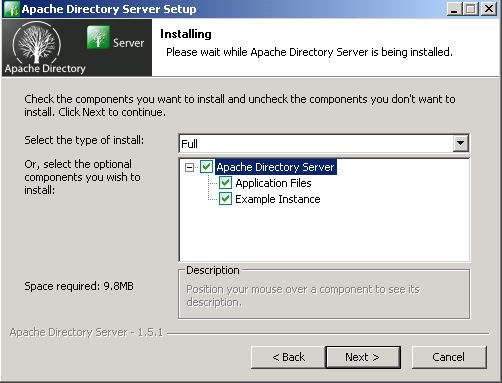
The install process starts with the usual license acceptance screen and selection of install components - by default all components are installed as shown:
-
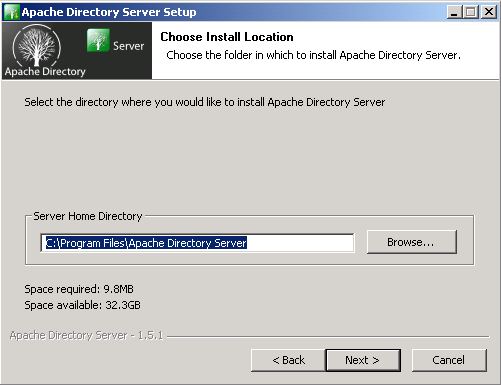
The next screen prompts for the install path. We left the default. Users who have deep seated objections to directory names with spaces can modify as desired.
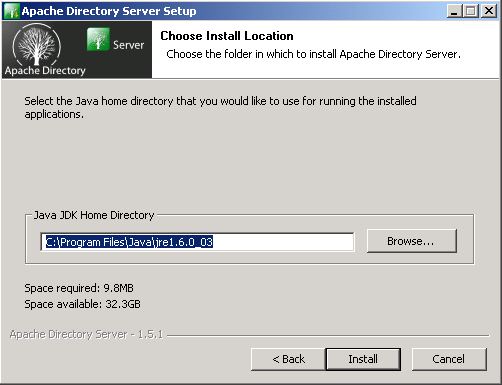
The next screen asks where to locate the java run time (ignore the confusing header test on this screen). In our case we had previously installed the latest version (at time of writing JRE 1.6.0_03) from this location. Users who have no JRE installed should abandon the install (click Cancel). Install the JRE and re-run the ApacheDS install. We accepted the default as shown.
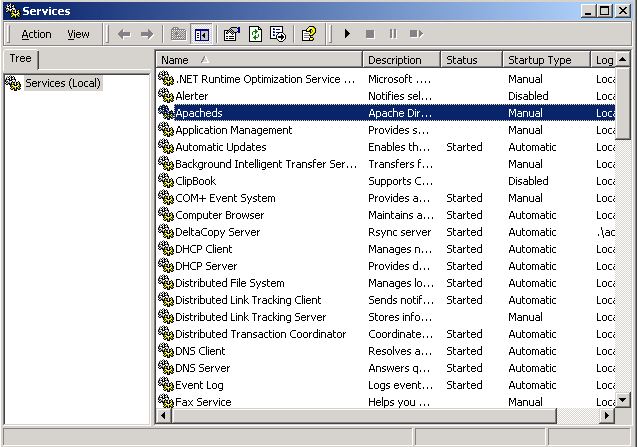
The installation now completes. ApacheDS is installed as a windows NT service and is set to start automatically at reboot. To modify this behaviour or to initially start the service use Start->Programs->Administrative Tools->Services and then find the service Apacheds as shown:
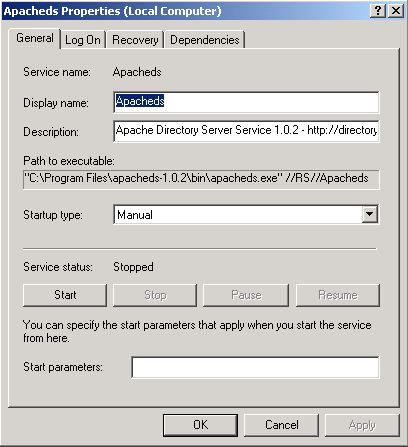
Double click the entry and the following screen is displayed which allows modification of the Startup Type (Automatic - Default, Manual, Disabled). Since this service will be used occasionally we set the Service Type to Manual. To start the service click the start button. Failure messages are written to the Event Log (Start->Programs->Administrative Tools->Event Viewer)
-
The configuration file for ApacheDS is called server.xml and if you are into XML and Java it looks pretty normal - otherwise it looks like a disaster. There are two copies of this file the first is in %ApplicationRoot%\conf\server.xml and %ApplicationRoot%\instances\default\server.xml.
The default port used by ApacheDS for ldap service is 10389 (meaning it does not need admin/root privileges to allocate) if you need to run on the more normal port of 389 find and edit the server.xml file for the instance (normally)

Problems, comments, suggestions, corrections (including broken links) or something to add? Please take the time from a busy life to 'mail us' (at top of screen), the webmaster (below) or info-support at zytrax. You will have a warm inner glow for the rest of the day.



