Chapter 14. LDAP Tools
- OpenLDAP Tools - command line utilities
- LDAPBrowser/Editor - our LDAP Browser of choice
- ApacheDS Tools - tools and utilities
Note: Many folks have adopted the flexible and powerful Apache Directory Studio as a general purpose LDAP browser and client. It is an excellent choice. We tend to stick with LDAPBrowser/Editor because we think the name is very catchy (!!) and old dog....new tricks...
LDAPBrowser/Editor
There are a number of Open Source LDAP Browsers. We happen to have chosen LDAPBrowser/Editor for no particular reasons - except it is small and lightweight - Java based and consequentially runs on multiple platforms - as, indeed, do many other Browsers. LDAPBrowser/Editor has not been maintained for a number of years and is only available in source form for educational institutions - but it is simple, feature adequate and rock solid (but its support for LDIF can be idiosyncratic for anything outside the core feature set).
Note:We note that Argonne Labs (the current home of the LDAP Browser/Editor) is now making the software available through the OpenChannel Foundation which mades a charge (currently $35) per copy. We are leaving the following notes here for any historical users or even new users in the event the software is restored to this world. Any of the alternative LDAP browsers is a pefectly reasonable substitute.
LDAP Browser/Editor can be a tad quirky so the following notes are only designed to expose some of its more esoteric characteristics - rather than be a user manual - the help system is surprisingly good and there are a number of useful HTML documentation pages. But... we needed these notes on:
printing and saving
creating and using templates
reading operational attributes on connection (rootDSE, subschema, cn=monitor, cn=config)
accessing cn=config.
Printing and Saving
LDAPBrowser does not have a print feature. If you want to save or print results, then select the required entries in the right or left hand pane. Click the copy icon and then paste to a suitable utility such as Notepad on Windows or kedit under KDE or similar text utility. Then save, edit, save or print as required.
Creating Templates
The template system is very flexible once you finally get it. To create a template use the following process:
Select any entry in the current DIT which uses the same objectClass as the template that you want to create - in the example case the selected entry uses inetOrgPerson:
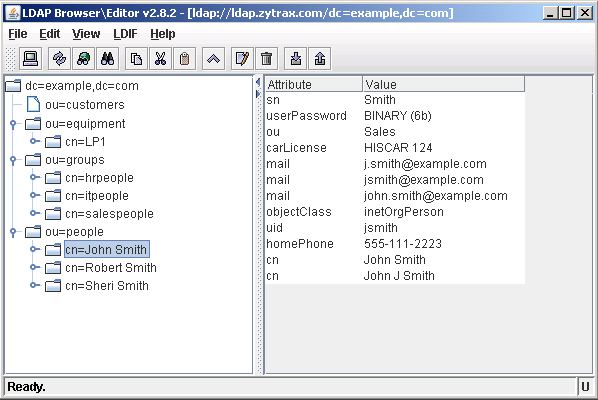
Hint: Select an entry with the maximum number of attributes - since the template only saves the attributes of the entry on which it is based (see step 7 for a method of manually editing the template).
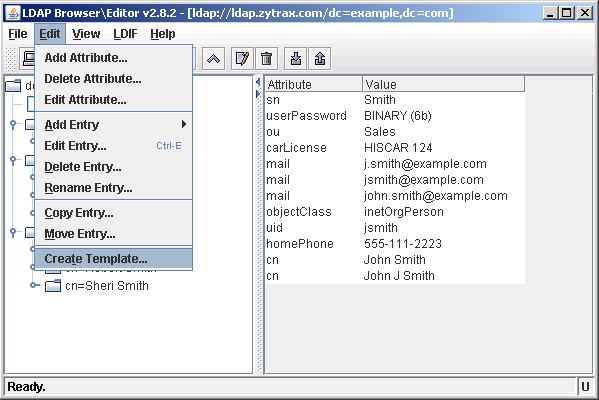
Select the Edit menu and Create Template:
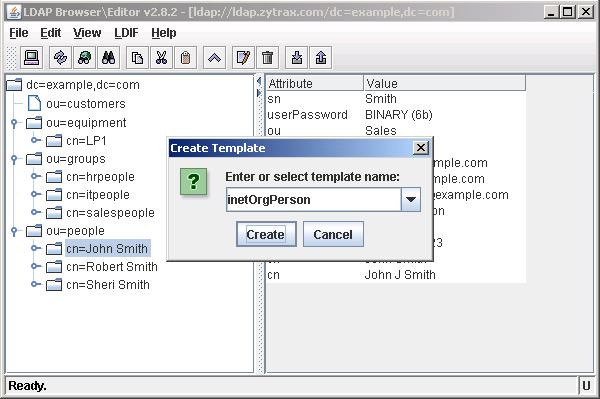
LDAPBrowser will suggest a template name based on the objectClass name - accept or edit as you desire and then click Create:
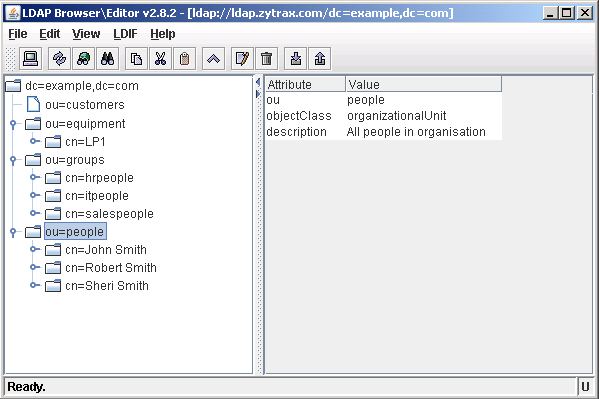
To use the template select the DIT entry under which you want to add the new child entry - in this case we will add under ou=people:
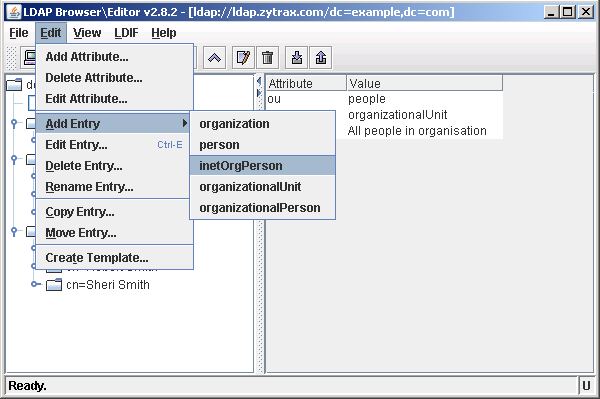
Select the Edit menu, Add Entry and then select the template that you want to base the new entry on - in this case our recently created inetOrgPerson template:
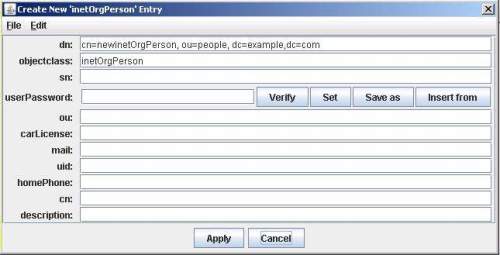
A window will be opened containing all the attributes contained in the stored template. Fill the required fields and then select Apply:
Templates save the objectClass and attributes of the entry on which they are based - if you want to add additional attributes you can use the Edit, Add Attribute... menu or edit the template file. The template file for inetOrgPerson is shown below (saved in templates/template-name.template in the LDAPBrowser application directory). Just add the required attribute names under the Required or Optional headers (LDAPBrowser does not check for Required attributes):
# name : inetOrgPerson
#
# objectClass : inetOrgPerson
#

PREFIX: cn

REQUIRED ATTRIBUTES

OPTIONAL ATTRIBUTES
sn
userPassword
ou
carLicense
mail
uid
homePhone
cn
description
Operational Attributes on connection
When accessing rootDSE, subSchema, cn=monitor and cn=config especially you need to read the user and operational attributes on connection - by default LDAPBrowser only displays user attributes. We could find no other way, except using the session (.cfg file) feature (of course you can always use ldapsearch), of getting this operational data.
The following three .cfg files allow display of the rootDSE, subschema (all user and operational attributes) and subSchema (objectclasses collection only) for a generic localhost and should be saved to the LDAPBrowser application directory and will show up when the application is loaded or when File->Connect is invoked. Edit the various fields using a normal text editor and then save to use with your server or use the session edit feature of LDAPBrowser. (display .cfg file). The first .cfg file (shown below) will simply display rootDSE values:
#################################
#                               #
# LDAP Browser v2.8 config file #
#                               #
#  rootDSE                      #
#                               #
#################################

# host of the ldap server - change
# or use edit feature in LDAPBrowser
host=localhost

# port of the ldap server
port=389

# ssl port of the ldap server (if any)
sslport=636

# base dn for rooDSE is blank
basedn=

# sets the ldap version number [2|3]
version=3

# dn of the directory manager (rootDSE is anonymous read)
managerdn=

# password of the directory manager (N/A)
password=

# bind with the manager credentials [yes|no]
managerlogin=no

# specifies if the connection should be
# made automatically [yes|no]
autoconnect=no

# specifies the type of the indicator of the leaf node
# supports [int | boolean ]
leafindicatortype=int

# specifies the name of the indicator of the leaf node
# valid attribute - usually operational attribute
# note: works only with LdapV3 servers!
leafindicator=numsubordinates

# sets the maximum number of results
# 0 or not specified - unlimited
# limit=0

# sets the size of a batch.
# 0 or not defined - all entries returned at once.
# batchsize=0

# sets the timeout of the ldap operations in msec
# 0 or not specified - unlimited timeout
# timeout=0

# manage referrals [yes|no]
# if no referrals are returned at normal entries
managereferrals=no

# set this to yes if your ldap server
# supports moving tree in DIT
supportsmovetree=no

# sets the 'derefrence alias' option
# [never|alwyas|search|find]
derefaliases=never

# defines if an entry should either keep or delete
# the old rdn when renaming the entry
deleteolddn=yes

# defines the sorting order of the DIT tree
# if not specifed, no sorting is performed
# otherwise supports [ascending|descending]
sorttree=ascending

# used for fixing the location of the windows
# on the screen. related to bugs in java
# fixlocation = 10

# sets the buffer size of the error window
# (in bytes) default=2048
# logsize=2048

# sets if the error window should popup on
# error. [yes|no] default: no
# popuperrorwindow=no

# defines the ldap filter used to build
# the tree structure. default: (objectclass=*)
# ldap.list.filter=(objectclass=*)

# defines the list of attributes to retrieve
# on each read. useful for specifying the
# operational attributes (space separated)
# use this to get all (user and operational) attributes
ldap.attributes.list=* +


###################
# SECURITY settings
###################

# sets the security protocol
# eg. [ssl|gssapi?]
# security.protocol=ssl

# sets the authentication
# eg. [simple|external]
# security.authentication=simple

# sets the socket factory
# eg. javax.net.ssl.SSLSocketFactory
# ldapsocketfactory=javax.net.ssl.SSLSocketFactory
The same process is used to display of all operational attributes under subschema (display .cfg file). To illustrate the use of additional options this file displays only the objectclasses collection under subschema (display .cfg file).
We used the same session process to access the operational attributes of cn=config (more info and configuration of cn=config) which is absolutely essential since all the interesting stuff is held as operational attributes. Display cn=config.cfg and display cn=monitor.cfg files - use 'save as' from your browser and then edit as required using your favorite text editor.
Assuming you have saved the .cfg files above unedited, they can be changed at run-time using the following procedure:
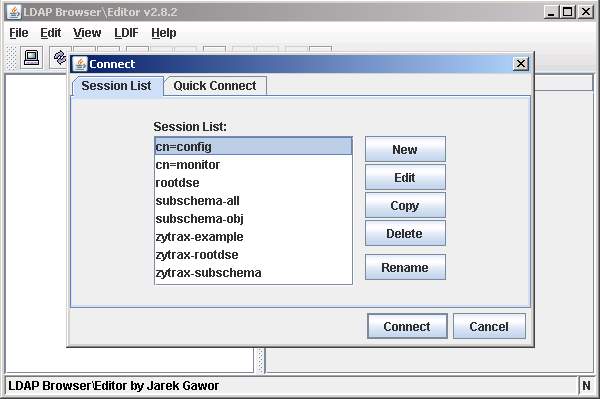
When LDAPBrowser/Editor loads it displays the current session configuration files as shown:
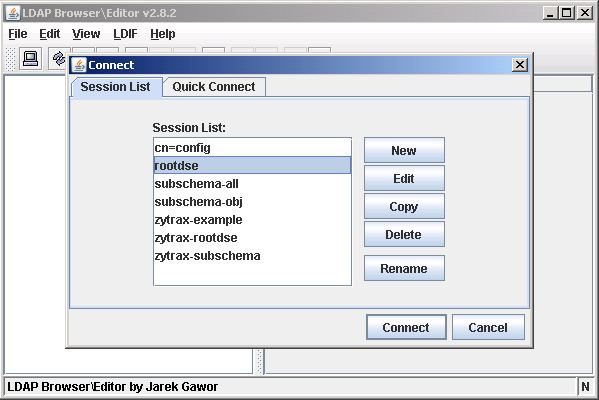
Select the required session and click the Edit button.
Edit the Host field and any other required variables:
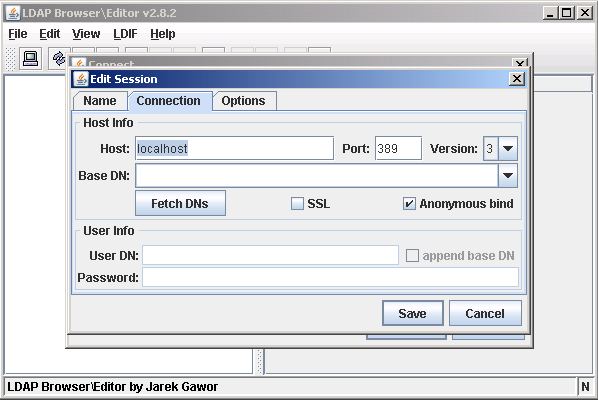
Click the Save button.
Click the Connect button"
When LDAPBrowser/Editor connects it displays the RootDSE in the left pane. Double-click this entry to display the attributes in the right hand pane as shown:
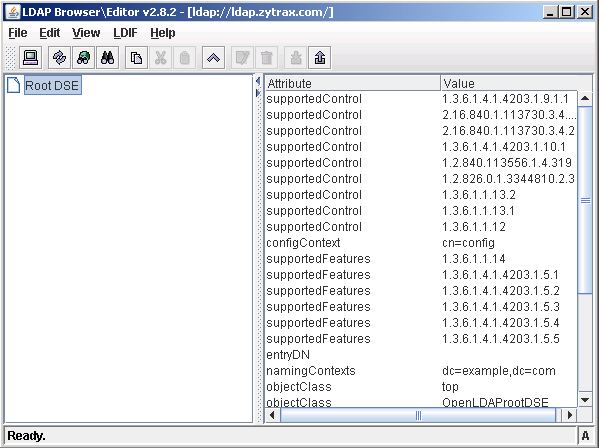
To print or save the variables use this procedure.

Access cn=config
Assuming you have created a session file using the above operational procedure for cn=config then follow this process to display and use the cn=config DIT:
Note: We got an email suggesting that in an attempt to sensibly limit access to cn=config features (it can after all be used as an attack vector) some out-of-the-box LDAP installations limit cn=config access by use of complex ACLs. If the procedure below does not work you either need to use ldapsearch or carefully read the installation documentation to figure out what was done.
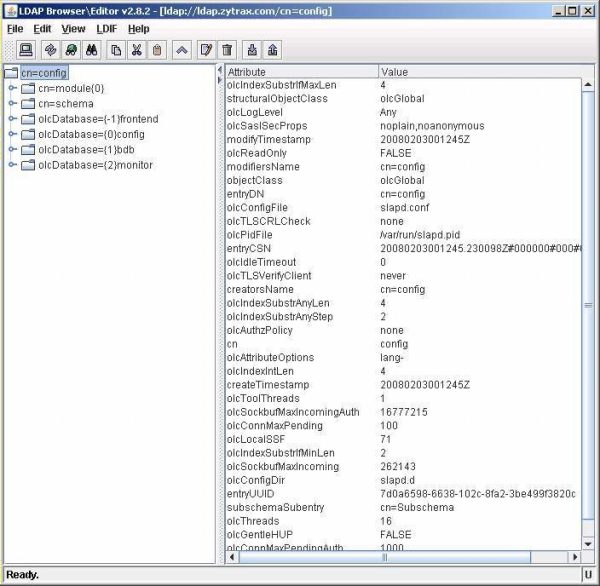
Select the cn=config session then click Connect.
The cn=config initial entry displays the global options section of the old slapd.conf with the exceptions of ModuleLoad (under cn=module) and included schemas (under cn=schema).
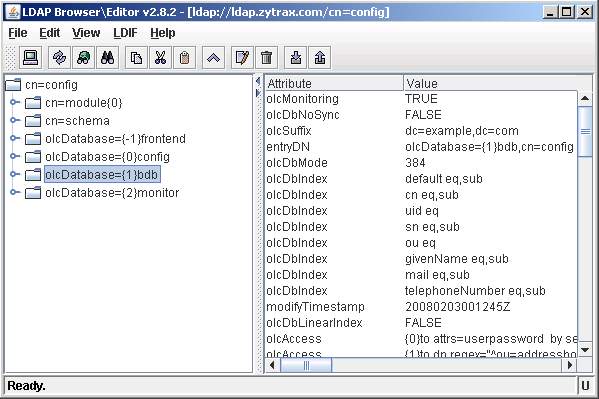
The olcDatabase={1}bdb entry displays a single instance of a bdb configured database section.
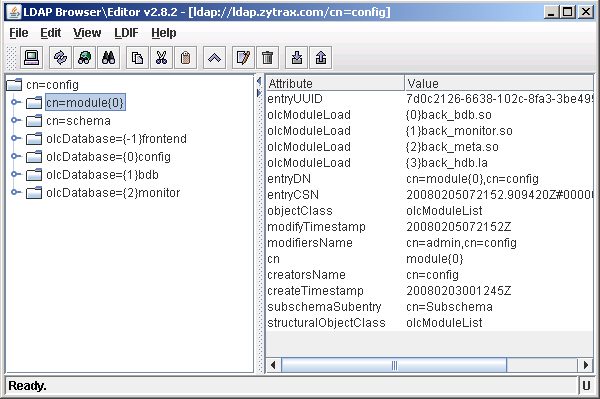
The cn=module entry displays the currently loaded modules - in this case back_bdb, back_monitor and back_meta. OpenLAP automatically allocates the overlay instance indexes numbered from {0} for example {1}back_monitor.so in the displayed screen. There is one instance for each type of overlay which in turn may be used for multiple Database instances (next screen).
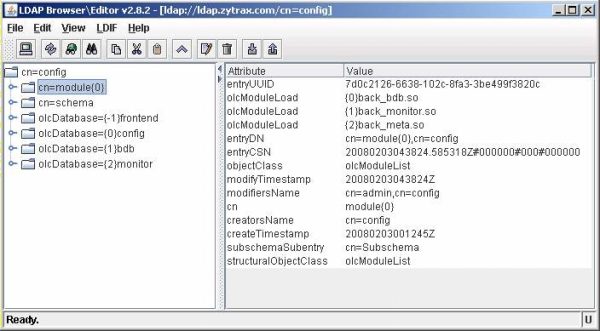
To illustrate using the cn=config feature we will add a new overlay. Select Edit amd Add Attribute...
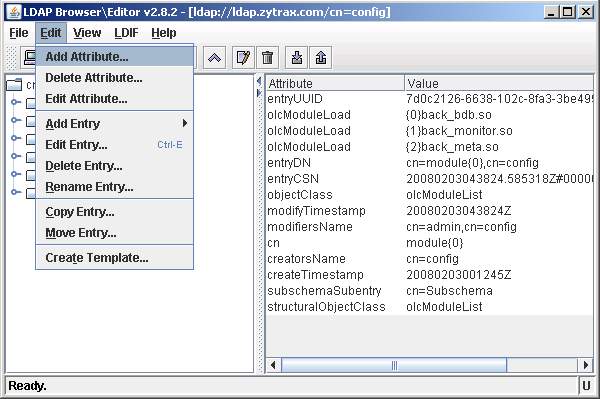
You must add the overlay before defining the database to which it applies.
You will be promted to add the name of the attribute which in this case is olcModuleLoad. Select the appropriate type of attribute which in this case is string. Click OK.
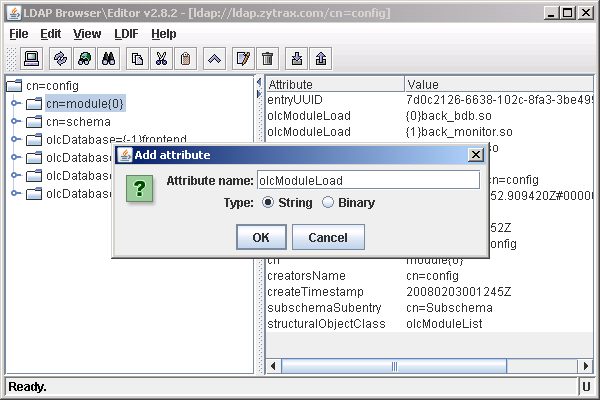
The next screen prompts using the attribute name (entered in the previous screen) for the attribute value. Simply enter the name of the overlay (in this case back_hdb.la) - OpenLDAP will allocate an instance index when the attribute is added. Click Apply.
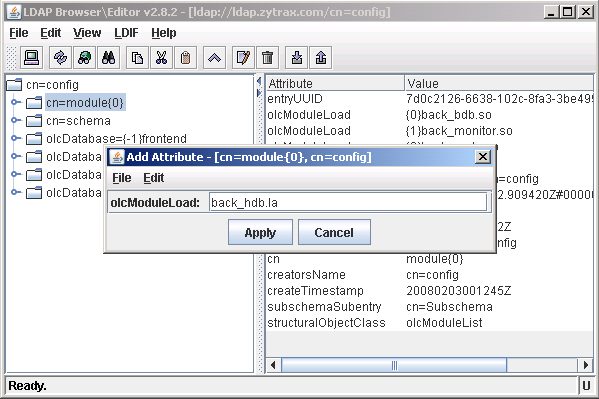
This screen shows that the add attribute was successful and OpenLDAP has added back_hdb.la to the list of olcModuleLoad attributes with the next available instance index {3}back_hdb.la.
The next sequence of screens shows adding a new database instance (database section in slapd.conf jargon). Create a template from an existing instance of the required database type - in this case we will use bdb - so we created a template from olcDatabase={1}bdb. The required attributes of olcBdbConfig are defined here.
Problems, comments, suggestions, corrections (including broken links) or something to add? Please take the time from a busy life to 'mail us' (at top of screen), the webmaster (below) or info-support at zytrax. You will have a warm inner glow for the rest of the day.



 RSS Feed
