Appendix A - LDAP - Some Notes on Structuring Directories
This note discusses structuring LDAP directories in very general terms. Directory structuring is a horribly contentious subject and books have been written about it. The following notes may help - or there again they may not.
We look at a simple address book example to isolate some general principles - but they could apply equally well to equipment records, catalogues or whatever.
Flat is Good
Directories in general are typically very flat in structure 2 or 3 levels of hierarchy are common - more than that are pretty unusual. While on first glance this seems a little counter intuitive to classic database guys remember LDAP is optimized to power ALONG a level rather than UP and DOWN a hierarchy. That is the whole reason for the powerful indexing methods.
A simple example may suffice to illustrate: When looking at a company and structuring a directory it's pretty obvious the first split is by department. BUT IS IT? The following diagrams show two ways to structure a directory.
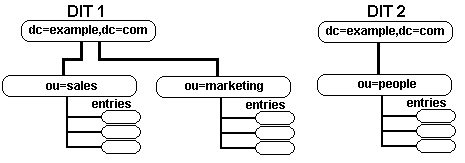
DIT 1 makes department an ou entry, DIT 2 makes department an ou attribute of entries under an ou of people. Sounds like a trivial difference.
Now lets look at finding some typical data:
Find all the people in sales:
DIT 1 - Search DN ou=sales,dc=mycompany,dc=com, scope - one level, filter cn=*
DIT 2 - Search DN ou=people,dc=mycompany,dc=com, scope - one level, filter ou=sales
About the same.
Find all the people in the company:
DIT 1 - Search DN dc=mycompany,dc=com, scope - sub (all levels), filter cn=*
DIT 2 - Search DN ou=people,dc=mycompany,dc=com, scope - one level, filter cn=*
Structure 2 wins - in speed and simplicity.
Lazy is Good
We'll stick with our structures and perform a simple task: Bill just moved from sales to marketing (a separate corporate department).
DIT 1 - Export Bill's record to an LDIf file, delete it from sales, edit the LDIF file, ldapadd the record to marketing. And hope he does not do this too often.
DIT 2 - modify Bill's ou attribute from sales to marketing.
Wonder who won that round.
Problems, comments, suggestions, corrections (including broken links) or something to add? Please take the time from a busy life to 'mail us' (at top of screen), the webmaster (below) or info-support at zytrax. You will have a warm inner glow for the rest of the day.



